Can You Remove a Google Review? What Works and What's a Waste of Money

Key Takeaway
Learn how to report a Google review, appeal an eligible denial, handle extortion, avoid removal scams, and respond when the review stays.
A one-star Google review has a way of becoming the most interesting thing in the room. You see it, your stomach drops, and the first impulse is obvious: How do I delete this?
The frustrating answer is also the useful one. A business cannot directly delete a review a customer posted. You can report a review that violates Google's policies, track the decision, and appeal once when Google makes that option available. If the review describes a genuine negative experience, even harshly, your better move is usually to respond well and fix whatever caused the complaint.
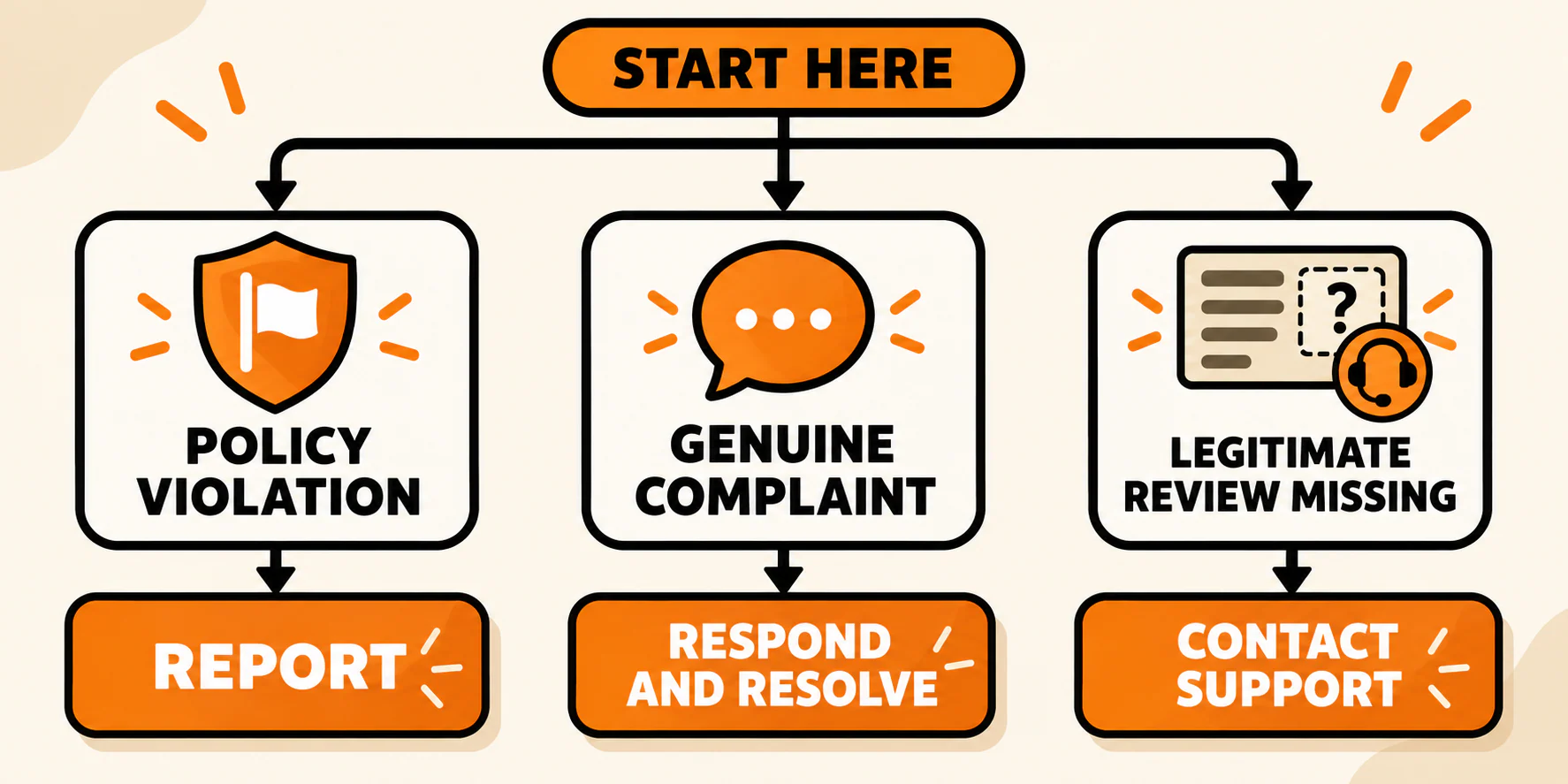
Before you click anything, decide which problem you actually have:
- A probable policy violation that should be reported
- A genuine complaint that should be answered and resolved
- A legitimate review that disappeared, which is a support issue rather than a removal task
That distinction matters. Reporting every review you dislike is just clicking with extra emotion.
First, decide what kind of review you are dealing with
Google's test is not whether a review is fair, painful, or accurate from your point of view. The test is whether the content violates its rules. Google's current prohibited and restricted content policy covers several categories that may apply to reviews:
- Fake engagement or a conflict of interest. This includes a review that is not based on a genuine experience, was bought or incentivized, was posted through multiple accounts to manipulate ratings, or came from someone with a disqualifying conflict such as a competitor.
- Harassment, threats, hate speech, or certain offensive allegations. Strong criticism is allowed. Threats, doxxing, hate speech, deliberate attacks, and some unsubstantiated accusations of criminal or unethical conduct may cross the line.
- Personal information. The review exposes another person's personal information without consent.
- Off-topic or promotional content. The post is a political rant, unrelated commentary, an advertisement, or a solicitation rather than a review of the business.
- Meaningless or repetitive content. The contribution is unintelligible or repeatedly posted.
Do not turn clues into certainty. If you cannot find the reviewer's name in your customer records, document that, but do not treat it as proof that the review is fake. The reviewer may have used a different name, visited with a family member, or interacted with your business in a way your records do not capture.
What if the review describes a real experience but gets details wrong? Respond to the disputed details. Disagreement by itself is not a policy violation.
The third case runs in the opposite direction. If a legitimate customer review vanished, do not report anything. Check that your profile is active and that you are looking at the correct location, then use Google Business Profile support to investigate. That is a missing-content problem, not a takedown win.
How to report a Google review that may violate policy
Once you have a policy reason, the process is fairly short. Figuring out whether the policy really applies is the hard part.
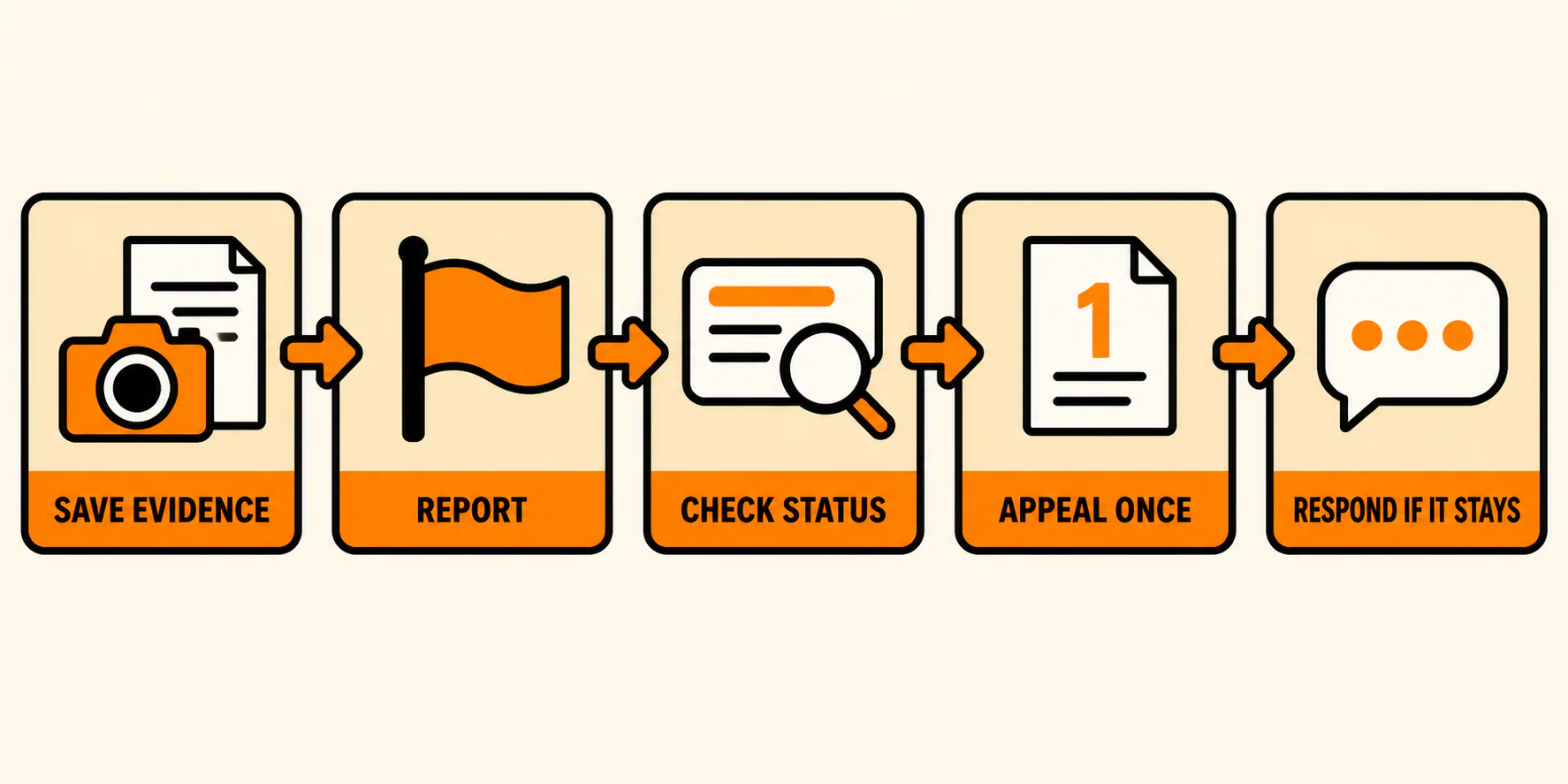
1. Save the evidence before you report it
Take a screenshot of the full review and record:
- The reviewer's displayed name
- The review text, star rating, and date
- The direct link to the review, if available
- The specific policy section you believe it violates
- Any relevant records that support your report, without publishing private customer information
- Related reviews or messages that show a pattern, if a pattern is part of the concern
This gives you a clean record if the review changes, disappears, or becomes eligible for an appeal. It also forces you to answer the question that matters: What rule did this content break?
2. Report the review from your Business Profile
Google's current instructions are to open your Business Profile, select Read reviews, choose Report next to the review, select the closest truthful reason, and send the report. You can follow the live steps in Google's review reporting and appeal guide.
Choose the reason that best matches the content. Do not select a more dramatic category because it sounds urgent. A precise report is more defensible than a creative one.
You are done with this step when the report has been submitted and you have saved the review details and policy reason in your records.
3. Check the status instead of repeatedly flagging it
Use Google's Reviews Management Tool to see whether the review is pending, was found not to violate policy, or has been escalated. Google says an evaluation typically takes several days, but that is not a promised deadline.
Mass flagging, asking friends to report the same review, or submitting the same complaint over and over does not change who controls the decision. That creates activity where you need evidence.
What to do if Google says the review does not violate policy
A denial does not always end the process, but it does not give you a reason to keep starting over.
Google documents a one-time appeal for an eligible review through the Reviews Management Tool. If the tool offers that option, select the review, explain the exact policy issue, and attach or describe the strongest relevant evidence. Google says an appeal submission can include up to 10 reviews.
Keep the appeal short and specific. Identify:
- The review in question
- The exact policy category
- The part of the review or evidence that supports that category
- Any pattern relevant to the violation
"This review is hurting my business" may be true, but it is not a policy argument. A specific, checkable statement such as "This reviewer posted the same promotional phone number on five unrelated profiles" gives Google something it can evaluate.
If the appeal option does not appear, do not waste time hunting for a secret sequence of clicks. Move to the response and recovery plan while you keep your documentation.
If someone is demanding money, goods, or favors
Review extortion needs a different response. Google describes this as negative review activity followed by a demand for money, goods, or services in exchange for removing the reviews.
Do not pay, negotiate, or start a public fight with the accounts involved.
Preserve the review links, screenshots, dates, contact details, and every message containing the demand. Then follow Google's instructions for reporting review extortion. Google says that channel is specifically for merchants facing a direct extortion attempt, so ordinary spam and off-topic reviews should still use the normal reporting process.
If the situation involves threats, personal safety, or a legal dispute, get advice from an appropriately qualified professional. A blog post cannot tell you whether a specific statement is defamatory or what legal action is appropriate.
What is actually a waste of money
The review-removal industry attracts big promises because worried business owners are ready to buy relief. Some paid help can be legitimate. The promise is what matters.
Be skeptical when a provider guarantees it can remove any Google review. Google controls the policy decision. A third party may help organize evidence, manage the reporting process, draft a response, build a compliant reputation program, or coordinate qualified legal advice. It cannot honestly guarantee what Google will decide.
Before hiring anyone, ask for the scope in writing:
- What work will the provider perform?
- What evidence will it use?
- Does the provider promise a process or an outcome?
- What happens if Google leaves the review in place?
- Are the fees and refund terms clear?
- Does the strategy comply with Google's review policies?
Walk away from tactics built around mass flagging, fake positive reviews, incentives, or review gating. Review gating means selectively asking happy customers for public reviews while steering unhappy customers somewhere private. Google prohibits merchants from offering incentives for reviews, discouraging negative reviews, or selectively soliciting positive ones.
Buying a pile of five-star reviews to bury a bad one replaces one problem with a policy violation of your own.
Public threats are not much better. Accusing a reviewer of fraud or threatening legal action in your reply can make the argument more visible and may reveal information that should stay private. Document serious issues privately and use the proper channel.
What to do when the review stays
Write your response for the prospective customer who will read it next month. You are not trying to win a courtroom drama in the review section. You are showing that a reasonable person is paying attention.
Keep the reply short, calm, and free of private details. If the complaint is from a known customer, a response can look like this:
Thank you for sharing this. We are sorry the experience did not meet expectations. We would like to understand what happened and discuss the next step directly. Please contact us at [phone or email] and ask for [name or role].
If you cannot match the reviewer to a customer record, do not call them a liar. Try this instead:
We have not been able to match this review to a customer record based on the information shown. We still want to investigate the concern. Please contact us at [phone or email] with the date and details of your visit so we can look into it.
Adjust either template to fit what you can truthfully say. In healthcare, legal, financial, or other privacy-sensitive businesses, avoid confirming publicly that someone is a customer or discussing the service they received.
Then look past the review itself. If the complaint reveals a real service failure, fix the process that allowed it. If you need more customer feedback, build a neutral system for requesting honest reviews from real customers. This guide to getting online reviews without being pushy explains how to ask without incentives or pressure.
Aim for a visible reputation that reflects a wider set of actual customer experiences. Trying to "drown out" criticism invites shortcuts you do not need.
What if you wrote the review yourself?
This article is for business owners dealing with someone else's review. If you posted the review, you have a different option: Google lets reviewers edit or delete their own contributions through Google Maps. Google's reviewer-side instructions show the current steps.
A business can ask a customer whether they would consider updating a review after a real resolution. It cannot require the change, reward the customer for it, or make help conditional on removal.
Your Google review action plan
When a bad review lands, use this order:
- Diagnose it. Is it a likely policy violation, a genuine complaint, or a legitimate review that went missing?
- Document it. Save the review, link, date, policy reason, and relevant evidence.
- Report it once. Use the closest truthful policy category.
- Monitor the decision. Check the Reviews Management Tool instead of organizing a flagging campaign.
- Appeal if eligible. Make the one-time appeal concise and evidence-led.
- Use the extortion route when it truly applies. Preserve every demand and use the dedicated form.
- Respond if the review stays. Be calm, protect private information, and give the reviewer a direct next step.
- Fix the system. Resolve real service issues and keep asking customers for honest feedback in a neutral way.
That is less satisfying than a magic delete button. It respects Google's rules and gives you something useful to do at every outcome.
Need help with the larger picture? YEAH! Local can help you manage your Google Business Profile, review process, and local visibility as part of a practical local SEO strategy. No magic buttons. Just a cleaner system.