
Key Takeaway
Google Guaranteed is now Google Verified. Learn how local service businesses can check eligibility, complete verification, and manage Local Services Ads.
If you are searching for Google Guaranteed for a home-service business, start with the name change. Google Verified is the current Local Services Ads badge. Google consolidated Google Guaranteed, Google Screened, License Verified by Google, and the Money Back Guarantee into Google Verified beginning in October 2025.
The old badge is not something new advertisers apply for, and it is no longer a current customer-reimbursement benefit. The useful question is whether your category and location can use Local Services Ads, what Google requires from your specific business, and how you will run the account once it is eligible.
This guide is for US home-service operators. It explains how to check eligibility, prepare for the assigned verification process, launch carefully, and keep the account in working order. It cannot tell you whether Google will approve a particular business, what a lead will cost, or where an ad will rank.
What changed from Google Guaranteed to Google Verified?
Google's Google Verified announcement describes the change as a unified badge program for Local Services Ads. For an eligible advertiser that completes Google's assigned screening and verification, the current badge is Google Verified.
| Legacy term | Current guidance for a new advertiser |
|---|---|
| Google Guaranteed | Use Google Verified when referring to the current Local Services Ads badge. |
| Google Screened | Also folded into Google Verified. Do not plan around the former badge distinction. |
| Money Back Guarantee | Discontinued for new bookings. Google's current help page limits the historical exception to services booked through Local Services Ads before December 7, 2025. |
The badge indicates that the advertiser completed the screening and verification Google assigned. It is not a service-quality warranty, a promise of approval, a top-placement switch, or proof that Local Services Ads will be profitable. Google says the badge appears on the Local Services Ads profile and may appear dynamically on other surfaces, so do not build a plan around a fixed placement. See Google's current Google Verified badge guidance for the transition and display details.
Before you apply: check eligibility and get the account ready
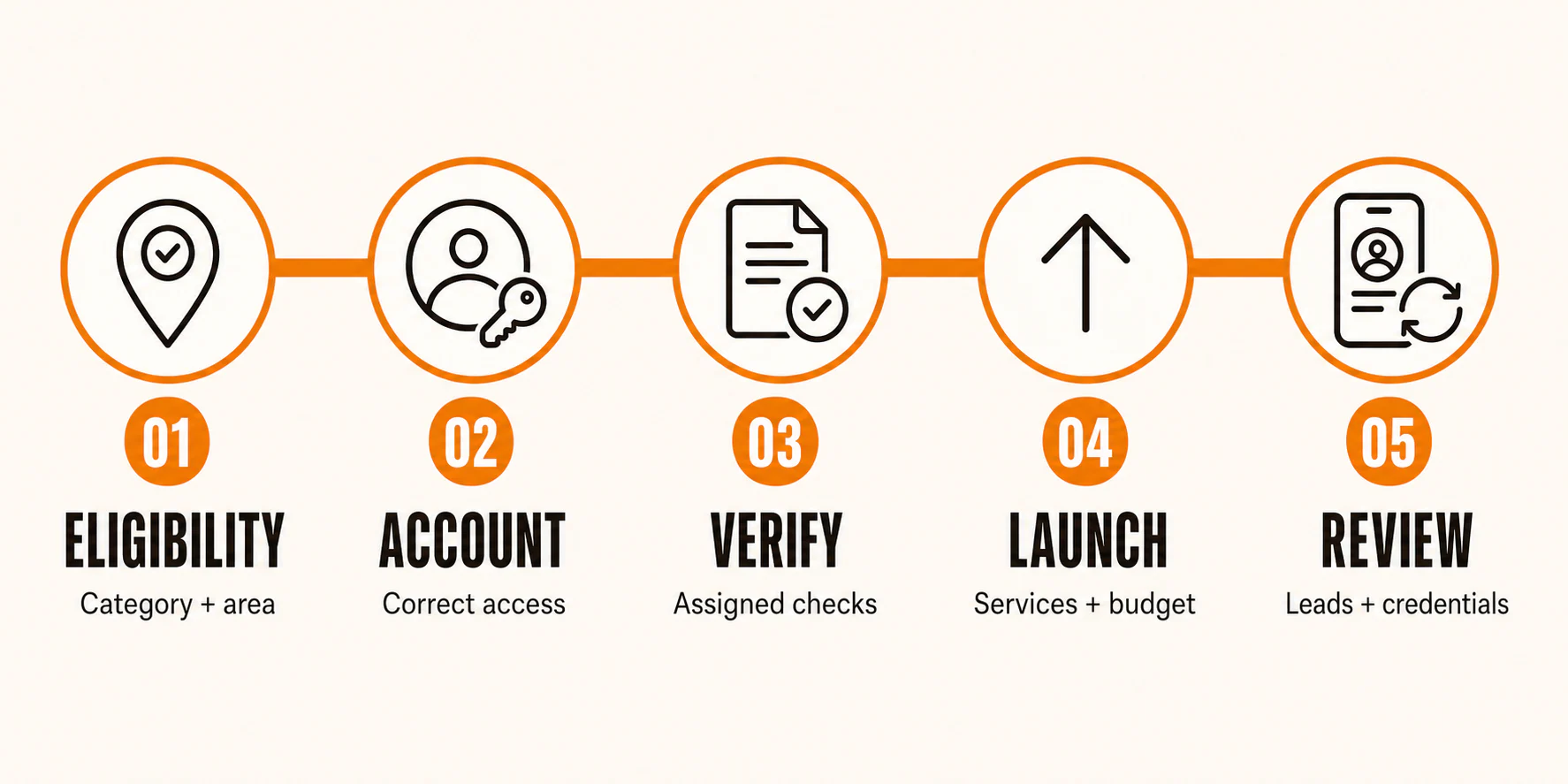
Do not begin by gathering every document you have. Start with Google's live Local Services Ads eligibility path and the business information that will need to match if Google asks for it. Eligibility and screening vary by category, location, and account.
For a US home-service business, a practical readiness list is:
- Confirm the service category and service area in Google's current eligibility flow.
- Make sure the person handling setup has the correct Google account access and, where Google requires it, ownership or manager access to the related Google Business Profile.
- Use the same legal business name, address, and contact details across the account and every document you submit.
- Gather current business registration, licenses, insurance, D-U-N-S or alternate documentation, identity details, and representative or field-worker information only when the dashboard assigns them.
- Decide which services, job types, hours, and areas the business can actually handle. A broader profile is not helpful if the team cannot answer or fulfill the resulting work.
- Prepare accurate business details, photos, reviews, billing details, and a named owner for lead response and follow-up.
Google's screening and verification overview lists checks that may apply, including background, registration, insurance, licensing, Google Business Profile, identity or representative, D-U-N-S, and advanced verification. The important word is may. A requirement shown for another category or state is not automatically your requirement.
Completion check: The dashboard shows that your category and location are eligible, and each requested item has a named owner, an unexpired document, and matching business details. Resolve inconsistent names, addresses, dates, or account relationships before submitting rather than guessing at an approval date.
How to get Google Verified through Local Services Ads
1. Create or access the Local Services Ads account
Use Google's US Local Services Ads getting-started path to begin with the business that will actually advertise. Local Services Ads has its own advertiser profile. Google can use information connected to a Google Business Profile during qualification, but the two profiles are not interchangeable.
Check the business identity, account access, and profile relationship before adding services or submitting documents. If the wrong person owns the account, or the business profile cannot be matched where required, fix that before continuing.
Completion check: You can enter the Local Services Ads account for the correct business and see the category and location path Google is evaluating.
2. Choose only the services and areas you can actually serve
Set job types and service areas around real capacity. Google lets advertisers choose them, but it also explains that an ad can match people Google estimates are in an area or people whose search shows interest in it. City and postal boundaries can overlap. Your settings are an important control, not a promise of perfectly fenced geography. Read Google's service-area and job-type guidance before treating a map setting as a hard boundary.
Start conservatively. Include the jobs you have the people, credentials, hours, and dispatch coverage to fulfill. Exclude work you cannot quote or complete reliably. Revisit the selection after you have enough lead and booked-work data to make a decision.
Completion check: Every selected job type and area has an operational owner behind it, and no one on the team is assuming the settings will prevent every out-of-area inquiry.
3. Submit the exact documents and people Google requests
This is where a generic Google Guaranteed checklist becomes risky. Google may ask for licenses, insurance, business registration, identity or representative checks, background checks, D-U-N-S, a Google Business Profile relationship, field-worker details, or advanced verification. The mix varies by business type and state. Google's US requirements page is useful context, but your dashboard is the operating list.
Before uploading anything, compare the legal name, address, dates, and entity details across the form and document. Check that a license or policy is current and applies to the business and service Google is asking about. Do not add a storefront, address, worker, or credential just to satisfy a presumed rule. If a requirement is unclear, use the account's stated request or Google support path rather than inventing a workaround.
Most avoidable delays are administrative: expired files, a mismatch between the account and the document, missing account access, or a request that nobody owns. Keep a simple tracker of the request, document owner, expiration date, and submission status.
4. Complete the profile and wait for the account-specific review
Finish the profile information Google asks for, including the details that may appear to prospective customers. Google says a Local Services Ads profile can include the business name, tracking phone number, location or service cities, reviews, hours, Google Verified status, photos, and a business bio. Formats can change, so accuracy matters more than trying to optimize for a screenshot you saw elsewhere.
For US advertisers, Google reports an average of three to four weeks after documents are submitted. That is an average, not a deadline or approval promise. Category-specific checks, follow-up questions, document consistency, and other account factors can change the timing. Some advertisers may have a pre-badge route after preliminary checks; follow the status and limitations shown in the account rather than treating pre-badge activity as final verification.
Completion check: The requested profile and verification tasks show as complete or are awaiting a clearly identified Google review. You know which outstanding item is yours to fix and which is with Google.
5. Confirm the badge and account status before treating setup as complete
Do not call the account finished because the forms were submitted. Confirm the Google Verified status where Google presents it, confirm billing readiness, and confirm that the account is eligible to run in the selected setup. The Local Services Ads profile overview is a useful reference for the kind of information Google may show.
Verification is an operational milestone, not a placement guarantee. Google describes Local Services Ads order as auction-based and considers the bid along with the likelihood of a lead, including query context, relevance, profile quality, ratings and review count, response time, images, and completed verification. Those are controls worth managing, not a ranking formula you can solve once and forget.
Completion check: The account's verification and billing status are ready, the profile accurately represents the business, and the team understands that lead volume and ad position still need monitoring.
Set a budget and bid without guessing at profitability
Local Services Ads uses lead bids and budgets, not a universal weekly-spend recipe. Google currently documents three bid modes: Maximize Leads, target cost per lead (target CPL), and max per lead. It recommends Maximize Leads generally, but its own weekly lead guidance depends on the bid mode or bid and the budget. That is why a generic dollar amount is not a responsible starting point.
Start by defining the numbers the business actually knows:
- What is a booked job worth to the business after the direct costs that matter for this decision?
- What share of qualified inquiries becomes booked work?
- How many additional inquiries can the team answer and fulfill without harming service?
- What bid and budget options does the account currently recommend for the selected services and areas?
Use those inputs to set a bounded test, then review lead outcomes before expanding it. An acceptable lead cost depends on the value of a booked job and the business's observed close rate. It is not a promise that the account will deliver that cost, and it should not be confused with profit.
Google's Local Services Ads bidding guidance explains the current modes and budget controls. Keep the first decision small enough that a bad assumption is visible and correctable.
Handle leads, credits, and disputes correctly
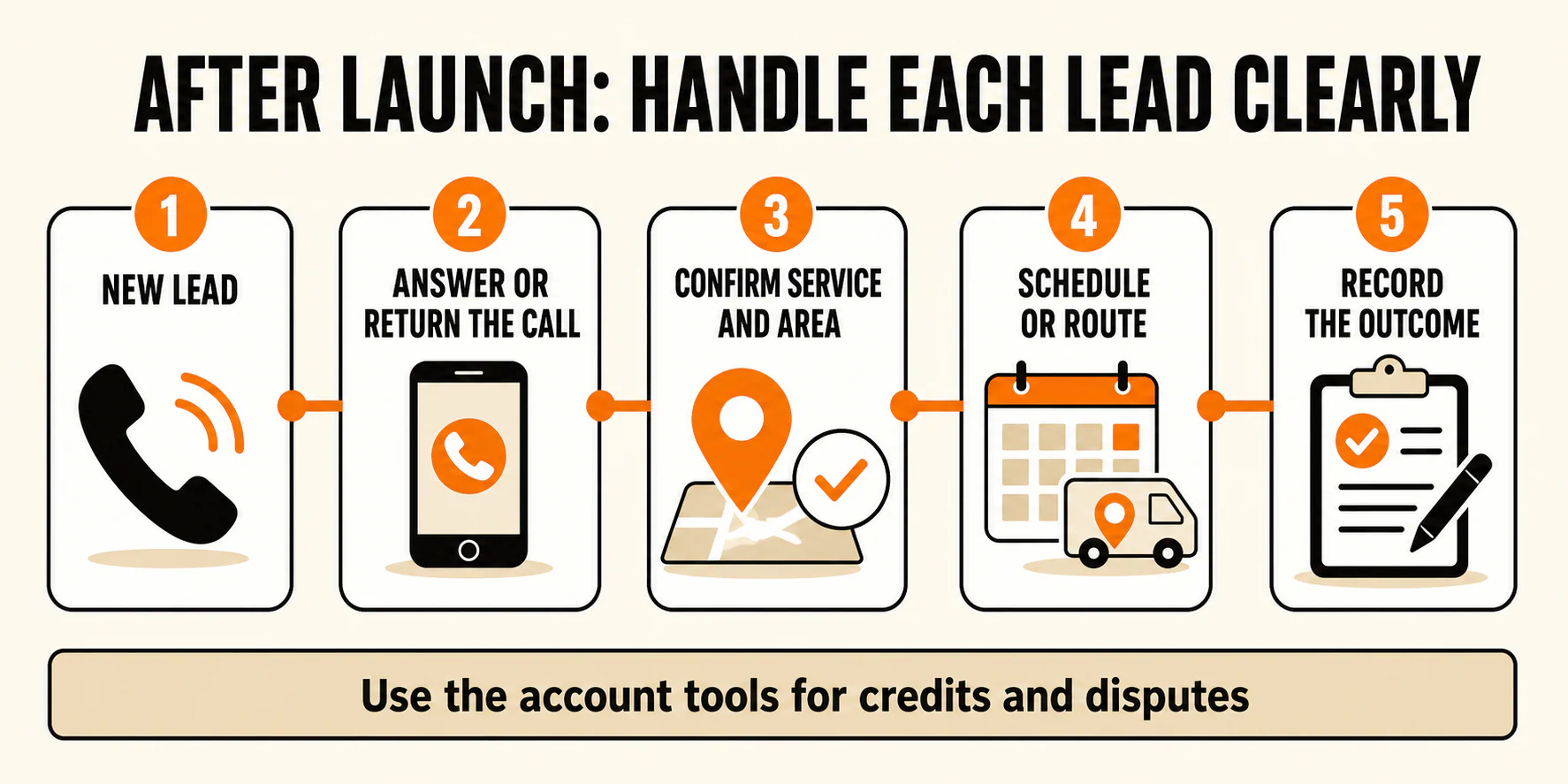
Treat lead management as an operating process, not a billing argument after the fact. Assign a person to respond promptly, record the inquiry, qualify it against the services and areas you actually offer, and connect the lead to booked work or a clear non-booked reason. That gives you a record for staffing, bidding, and service-area decisions.
Google can assess lead quality, avoid a charge in some cases, or apply an automatic credit later. Its automated lead-credit guidance says credits are typically applied within 30 days and carries important limits: the automated program excludes health-care verticals, tax specialists, and EMEA advertisers, and it no longer supports credits for job type not serviced or geography not serviced.
Google also documents a US and Canada manual dispute route for an advertiser that believes a lead is invalid, subject to its applicable policy and account options. That is not a promise that every unwanted lead will be credited. Use the lead status and dispute choices visible in the account, and keep the supporting details you would need to explain the issue.
For each lead, capture:
- response time and response owner;
- service requested and location provided;
- whether the request matched a selected job type and area;
- contact attempt and outcome;
- booked, lost, duplicate, or otherwise non-booked disposition; and
- any account credit or dispute status.
This is also where a Local Services Ads management workflow can be useful if the business needs help with the operating cadence, not just the application.
What affects Local Services Ads placement?
Google does not publish a simple rank checklist. Its ad-rank documentation says order is auction-based and reflects bid plus lead-likelihood and profile factors. The practical controls are straightforward even if the outcome is not guaranteed:
- keep the selected services and areas accurate;
- answer and follow up on leads quickly;
- keep the profile complete and consistent;
- maintain truthful reviews, photos, and other profile information; and
- respond when Google requests a verification update or re-evaluation.
Completed verification is part of the picture, but it is not a shortcut to the top of the results or an assurance of leads. The useful question is whether the account is accurate, responsive, and configured for work the business can handle.
Google Verified does not replace the rest of your marketing
Local Services Ads can be one acquisition channel. They do not replace an accurate website, a well-maintained Google Business Profile, honest reviews, local visibility work, or a follow-up process that turns inquiries into booked work.
Standard Search Ads and Local Services Ads also solve different problems. If you need help deciding how paid Search can complement a Local Services Ads program, see YEAH! Local's pay-per-click advertising service. If the issue is the business's broader local presence, local SEO work is the more relevant next question. Neither service changes Google's eligibility or verification rules.
For a business combining channels, compare lead quality and booked-work outcomes across them without assuming one platform should carry the entire pipeline. That is the kind of connected measurement approach a Local Growth Engine is intended to support.
Final Google Verified launch checklist
Use this as a final pass before treating the Local Services Ads setup as live:
- Confirm the current category and location are eligible in Google's live path.
- Verify access to the correct Local Services Ads account and, when required, the related Google Business Profile.
- Match the business identity across the account and assigned documents.
- Complete only the screening and verification items Google assigns to the account.
- Check that licenses, insurance, registration, identity, worker, or other documents are current where requested.
- Select services, job types, hours, and areas the business can actually support.
- Complete the profile with accurate business details, reviews, photos, and billing information.
- Confirm Google Verified and account status in the places Google presents them before calling verification complete.
- Choose a bid mode and budget using known lead value, close rate, capacity, and current account recommendations.
- Assign lead response, outcome tracking, and review of credit or dispute options.
- Monitor credentials and respond to future Google verification requests.
Use Google's live eligibility path first, then work from the requirements the dashboard assigns to your category and location. If the setup or ongoing operations need an owner, YEAH! Local can help without promising approval, placement, or profitability.
Last updated