Google Local Services Ads Explained: How LSAs Work From Eligibility to Booked Job

Key Takeaway
Learn how Google Local Services Ads work: from eligibility and verification to bidding, charged leads, response, and booked-job measurement.
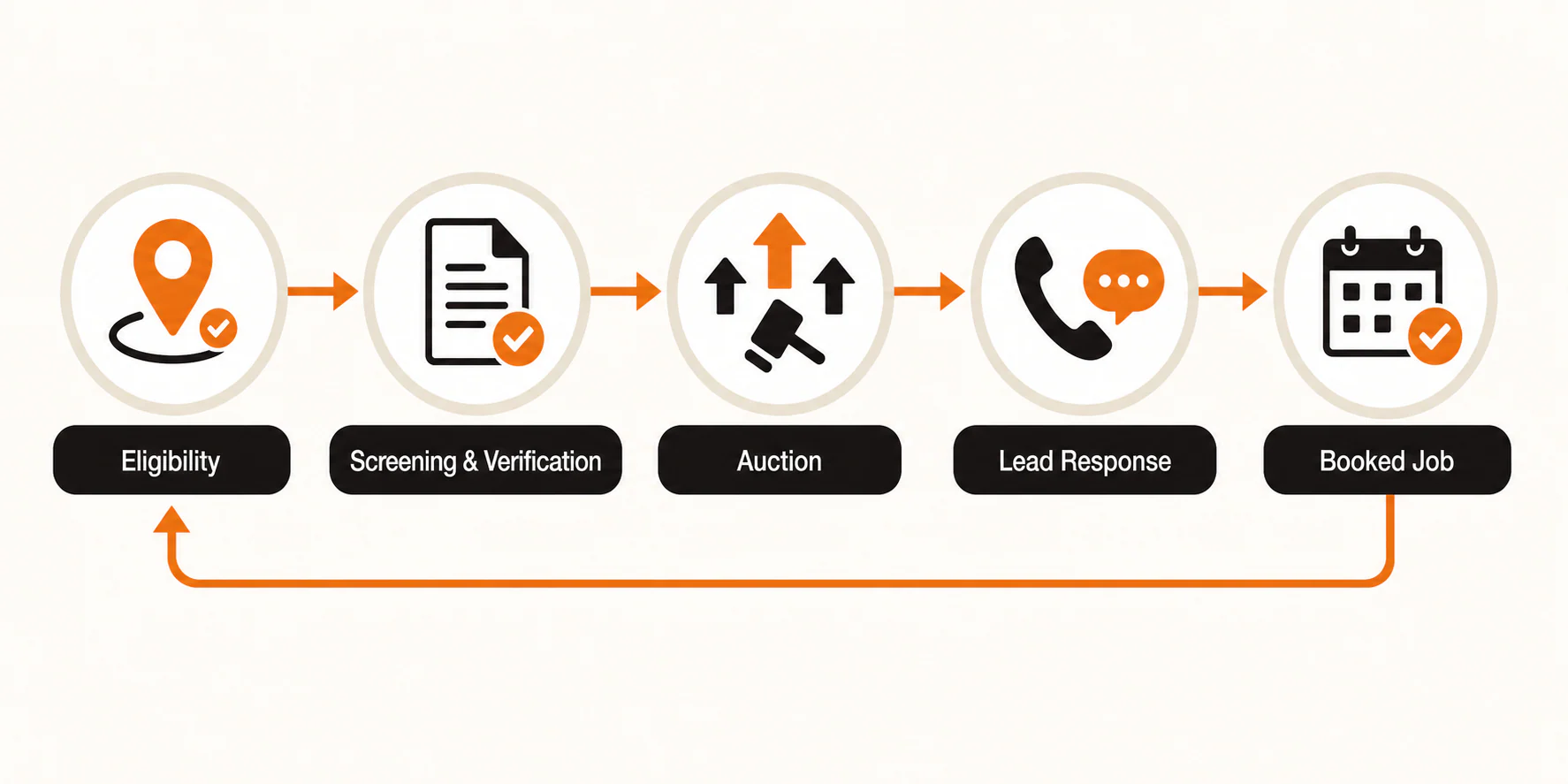
Google Local Services Ads (LSAs) are a separate Google advertising channel for eligible local service categories. In the United States, they can generate calls, messages, and, where that option is available, booking requests from people looking for a local provider. The operational path is more involved than "turn on an ad": check eligibility, complete the requirements Google assigns, build an accurate profile, participate in an auction, handle the resulting leads, and then measure whether those leads become booked work.
LSAs use an auction. The former Google Guaranteed customer-reimbursement benefit does not apply to new bookings. And a platform-reported lead is not automatically a qualified inquiry, a booking, a completed job, or revenue.
A local business should evaluate whether it can operate this channel accurately, respond well, and measure the outcomes that matter. This guide walks through that decision in order. It cannot predict your approval, placement, lead price, lead quality, or profitability. Those depend on category, location, account conditions, capacity, and the business's own results.
Local Services Ads versus standard Google Ads
LSAs and standard Google Ads solve related but different problems. Standard Search campaigns generally give an advertiser more control over keywords, ad copy, landing pages, and click-based measurement. LSAs are built around an eligible local-services profile and contact-oriented lead paths. Google documents calls, messages, and, in some cases, bookings as LSA lead types; advertisers are charged for valid leads rather than every click.
Neither model is automatically the better choice. A business may use both, then compare them using the same operational definitions: charged lead, qualified inquiry, booking, completed job, and, when the records support it, revenue or margin. For the standard Search side of that comparison, see our practical guide to advertising on Google Ads.
| Question | Local Services Ads | Standard Google Ads |
|---|---|---|
| Primary entry point | An eligible local-services profile and contact path | Search campaigns and ads that can send traffic to a chosen destination |
| Billing model | Valid leads, with price affected by factors such as location, job type, lead type, and bid mode | Often clicks, although campaign settings and conversion goals vary |
| Eligibility | Category and location availability plus assigned screening/verification | Separate policy and account requirements; no LSA screening route |
| Core operating risk | Inaccurate service details or weak intake can turn paid contacts into poor outcomes | Weak query, ad, landing-page, or measurement alignment can waste spend |
| Useful decision measure | Whether charged leads progress to qualified and booked work | Whether paid traffic produces the business outcome being measured |
The table is a working distinction, not a verdict. If your category or location is not eligible for LSAs, standard Search, local SEO, referrals, and other channels may still be viable.
Step 1: Check category and location eligibility first
Before gathering documents or setting a budget, use Google's Local Services Ads starting point to check the category and location that actually match the work you offer. Availability is not a permanent universal list: it can vary by service and market.
Use the real business model when you check. A company that occasionally performs a service should not select a broader category just to enter the program, and a business should not add cities it cannot realistically serve. Those choices may create lead-fit problems later, even if the account appears to have more opportunity on paper.
Completion check: You can identify an eligible category and service area that match your current licenses, staffing, and intake capacity.
If this step fails: Stop rather than forcing an approximate category. Put effort into another channel that fits the business, or revisit LSAs only when the eligible service or market genuinely changes.
Step 2: Complete the screening and verification Google assigns
Eligibility is only the first gate. Google says Local Services Ads qualification can vary by service, country, and whether a provider enters through Google directly or a partner. Depending on the route, assigned requirements may include business, owner, professional, license, insurance, identity, registration, background, or advanced verification checks. In the United States, requirements also vary by category and location. Google's qualification guidance is the right place to confirm the current scope, rather than relying on an old universal checklist.
The practical task is consistency. Use the same legal business details, contact information, service descriptions, and current documents wherever Google requests them. A mismatch, expired license or insurance document, incomplete profile, or missing access to the relevant account can keep the process from moving forward. Google publishes an average screening window in some US guidance, but an account-specific timeline is not something this article can promise. Allow time for the requirements shown in your account.
What Google Verified means now
Google uses a single Google Verified badge for eligible advertisers that complete their assigned requirements. It is not a guarantee of placement, service quality, lead quality, or profitability. It also does not change an ad's ranking simply because the badge transition occurred.
Google discontinued the former Google Guaranteed customer reimbursement program for new bookings. Under Google's current policy, reimbursement requests are limited to qualifying services booked before December 7, 2025. Requests also had to be submitted within 30 days of the initial service completion date. Our Google Verified and former Google Guaranteed guide covers that transition in more detail.
Completion check: Every assigned requirement is marked complete and the documents and business details remain current.
Step 3: Build the profile around work you can actually take
Once the account is eligible and the assigned verification work is underway or complete, treat the profile as an intake promise, not a wish list. Keep services and job types aligned with the work you can deliver. Set service areas and hours to reflect actual coverage. Verify that every visible contact path reaches someone who can respond.
That means checking more than the phone number. If messages or booking requests are available for your category and account, make sure they have an owner. If an office closes at a certain time, the profile should not imply otherwise. If a team is booked out, the person responsible for the account needs a way to adjust availability or pause activity rather than letting contacts go unanswered.
Google's ad-ranking guidance lists profile-related inputs such as responsiveness, relevance to the search, reviews, response time, photos, and completed verification checks alongside bid. Those inputs do not form a fixed formula, and following the list does not guarantee a position. Even so, they give businesses good reasons to keep the profile accurate and maintained. Google also says high-quality profile photos may contribute to ranking and can help users understand the business. Use real, current photos that clarify the work rather than decorative stock imagery.
Completion check: A staff member tests each active contact method, confirms hours and service areas, and can explain who owns calls, messages, and booking requests.
Important boundary: A job type or location mismatch is not a sound strategy for treating a future contact as a credit. Google's current automated-credit guidance specifically does not cover leads categorized as a job type not serviced or a geography not serviced.
Step 4: Understand the auction before choosing a bid approach
LSAs do use an auction. Google says profiles are ordered using a bid and overall profile quality. Factors such as responsiveness, search context, relevance, reviews, photos, and completed checks help inform the outcome. Google's published factors do not amount to a formula or a promised ad position.
For accounts that have not yet migrated to Google Ads, Google's current LSA bidding guidance describes three approaches:
- Maximize Leads: Google adjusts bids with the goal of finding as many leads as possible within the budget.
- Target CPL: An optional target cost per lead that gives Google a signal while it still manages bids dynamically.
- Max per lead: A manual ceiling for the amount you are willing to pay for a lead.
There is an important 2026 transition to account for. Google began moving selected US advertisers in August 2026 from the separate LSA dashboard to a specialized Performance Max campaign with pay-per-lead goals. After an account migrates, manual Max per lead and vertical-level Target CPA are no longer supported, weekly budgets become daily averages, and bidding is managed inside Google Ads. Google calculates one campaign-level Target CPA for a migrated multi-vertical campaign. Advertisers that need different bidding rules by category must use separate campaigns. Google says the rollout will expand through late 2026 and 2027, so follow the settings and migration notices in your own account rather than assuming every advertiser has the same controls. Google's LSA migration guidance has the current schedule and account changes.
The name of a bid mode is not a forecast. A target CPL is not a promise that every lead will cost that amount, and a pre-migration Max per lead is not a promise of lead volume. Budget, location, job type, lead type, the bid choice, and auction conditions interact. Google's interface and recommendations may also change.
Start with a budget and available bid approach that the business can monitor without disrupting operations. Then let enough real leads and outcomes accumulate to make a decision. One unusually good or bad call is not a reliable channel diagnosis.
Completion check: The person funding LSAs and the person handling leads agree on the available bid approach, spend limit, intake capacity, and the outcome records they will review.
Step 5: Know what can become a charged lead
"Pay per lead" is a useful shorthand, but it is not the same as "pay only for booked work." Google describes valid LSA leads as including calls, messages, meaningful voicemail or automated engagement, returned missed calls that connect or leave voicemail, and booking requests where available. Lead availability and details can vary by market and vertical; for example, booking leads are not available for health care verticals in Google's US guidance.
Lead price is also variable. Google's lead documentation says it can vary by location, job type, lead type, and bidding mode. That is why a universal LSA cost range is less useful than the price and outcome history in your own account.
What about credits for poor-fit leads?
Google says it initially assesses leads and may reassess charged leads for automated credits. That process has important limits. Automated lead credits are not available for health care, tax specialists, or EMEA, and Google's current guidance no longer includes "job type not serviced" or "geo not serviced" as credit reasons.
Treat a credit as a documented account outcome, not a planning assumption. Review the lead record and billing record while the context is still available. More importantly, prevent avoidable poor-fit contacts by keeping services, areas, hours, and intake coverage accurate.
Completion check: The team knows where to find a lead record, how to match it to intake notes, and which lead fields it will preserve for later review.
Step 6: Respond and manage the account like an intake channel
LSAs do not end when the profile becomes active. Google documents that regular failures to answer or respond may affect ranking, and it lists responsiveness among the factors used in ad ranking. That is a reason to assign coverage, not a reason to invent a universal response-time rule.
Put a specific person or role in charge of each contact path. Create a simple escalation path for missed calls, after-hours messages, and booking requests. Train the team to record what happened next: wrong number, outside area, job not offered, qualified inquiry, scheduled estimate, booked appointment, completed job, or another category that fits the business.
The profile deserves the same maintenance. Recheck services, service areas, hours, photos, reviews, verification status, budget, and whether the account is active when business conditions change. A missed call, stale hours, paused account, exhausted budget, expired document, or profile that no longer reflects the work is a more useful troubleshooting starting point than assuming "LSAs stopped working."
Completion check: Intake coverage is documented, the account has an owner, and the business can identify the next maintenance trigger. That could be a staffing change, new service, updated license, reduced capacity, or a recurring reporting review.
Step 7: Measure charged leads through booked work
Before migration, Local Services Ads reports show charged leads and spend by call, message, and booking, as well as lead credits. Google also says US and Canada advertisers can mark leads booked with tracking details. After migration, current campaign data moves into Google Ads, but Google says historical LSA performance reports will not carry over. If Google notifies you that your account is migrating, save the historical reports you need before the transition.
Those are helpful platform signals, but they do not establish lead quality, completed jobs, revenue, or margin by themselves.
Use a simple outcome chain in your own records:
- Charged lead: The account recorded a billable LSA lead.
- Qualified inquiry: The contact fits the business's service, area, availability, and other legitimate intake criteria.
- Booking: An appointment, estimate, or job is scheduled under your business's definition.
- Completed job: The booked work actually occurs.
- Revenue or margin: A financial outcome is recorded, if the business can do so accurately.
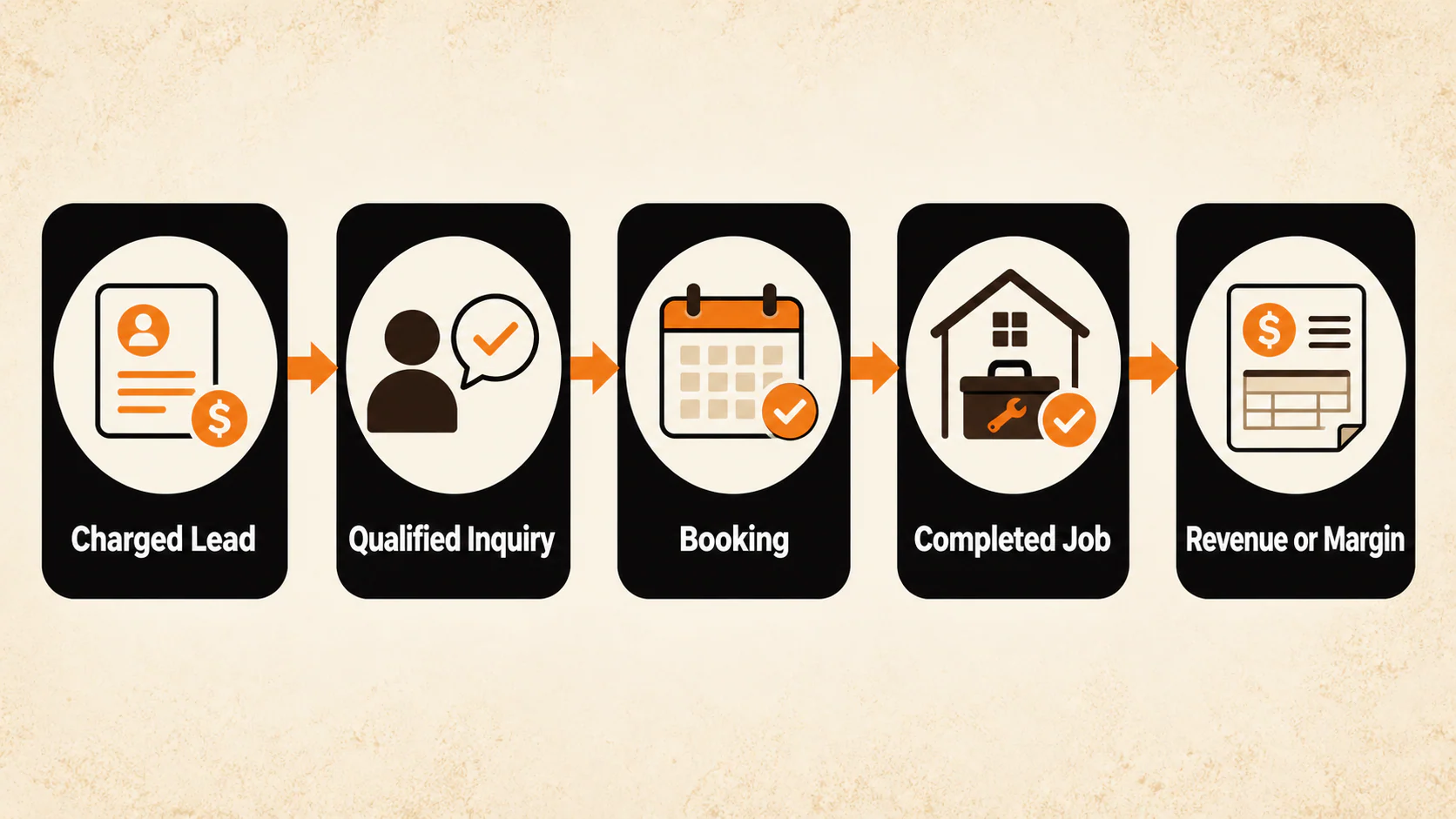
The labels need to be yours, but the separation matters. Counting every charged lead as a booking hides the part of the system you need to improve. Google's LSA reporting documentation explains the pre-migration reports and booked-lead fields; Google's migration page explains the new Google Ads reporting path. Reconcile the relevant platform data with a CRM, scheduling system, or intake log. If call quality is the missing piece, our guide to using AI call summaries to improve SEO, ads, and lead-quality review explains one way to create a more usable review record.
Use the results to make one operational change at a time. If qualified contacts are weak, inspect category, service-area, profile, and intake fit. If qualified inquiries are not booking, inspect availability, response handling, estimate process, and follow-up. If bookings happen but the economics do not work, inspect the true acquisition cost alongside job value and margin. The answer may be to continue, narrow the offering, adjust operations, or pause. The evidence here does not support a universal answer.
Completion check: You can trace a sample of LSA leads from the platform report into the business's intake or scheduling records without treating the platform lead count as the final outcome.
A simple recurring review
At a recurring review, pull the platform's charged leads, spend, lead type, and any recorded credit information. Then match those records to the same period in the intake or scheduling system. Keep the review focused on questions the records can answer: Which services and areas created contacts? Which contacts were qualified? Where did contacts fail to become bookings? Did a staffing or availability change coincide with missed response coverage?
This is not a demand for elaborate attribution. A modest, consistent reconciliation is more useful than a spreadsheet that stops at "lead." It also prevents a familiar reporting error: treating a lower charge count as a win without checking whether qualified and booked work changed too.
When an LSA test is a reasonable fit and when it is not
An LSA test can be reasonable when the business has an eligible category and location, can complete and maintain the assigned requirements, has accurate services and service areas, can respond to incoming contacts, and can measure booked outcomes. It also needs economics that can absorb customer-acquisition cost after the business looks at real records.
It is a poor fit when the category or location is ineligible, the business cannot maintain an accurate profile, calls and messages will routinely go unanswered, there is no way to tell whether leads booked, or real outcomes show the economics do not work. Those conditions point to a need for a different operating setup or a different channel.
Launch and maintenance checklist
Before treating a Google Verified LSA profile as fully onboarded, verify the whole loop. Google says qualifying categories may be able to run pre-badge ads after preliminary checks while the remaining verification steps are completed, so use the status and requirements shown in your own account.
- The eligible category and service area match the work the business can actually perform.
- All Google-assigned screening and verification requirements are complete and current.
- Services, service areas, hours, photos, reviews, and contact paths are accurate.
- Calls, messages, and any booking path have a named owner and tested coverage.
- The budget and available bid mode match intake capacity and are reviewed with the person accountable for spend.
- The team understands that ordering depends on an auction, not the badge alone.
- Any required migration backup is complete before the old LSA reports become unavailable.
- Lead records can be reconciled with qualified-inquiry and booking records.
- The review process distinguishes charged leads, credits, qualified inquiries, bookings, completed jobs, and financial outcomes.
- A maintenance trigger exists for staffing, services, hours, verification documents, capacity, and reporting.
If you want help connecting paid-search strategy to intake and measurement, YEAH! Local's PPC team can help evaluate the operating setup. The right next step is a review of eligibility, profile accuracy, response coverage, and outcome tracking. It is not a promise about where an ad will appear or what a lead will cost.
Frequently asked questions
Are Local Services Ads the same as Google Guaranteed?
No. Google now uses the Google Verified badge for eligible advertisers that complete their assigned requirements. The former Google Guaranteed customer reimbursement benefit is no longer a current benefit for new bookings. Google's policy limits reimbursement requests to qualifying services booked before December 7, 2025, and those requests had to be submitted within 30 days of the initial service completion date.
Do Local Services Ads use bidding?
Yes. Google describes an auction that considers bid and overall profile quality. Before an account migrates to Google Ads, the documented choices include Maximize Leads, an optional target CPL, and manual Max per lead. After migration, manual Max per lead and vertical-level Target CPA are no longer supported. Google calculates one campaign-level Target CPA for a migrated multi-vertical campaign. None of these settings promises rank, volume, price, or profit.
What does a Local Services Ads lead cost?
There is no reliable universal answer. Google says lead price can vary by location, job type, lead type, and bidding mode. Review the account's own charged-lead price alongside qualified and booked outcomes instead of relying on a generic industry range.
Can a business receive credit for a bad lead?
Google may issue automated credits after its assessment or reassessment, but credits are not guaranteed and have category and region exclusions. Health care, tax specialists, and EMEA are excluded from the current automated-credit program, and Google no longer treats an unserved job type or geography as a supported credit reason.
Do LSAs replace standard Google Ads or local SEO?
Not automatically. LSAs, standard Search ads, local SEO, referrals, and other channels can serve different parts of the demand journey. Compare them based on the business outcomes you can actually measure, then allocate effort where the real constraints and results point.
Last updated