Why Your Website Conversion Rate Dropped (And How to Find the Leak)

Key Takeaway
Website conversions suddenly down? Use this local-business troubleshooting plan to check tracking, traffic, site issues, calls, forms, and bookings.
The traffic chart looks steady. The phone is quieter. The form inbox has gone suspiciously calm. Now everybody has a favorite theory: the website is old, the ads are bad, the market changed, or the button needs to be orange.
Maybe. But a full redesign is a lousy first response to a conversion drop. It is expensive guessing when the real failure could be a tracking change, a different mix of visitors, a broken form, a weaker offer, or a missed-call problem after the website did its job.
Start by tracing the leak through five stages:
Follow the leak in the order a customer experiences it: make sure the action was recorded, see whether a different mix of people arrived, test whether they can call or submit, check that the page keeps the promise that brought them there, and find out what happened after the inquiry reached the business.
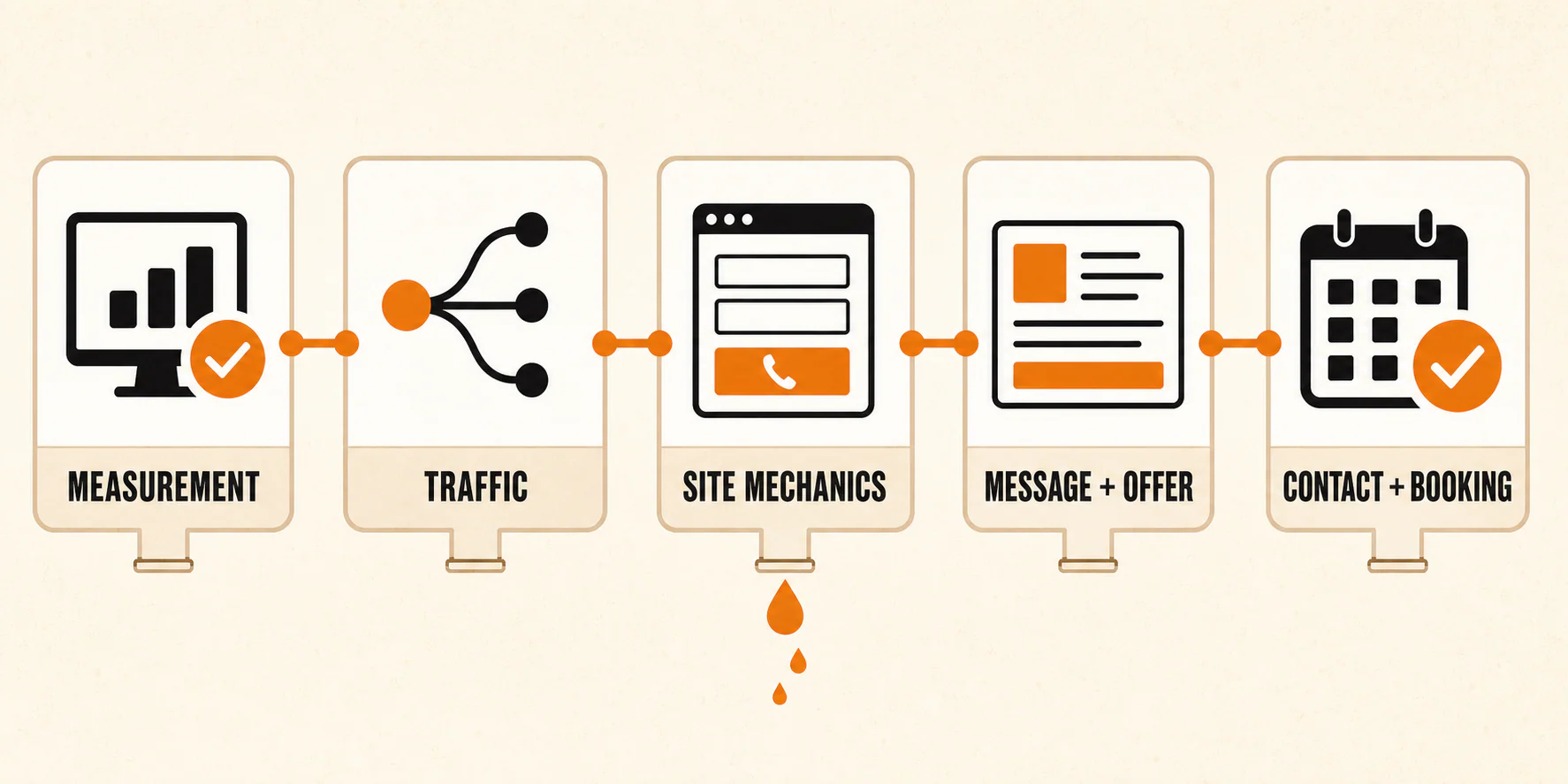
That order matters. Redesigning the page before checking the first two stages can leave the actual problem untouched, only with nicer fonts.
Table of Contents
First, define what actually dropped
"Conversions are down" is too vague to investigate.
For a local service business, a meaningful conversion might be a qualified phone call, a completed contact form, a scheduled consultation, or a booked appointment. Pick one primary conversion for this investigation. Keep the supporting actions separate.
Do not blend calls, forms, and bookings into one number and expect it to tell a clean story. If calls fell but forms held steady, you have a different problem than a business where inquiries stayed steady but booked appointments fell.
Compare matching periods that make sense for your business. Keep the weekday mix, promotions, service availability, and seasonality in view. A Monday-through-Friday period is not a fair match for a week that includes a holiday and two closed days.
Before you move on, make sure you can finish this sentence without hand-waving:
Our primary conversion is [action]. It declined during [period] compared with [matching period], while [supporting action] did or did not change.
Run this first-hour triage before changing the site
You do not need a strategy meeting yet. You need to find out whether a prospect can complete the basic path.
Use a phone that is not logged into your website tools. Visit the same kind of page a prospect would land on, then tap the phone number, submit the form, and open the scheduling path. Check the confirmation screen or message. Next, confirm that the call or submission appears in the system your team actually uses.
A button looking clickable tells you very little. Follow the action all the way to its destination and confirm that the team can see it.
| Symptom | First check | Likely owner | Proof the check passed |
|---|---|---|---|
| Calls dropped | Tap every prominent phone link on a real phone | Developer or site manager | The correct number opens in the dialer and the test call appears in the call log |
| Forms dropped | Submit each important form on phone and desktop | Developer or site manager | The visitor sees confirmation and the submission reaches the inbox or CRM |
| Bookings dropped | Complete the scheduling path through the final confirmation | Developer or operations owner | The test appointment appears on the correct calendar and sends the expected notice |
| Analytics conversions dropped | Compare tracked events with call, form, and appointment records | Marketer or analytics owner | Recorded events reconcile with a small set of known test actions |
| Leads arrive but few book | Review missed calls, response timing, capacity, and qualification | Operations or sales owner | Each test lead has a visible owner, response, and final disposition |
If a form or scheduling path fails during this test, stop theorizing about copy. Capture the page URL, device, browser, time, and what happened. That gives the developer a reproducible problem instead of "the website seems weird."
First make sure the reporting did not break
A conversion-rate drop can be real, or the reporting can be wrong. Treat those as separate possibilities.
Analytics tags, form plugins, consent settings, thank-you pages, call-tracking numbers, and event names can change. If the business received 20 calls but the dashboard recorded 8, the immediate job is measurement repair. That gap does not prove the page suddenly became less persuasive.
Compare the dashboard with records outside the dashboard:
- Call-tracking logs or phone-system records
- Form notification emails and CRM entries
- Scheduling confirmations
- Appointment records or lead-status reports
Use a few test actions that you can identify by time. Confirm whether each action appears in both the operational record and the analytics report. Write down mismatches instead of changing several settings at once.
Google Analytics interfaces and event setups can vary, so focus on the underlying question: did the action happen, and did your reporting record the same action? If the same test action appears on the website, in analytics, and in the system receiving the lead, you can trust that part of the measurement.
Then find the people and pages where the drop began
Once you trust the measurement, stop staring at the sitewide average. One number can hide a healthy segment and a failing one.
Break the primary conversion down by:
- Landing page
- Device category
- Traffic source and medium
- Campaign
- Geography or service area
- New versus returning visitors, when the data is available and useful
Google's traffic-source dimension guidance explains how source, medium, and campaign describe the way traffic arrived. Use those dimensions to ask a sharper question. Did conversions fall everywhere, or only for visitors from one campaign, one device type, or one landing page?
Be careful when moving between acquisition reports. Google distinguishes session-scoped Traffic acquisition from user-scoped User acquisition. Its acquisition-report documentation explains the difference. Comparing those reports as if they measure the same thing can create a second mystery while you are trying to solve the first one.
Keep narrowing until you can name the smallest useful affected segment. "Mobile visitors landing on the emergency plumbing page from paid search" gives you somewhere to look. "Website bad" does not.
If the homepage is the affected landing page, run the homepage conversion checks there. If another page owns the decline, keep the investigation on that page instead of automatically rewriting the homepage.
Test the path those visitors actually used
Now make a dated change log. Small changes count.
Review what changed before the decline:
- Forms, phone links, or event tracking
- Page templates, themes, plugins, or scripts
- Pop-ups, chat widgets, or consent banners
- Scheduling embeds or calendar availability
- Service pages, service areas, pricing, or business hours
- Ads, targeting, search-result copy, or landing-page destinations
Do not rely on memory. Check release records, campaign history, plugin updates, page revisions, and team notes where they exist. The useful question is not, "Did we redesign the site?" It is, "What changed in the path this affected visitor took?"
Then test the affected path on a real phone and a desktop browser. Look for buttons hidden behind banners, text fields that fight the keyboard, confirmation messages that never appear, calls routed to the wrong number, and calendars with no usable availability.
Performance belongs in this check, too, but use it as a diagnostic input rather than a conversion promise. Google's Core Web Vitals guidance defines Largest Contentful Paint (LCP), Interaction to Next Paint (INP), and Cumulative Layout Shift (CLS). In plain English, those metrics help describe loading, responsiveness, and visual stability.
PageSpeed Insights can show both field and lab information. The two views answer different questions, and mobile results may differ from desktop. If the affected segment is mobile, inspect the mobile experience. A good desktop score is not an alibi for a broken phone experience.
At this point, you should either have a mechanical problem you can reproduce or a tested path that works on the affected devices. If you find a reproducible technical issue, run the website audit checklist or hand the evidence to a developer before rewriting the offer.
If the path works, compare the promise with the page
If the measurement works and the path is usable, check whether the page still makes sense for the visitors arriving there.
Read the search result, ad, email, or referral promise that sends traffic to the page. Then read the page as a prospect in that situation. The two should agree on the service, location, problem, and next step.
Ask four questions:
- Does the page clearly offer the service the visitor expected in the location the business serves?
- Does it show accurate, specific proof that helps the visitor evaluate the business?
- Can the visitor tell whether to call, request a quote, or schedule?
- Does the page explain what happens after the visitor reaches out?
The old advice was often "add more trust signals" or "shorten the form." Those can be useful changes, but they are not diagnoses. A short form does not fix traffic looking for a service you do not offer. A testimonial does not fix a scheduling calendar with no availability.
The page should match what that visitor expected: the service, location, promise, and next action. If you identify a broad page-friction problem after that, work through the broader website conversion fixes instead of turning this incident review into an endless redesign.
Do not stop tracing the lead at the website
The website may have converted the visitor perfectly and still get blamed for a booking problem.
Trace a few inquiries from submission to final disposition. Check:
- Missed calls and unanswered voicemails
- Response delays or leads without an assigned owner
- Scheduling capacity and blocked appointment times
- Closed service areas or unavailable services
- Lead qualification rules
- Follow-up attempts and outcomes
A website conversion and a booked job are different events. If calls and forms stayed steady but appointments fell, the leak begins after contact. Changing the homepage headline will not fix an unreturned voicemail.
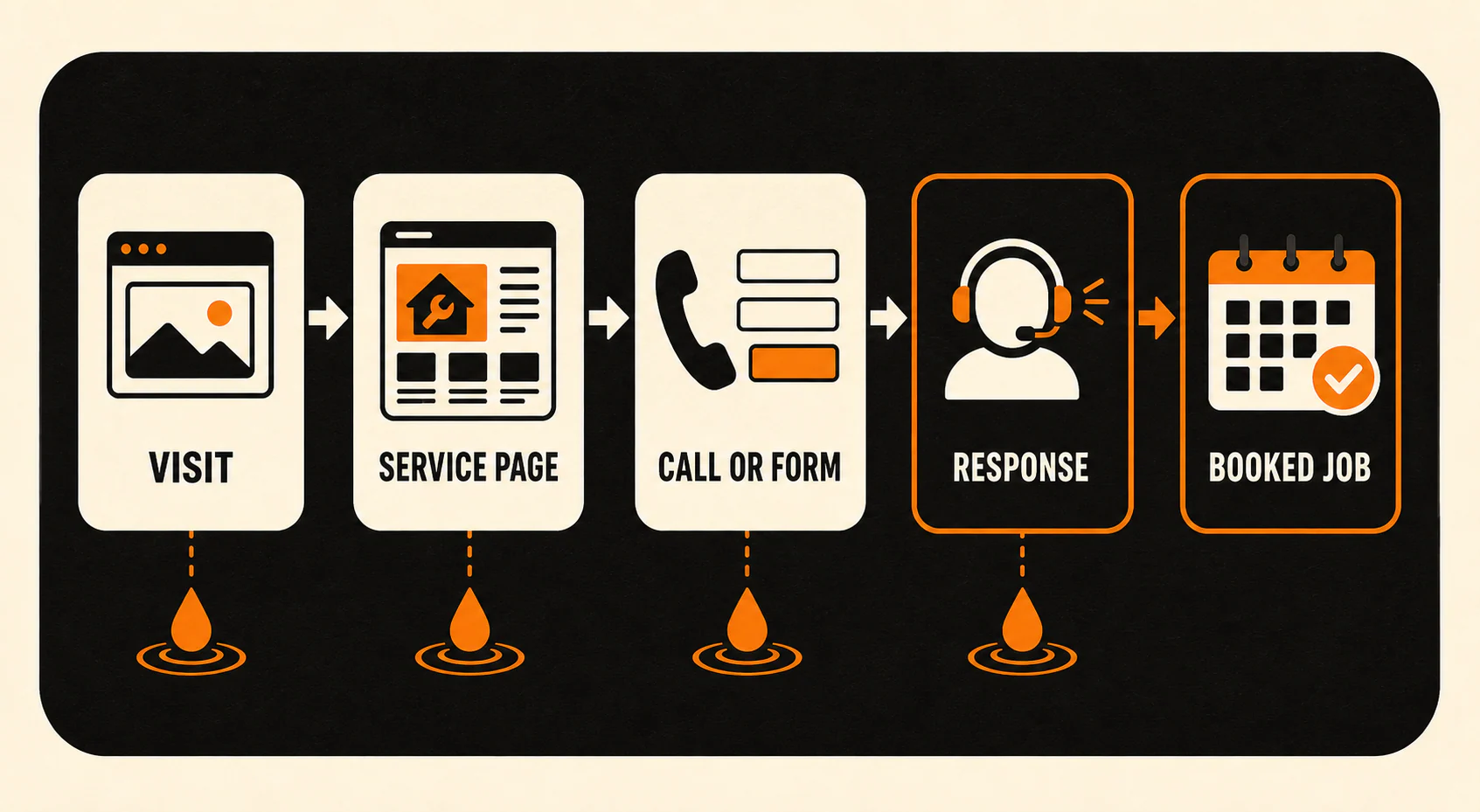
Each inquiry you review should have a visible path: received, assigned, contacted, qualified, booked, lost, or closed for a clear reason. When the gap is follow-up, tighten the lead follow-up system before spending money on more traffic.
Choose the smallest explanation that fits the evidence
By now you should have a smaller problem. Turn it into one testable hypothesis:
Write the idea in ordinary language: which visitors were affected, what changed, the single cause you suspect, the repair you will make, and the date you will look again. If the sentence needs three suspected causes and five fixes, the problem is not isolated yet.
For example, a useful hypothesis might focus on a mobile form that fails after a template change. "People do not like the website anymore" is not useful.
Choose a review date based on the traffic and lead volume available to your business. Do not borrow a universal test duration or sample size from a generic checklist. If the page receives very little qualified traffic, you may need more time to distinguish a pattern from noise.
Change one meaningful variable when you can. Keep the date, owner, before state, and after state. If several teams change the form, offer, campaign, and scheduling process on the same afternoon, the final chart might move, but it will not tell you why.
Once the cause is isolated, use the full CRO checklist to plan the next round without mixing incident repair with broad optimization.
The evidence usually tells you who should own the repair.
Call a developer or site manager when you can reproduce broken forms, incorrect phone links, scheduling errors, script conflicts, layout problems, or event-implementation issues. Give them the URL, device, browser, time, expected result, and actual result.
Call a marketer or analytics owner when the issue points to traffic quality, campaign changes, landing-page mismatch, offer positioning, or measurement design. Bring the affected segment and matching-period comparison.
Call the operations or sales owner when inquiries arrive but responses, capacity, qualification, or follow-up break down. Bring a small set of lead records with clear outcomes.
Sometimes more than one owner is involved. Assign each verified problem to the person who can change it instead of handing the whole mystery to "marketing."
Turn the diagnosis into the next useful decision
A general guide cannot diagnose your account or promise that a conversion rate will recover. Your records should leave you with a clearly defined conversion, the smallest affected group you can act on, the first stage that failed, one owner, one repair, and a date to look again.
If the data is trustworthy and the leak is isolated but the next move is still unclear, contact YEAH! Local. Bring the affected pages or campaigns, the dates, the test results, and the repair you are considering. That is a much better starting point than "our conversion rate hit rock bottom."
Last updated