
Key Takeaway
Think Google hates your website? Check seven SEO problems that can block indexing or weaken visibility, plus the practical fix for each one.
Your website is live. Your services are real. You spent time, money, and probably more patience than expected getting everything online.
And Google acts as if it has never met you.
It is tempting to conclude that Google hates your website. The good news is that Google does not have feelings. The less comforting part is that its systems are extremely literal. If your site sends missing, muddled, or manipulative signals, Google Search has to work with what you gave it.
Before you change anything, figure out which problem you actually have:
- The page is not indexed. Google cannot show the URL because it has not indexed it, cannot access it, or has been told not to include it.
- The page is indexed but not competitive. Google knows the page exists, but other results appear more relevant or useful for the search.
- A policy or manual-action problem exists. Search Console shows a specific issue that requires a specific correction.
A site: search can offer a quick clue, but Google's documentation for the site: operator says it is not exhaustive. A URL may be indexed even if that search does not show it. Use Search Console's URL Inspection tool for the page-level answer instead of diagnosing your entire SEO strategy from one search box.
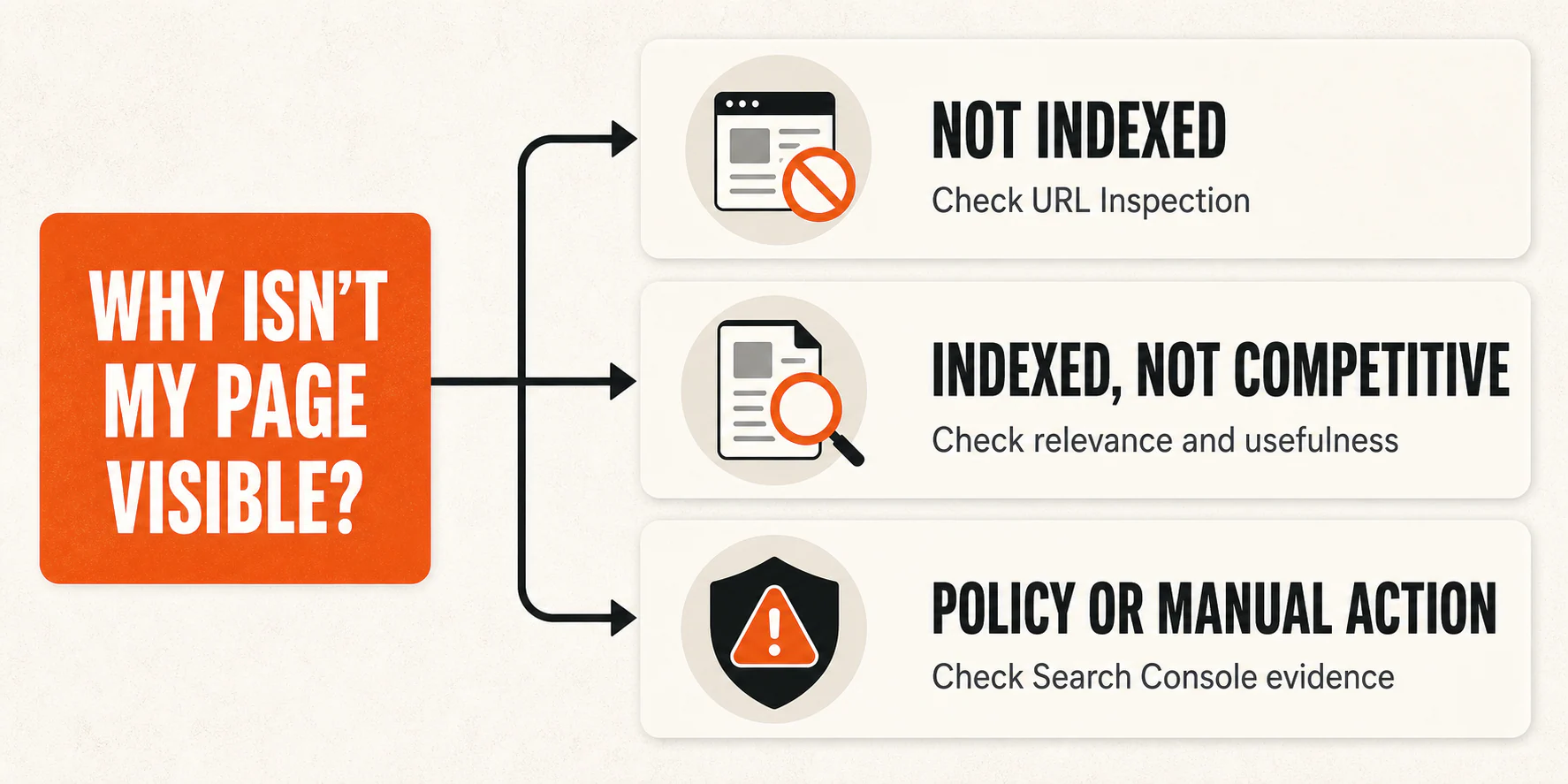
Once you know which bucket you are in, work through these seven problems. Fix the one you can confirm. Random SEO activity is still random, even when it comes with an impressive dashboard.
1. You are blocking Google by accident
Start with the unglamorous possibility: your own site may be telling Google to stay out.
Open URL Inspection in Google Search Console and test the exact page. Then check the basics:
- Does the URL return a normal, useful page with a
200status? - Is the page available without a login or password?
- Does the page contain a
noindexrule? - Is crawling blocked where Google needs access?
- Does the URL redirect somewhere unexpected?
The noindex rule deserves special attention because it is widely misunderstood. It does not mean "this page is less important." It tells Google not to show the page in Search after Google can crawl the page and see the rule. If you block crawling as well, Google may not see the noindex instruction at all. Google's documentation on blocking indexing with noindex explains the distinction.
Remove only the block that is accidental. A private account page may belong behind a login. A thank-you page may belong outside the index. Your main service page probably does not.
After the fix, test the live URL again in Search Console. Request indexing if appropriate, then watch the reported crawl and index status. Do not promise yourself a deadline Google has not promised you. Verification here means the technical obstacle is gone, not that the page will immediately rank where you want it.
2. Your content was made for a keyword instead of a person
A page can mention the right phrase twenty times and still dodge the question behind it.
Suppose someone searches for emergency water removal. They probably need to know whether you serve their location, how quickly they can reach you, what the first visit involves, and what to do while they wait. A page that spends 900 words explaining the dictionary definition of water damage may be "optimized" on paper and nearly useless in practice.
Google's guidance emphasizes helpful, reliable, people-first content, including original value, complete answers, clear sourcing, and evidence of real knowledge. It does not give you a magic word count or a winning content-tool score.
Read the page as a skeptical customer and ask:
- Does this answer the decision that brought the person here?
- Are the service details specific enough to be useful?
- Does it show who wrote or reviewed consequential advice?
- Can the reader tell what to do next?
- Did you add a section because it helps, or because a tool turned one keyword red?
Keep the relevant, in-depth material already on the page. Cut filler, repeated definitions, and sentences written mainly to squeeze in another variation of the query. Add firsthand business details you can stand behind, such as your actual process, service boundaries, requirements, or examples. Specificity is useful. Search-engine theater is not.
You will know the page is improved when a qualified reader can use it to understand, decide, or act without opening five more tabs just to fill in the blanks.
3. You are trying to manufacture authority with links
Relevant links and local citations can help people and search systems discover your business. That does not turn link building into a vending machine where enough coins produce a ranking.
The danger is the pattern you create on purpose: buying links that pass ranking credit, automating links across low-quality sites, arranging excessive exchanges, submitting to junk directories, or forcing keyword-heavy anchor text into articles you control. Google's spam policies list those practices as forms of link spam. Paid placements should be qualified appropriately, such as with sponsored or nofollow.
Look at your own acquisition history before panicking over every strange domain in a link report. Did someone buy a package promising hundreds of links? Are the same optimized anchors appearing across unrelated sites? Are "guest posts" thin wrappers built around a link? Those are patterns worth investigating.
The better fix is slower and much less mysterious: create something genuinely useful, build real local relationships, contribute to relevant organizations, pursue legitimate PR, and earn citations where your business belongs. A neighborhood association, trade organization, supplier, local publication, or community partner can make sense when the relationship itself makes sense.
Also, do not treat the disavow tool like monthly housekeeping. Search Console says Google typically ignores links from known spam sites, and its disavow guidance reserves the tool for advanced situations involving substantial artificial links and a manual action or likely manual action. If that description does not fit, put down the spreadsheet and investigate something you can actually verify.
4. Your duplicate pages are sending mixed signals
Duplicate content is not automatically a policy violation, and two similar pages do not mechanically cancel each other out. The practical problem is confusion.
You may have an HTTP and HTTPS version, tracking parameters, printer-friendly URLs, an old page left behind after a redesign, or several service pages with nearly identical copy. Google groups duplicate or very similar pages and selects a canonical, meaning the primary URL it uses as the representative version. Your declared canonical is a preference signal, not an order Google must obey.
Use URL Inspection to see which URL Google selected. Then map the signals you control:
- Which URL is in the XML sitemap?
- Which version do your internal links use?
- Do retired URLs redirect to the preferred page?
- Does the preferred page point to itself with a canonical?
- Are multiple pages genuinely useful, or are they the same page wearing different city names?
Google's canonicalization documentation recommends consistent signals. Pick the page that should remain, redirect URLs that no longer need to exist, point internal links to the preferred version, and keep the sitemap aligned.
If two pages serve different intents, make that difference real. A service overview and a detailed pricing guide can coexist because they do different jobs. Two vague pages targeting the same phrase need more than swapped headlines to justify their separate lives.
Inspect the affected URLs again after Google recrawls them. You do not need to eradicate every repeated sentence on your site. You need to give Google and your visitors a coherent primary path.
5. Your page is unpleasant to use
Your page does not need a perfect lab score. It does need to work for the person trying to use it.
Test the page on a real phone. Can you read it without pinching and zooming? Does the main content appear promptly? Do buttons move while you are trying to tap them? Does a popup cover the answer before the visitor has read the first paragraph? Can someone find the phone number, service area, or next step without a scavenger hunt?
Then use PageSpeed Insights and the Core Web Vitals report in Search Console to find measurable bottlenecks. Field data, when available, reflects real user visits. Lab diagnostics help you investigate likely causes. Neither is a universal ranking meter.
Google describes page experience as a collection of signals and explicitly says that good Core Web Vitals do not guarantee top rankings. Its page-experience guidance also warns against chasing a perfect tool score solely for SEO.
Fix the largest confirmed obstacle first. That might be an oversized hero image, script-heavy chat widget, layout shift, slow server response, intrusive interstitial, or confusing mobile navigation. The useful order depends on what the data and the page reveal.
If performance is the bottleneck, use this PageSpeed Insights improvement guide for the deeper workflow. Then repeat the same test and mobile walkthrough. A higher score is nice. A page that becomes faster, steadier, and easier to complete is the actual win.
6. Your important content and links are hard to crawl
A page can be excellent and still sit three broken turns away from the rest of your website.
Start at your homepage and important service pages. Can you reach the page through ordinary navigation or a relevant internal link? Or does it exist only in the sitemap, an old blog post, or a JavaScript interaction that may not produce a standard link?
For an important page, check that:
- At least one relevant page links to it.
- The link uses a normal crawlable
<a>element with a usable destination. - The anchor text describes what the reader will get.
- The destination returns a working page rather than a chain of redirects or an error.
- Essential information is present reliably, not hidden behind a fragile interaction.
Google says links help it discover pages and understand relevance. Its link best practices recommend concise, descriptive, natural anchor text. There is no magical ideal number of links, and stuffing every anchor with the same keyword is not a clever shortcut.
Build a simple hierarchy. Link service pages from the pages that introduce those services. Link useful supporting articles where they answer the reader's next question. Repair or replace dead internal destinations. If a script or widget adds friction without adding value, simplify it.
For the bigger relationship between structure, design, and search visibility, see how to make web design and SEO work together. Good design is not decoration here. It helps people and crawlers find the path you meant to create.
7. You are dressing up manipulation as optimization
Some SEO mistakes are ordinary mistakes. Others are attempts to make a page look more useful or relevant to Google than it is for the visitor.
Hidden text, doorway pages, keyword stuffing, mass-produced unoriginal pages, and misleading structured data fall into the second category. Adding the word "strategy" does not improve the disguise.
Compare questionable work against Google's current spam policies, not an old checklist from a forum. If Search Console reports a manual action, read the specific issue, remove the violating tactic, document the correction, and follow the stated review process. Do not assume disappointing rankings equal a penalty. Evidence first.
Structured data deserves its own reality check. It helps machines understand eligible page content and can make a page eligible for certain search features. It does not guarantee a rich result, and it is not a general ranking booster. Google's structured-data guidelines require the markup to describe content that is visible and truthful on the page.
So if a page marks up reviews visitors cannot see, invents ratings, or labels something as a recipe when it is plainly not a recipe, the fix is not more schema. Remove the misleading markup. Make the visible content accurate. Use structured data only when it honestly describes what is there.
The same test works for the rest of this category: would the page still make sense if Google did not exist? If the tactic mainly exists to create a false signal, it is not helping you build a durable website.
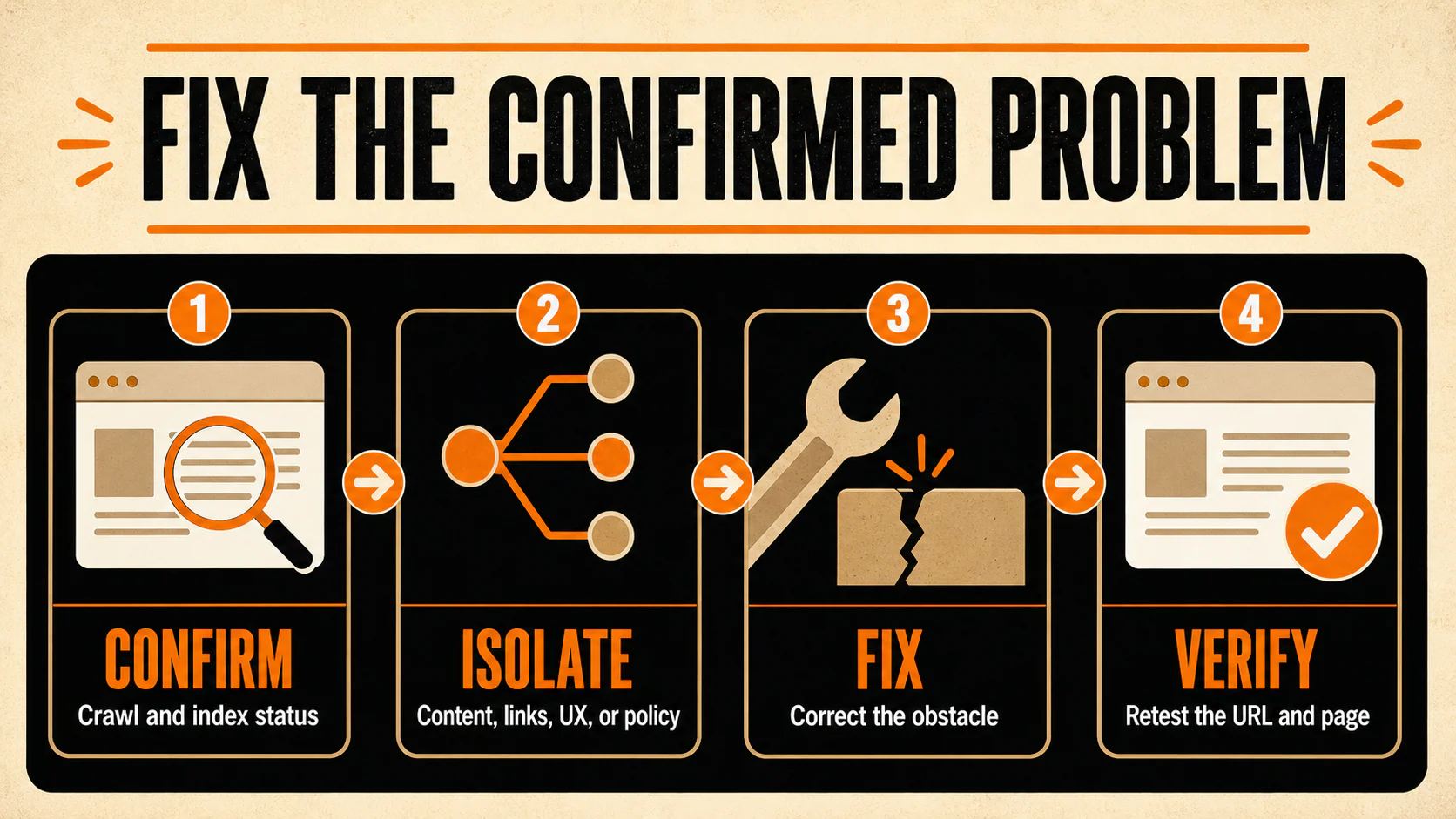
Fix the confirmed problem, not the SEO rumor of the week
If you are not sure where to begin, use this order:
- Confirm that Google can crawl and index the page.
- Confirm that the page answers a real searcher's task with useful specifics.
- Clean up conflicting URLs, canonicals, redirects, and internal paths.
- Improve the experience problems you can confirm with data and a real walkthrough.
- Investigate policy issues when Search Console or your own link and content history gives you a reason.
For a wider review, work through this website audit checklist with AI prompts. It will help you inspect the rest of the site without turning the process into a pile of disconnected tool reports.
If you uncover a technical, content, or authority problem that is bigger than a one-page fix, YEAH! Local's SEO services can help you sort the signal from the noise.
Google is not holding a grudge. It is just very literal, occasionally opaque, and unimpressed by shortcuts.
Last updated