
Key Takeaway
Learn what AI agents can do for a local business, which workflow to pilot first, where humans stay involved, and how to test results safely.
Your next employee is probably not a robot. Good.
An AI agent can handle a useful piece of work for a local business. It might collect details from an appointment request, route a website inquiry, prepare a follow-up message, or turn a reviewed call into an internal task.
But calling it a "super employee" oversells the technology and skips the hard part. The agent still needs accurate information, limited permissions, clear instructions, a human owner, and a way to fail without creating a bigger mess.
So do not start by shopping for a digital employee. Start with one bounded job. If you can describe where that job begins, what the system may do, when a person takes over, and how you will judge the result, you may have a sensible pilot. If you cannot, map the process first.
Software does not fix an undefined workflow. It just moves the confusion faster.
What an AI agent actually is
The labels get thrown around as if they mean the same thing. They do not.
- A chatbot responds inside a conversation. It may answer questions, but a reply alone does not make it an agent.
- A conventional automation follows a fixed trigger-and-action rule: when this happens, do that.
- An AI assistant helps a person create, summarize, or analyze something. The person remains the operator.
- An AI agent uses a model and connected tools to pursue a defined goal within the permissions you configure. Depending on the setup, those tools might include a calendar, inbox, customer record, or phone system. The agent may read approved information, choose among allowed steps, update another system, or hand the work to a person.
That last category is where owners need to slow down. Giving software permission to change a calendar, customer record, or phone workflow is not the same as asking it to draft a paragraph. The official OpenAI agents guidance, for example, treats tools, guardrails, evaluation, permissions, and safety as separate parts of a production agent system. That is a useful implementation lesson even if you use another provider.
An agent can still use the wrong information, misunderstand a request, or take an allowed action at the wrong time. Human review is not proof that the technology failed. For customer-facing or consequential work, review can be part of a well-designed system.
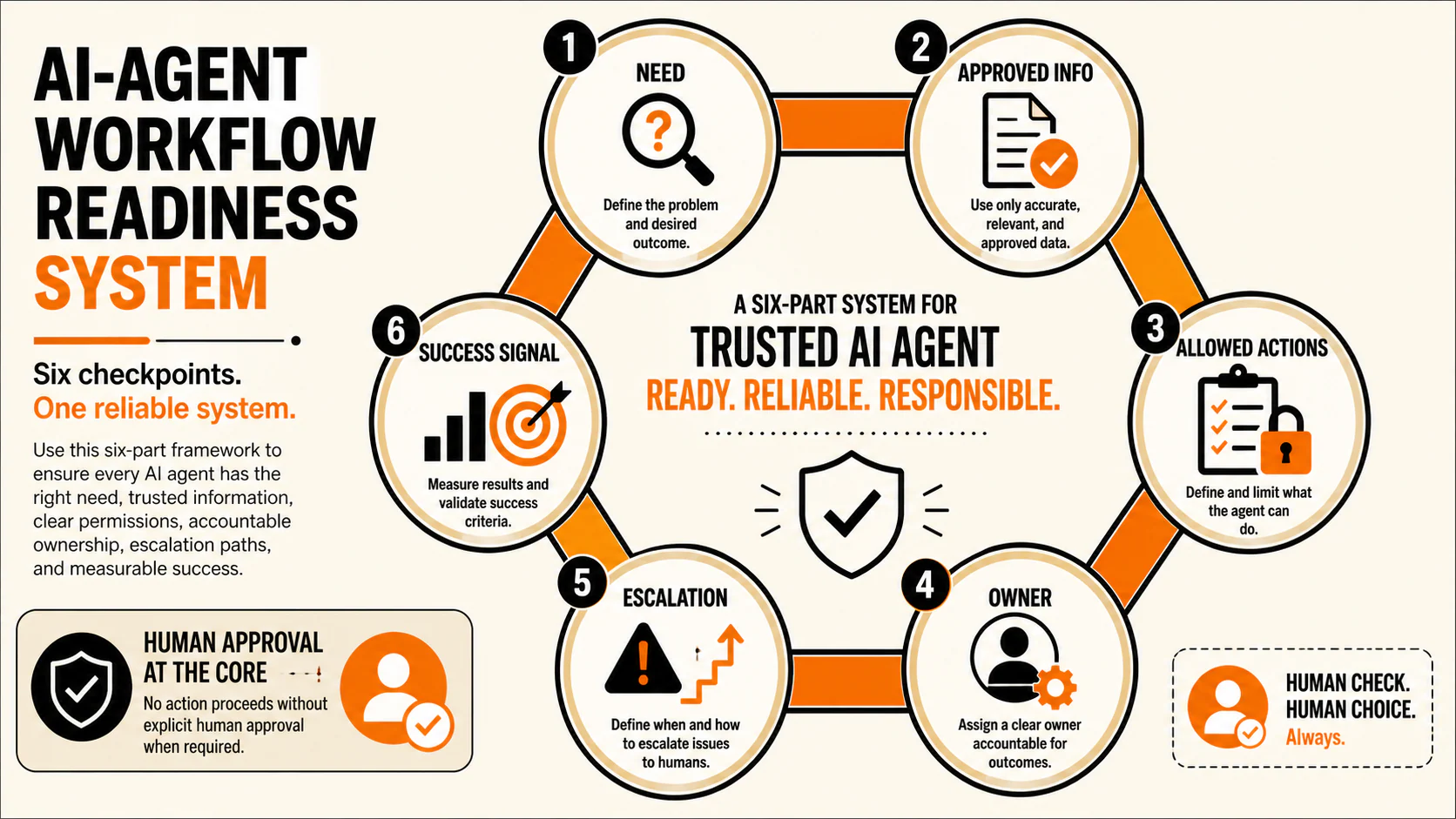
The six-part readiness test
Before you compare tools, answer these six questions about one real workflow:
- What exact need starts the workflow? Name the customer or team request, not a vague goal such as "improve efficiency."
- What approved information can the agent use? Identify the FAQs, policies, service details, schedules, and examples it can rely on, along with who keeps them current.
- Which actions may it take? Be equally clear about prohibited actions. "Can read appointment types but cannot promise availability" is useful. "Help with scheduling" is not.
- Who owns the workflow? Put one person in charge of the source material, exceptions, monitoring, and changes.
- When must it escalate? Define the conditions that stop the automated path and send the work to a person.
- What signal shows the workflow worked? Decide what you will inspect: correct completion, useful escalation, error type, response time, or a qualified business outcome.
If you cannot answer all six, you are not ready to automate that workflow. That does not mean the idea is dead. It means the next job is process mapping, not software shopping.
Four useful local-business jobs to consider
Make the first pilot boring. Give it a clear beginning, limited actions, accessible source material, and an obvious human handoff.
| Workflow | Useful first job | Source of truth | Human handoff |
|---|---|---|---|
| Calls and appointment requests | Answer approved common questions or collect the details a staff member needs. A focused voice AI appointment workflow should never invent availability or improvise an emergency response. | Current service details, hours, location information, appointment rules, and an approved emergency route. | Transfer or flag emergencies, unusual requests, uncertain answers, and anything outside the approved scheduling rules. |
| Website inquiries | Ask a short set of qualifying questions and route the request to the right person. Fix the offer and contact path before adding automation to a website that is supposed to generate leads. | The live offer, service area, qualification rules, contact preferences, and routing list. | Escalate unclear requests, complaints, sensitive details, and questions the approved material does not answer. |
| Lead follow-up | Draft or send approved reminders according to a defined sequence. A good lead follow-up process also needs stop rules, not just more messages. | Approved message templates, timing rules, lead status, contact consent, and the assigned owner. | Stop when the person replies, opts out, disputes the message, or asks for judgment the agent does not have. |
| Call notes and task creation | Summarize a reviewed call and create the next internal task. The team can use AI call summaries as an input, but an AI label is not proof of lead quality. | The call record, an approved summary format, task categories, and ownership rules. | Send uncertain details, conflicting instructions, and any high-consequence classification to a person before the record is used. |
Notice what is missing: a promise that any of these workflows will produce more leads or bookings. A pilot may streamline part of the process, or it may expose bad documentation and weak handoffs. The point is to find out before expanding it.
What not to automate first
Your first agent pilot should not be a stress test for the business.
Do not lead with angry customers, refunds, discount exceptions, emergencies, safety decisions, sensitive records, legal or financial promises, or actions that are difficult to reverse. Those situations carry more context, emotion, and consequence than a first pilot needs.
The reason is basic risk management for AI systems. Test the system where mistakes are visible, recoverable, and unlikely to hurt a customer. The NIST AI Risk Management Framework is voluntary guidance, not a certification or a local-business compliance checklist, but its broader point is relevant: trustworthiness and risk belong in design, use, and evaluation, not as an afterthought.
If a workflow touches regulated data, calling or texting rules, medical information, financial information, or another sensitive category, get the appropriate sector and legal review before deployment. A general article cannot determine that boundary for your business.
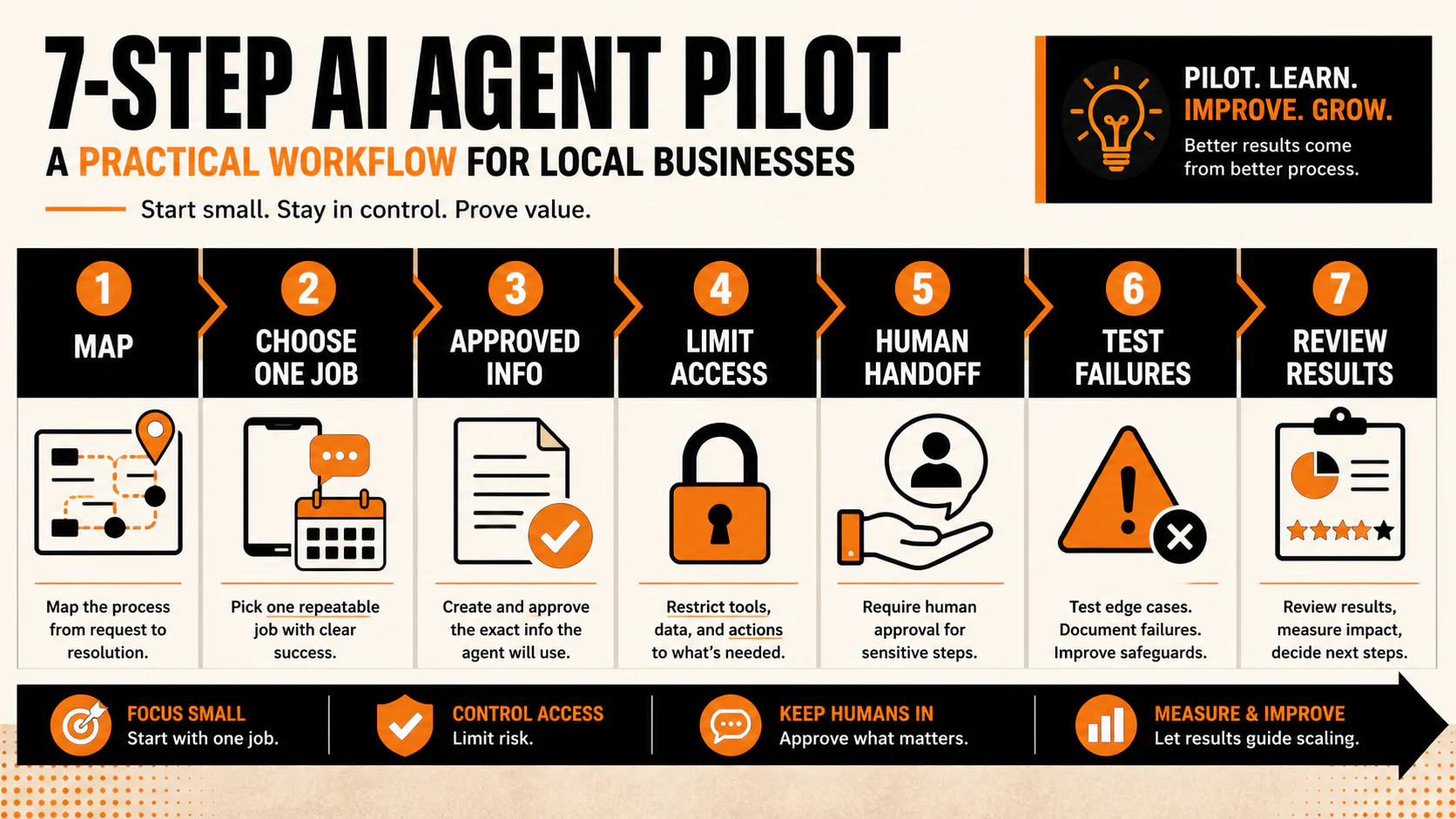
A seven-step pilot that teaches you something
Buying a tool is not step one. Here is the order that gives you a chance to learn what actually happened.
1. Map the current workflow
Write down the trigger, each step, the systems involved, the usual exceptions, and the person who currently owns the outcome. If the team handles the same request three different ways, settle that before you automate it.
2. Choose one frequent, bounded job
Pick a task that appears often enough to observe but is narrow enough to inspect. "Collect appointment-request details" is a job. "Handle the front desk" is a wish.
3. Prepare the approved information
Gather the FAQs, service descriptions, policies, examples, and decision rules the agent may use. Remove stale or conflicting material. An agent with bad source information can produce a polished wrong answer.
4. Limit access and allowed actions
Give the system only the tools and permissions required for this job. Where the setup allows it, separate permission to retrieve information from permission to change a record. Require approval before a consequential action, and list the actions the system must never take.
5. Define the human handoff
Name the owner, the escalation triggers, the destination, and the expected response. "Send to the team" is not a handoff. "Create a priority task for the office manager when the request includes an emergency term or no approved answer exists" is much closer.
6. Test ordinary requests and failure cases
Run expected requests, missing information, conflicting information, vague wording, edge cases, and deliberate failures. Check what the customer sees, what the system records, whether the handoff arrives, and whether a person can understand why it escalated.
7. Review the evidence before expanding
Track operational signals separately from business outcomes.
Operational signals include completion rate, escalation quality, response time, error patterns, and how often a person must correct the work.
Business outcomes include qualified inquiries, kept appointments, completed sales, or another result your existing systems can actually attribute.
A message is not automatically a lead. A lead is not automatically an appointment. An appointment is not automatically revenue. Keep those stages separate or the scorecard will tell you a comforting story instead of the truth.
Expand the agent's role only when the workflow is reliable enough for the consequence of the next action.
DIY, configured platform, or professional build?
There is no universal best way to implement an AI agent. The right path depends on the job, your systems, the downside of an error, and who will maintain it after launch.
| Decision factor | DIY | Configured platform | Professional build |
|---|---|---|---|
| Workflow complexity | Better suited to a narrow workflow the team can clearly map and troubleshoot. | Useful when the workflow fits the platform's supported patterns and integrations. | Worth considering when the workflow has custom logic, several dependencies, or unusual handoffs. |
| Number of systems | Manageable when only a small number of well-understood tools are involved. | Check whether the required connections and permissions are genuinely supported. | May fit when several systems need custom integration or data mapping. |
| Data sensitivity | Requires the business to evaluate access, storage, and review controls itself. | Evaluate the platform's current documentation and configuration against the actual data involved. | Can support a tailored design, but a custom build does not remove privacy, security, or review obligations. |
| Consequence of an error | Keep actions low-risk and reversible. | Use approval gates and platform controls where they fit the workflow. | Consider deeper testing and tighter controls when a wrong action carries greater consequence. |
| In-house capacity | Someone must be able to configure, test, monitor, and repair it. | The interface may reduce build work, but the workflow and source material still need an owner. | Outside help can handle implementation, but the business still owns policies, exceptions, and acceptance. |
| Maintenance ownership | Your team owns it. | Confirm who handles platform changes, broken connections, and workflow updates. | Define support, documentation, monitoring, and handoff before the engagement begins. |
A configured platform can reduce technical work without removing operational work. A professional build can address custom needs without making a fuzzy process clear by itself. And DIY is only cheap if someone has the time and judgment to maintain it.
What does an AI agent cost?
There is no honest universal price for "an AI agent" because that is not a complete scope of work.
Total cost can include software licenses or usage, integrations, setup, workflow documentation, testing, monitoring, maintenance, and the staff time required to review exceptions. Those costs vary with the systems involved, the volume of activity, the quality of the source material, and the consequence of a mistake.
A low subscription price can become expensive if the workflow breaks every week. A custom build can be overkill for a simple routing job. Neither price tells you whether the job is worth automating.
Define the workflow first. Then price the actual permissions, integrations, testing, and ownership it requires.
Automate one job, not the idea of an employee
An AI agent can be useful for a local business. It just needs a smaller job description than the hype suggests.
Choose one workflow. Give it approved information and limited permissions. Put a person in charge. Test the failure cases. Measure operational performance separately from leads, appointments, and revenue. Then decide whether expanding the role is justified.
If you want help mapping a lead-response or appointment workflow before choosing the technology, YEAH! Local can help you find the bottleneck, define the handoff, and decide what is worth testing. No robot-employee pitch required.
Frequently asked questions
What is an AI agent for a small business?
An AI agent is a system that uses a model and connected tools to pursue a defined goal within configured permissions. For a local business, that could mean collecting inquiry details, routing a request, preparing a follow-up, or creating an internal task. The useful definition includes the source information, allowed actions, human owner, and escalation rule, not just the AI model.
Will an AI agent replace an employee?
Do not plan the project around replacement. An agent handles a workflow, not the full context, accountability, judgment, and range of work a person carries. Start by identifying a bounded task and the human handoff it still needs.
What should a local business automate first?
Start with a recurring, low-consequence job that has clear source material and an easy-to-review result. Collecting appointment details, routing a website inquiry, or preparing an internal call task may be more suitable than refunds, complaints, emergencies, or sensitive decisions.
How much does an AI agent cost?
Cost depends on the software or usage, integrations, setup, documentation, testing, monitoring, maintenance, and internal review time. Price a defined workflow instead of comparing generic monthly subscriptions.
How do you know an AI agent is working?
Set the success signal before launch. Review correct completions, useful escalations, response time, error patterns, and correction effort. Track qualified business outcomes separately, and do not assume that more messages automatically mean more leads, appointments, or revenue.
Last updated