How Web Design and SEO Work Together Before, During, and After a Redesign

Key Takeaway
A good-looking redesign can still lose pages, confuse visitors, and drop leads. Build SEO into the work before, during, and after the redesign.
A redesigned website can look finished and still fail the business. That is the uncomfortable part.
The service pages may be beautiful, but the navigation no longer links to them in a way search systems can follow. The desktop layout may look clean, but the mobile version hides the proof a prospect needs. The new form may submit correctly, but nobody checked whether the business receives the inquiry or whether the conversion is recorded.
The opposite failure is just as real: a page can be technically discoverable and still confuse the person who lands on it. A beautiful site with no discoverability and a discoverable site that frustrates visitors are both business failures.
So, which comes first: web design or SEO?
Here is my blunt answer: neither should be treated as a finishing layer. Before anyone draws a wireframe, define the page's audience, purpose, content, search job, and next action. Then carry those requirements through design, development, launch, and measurement.
For a local business owner, that means asking four practical questions throughout the project: Can people understand the page? Can search systems discover and interpret it? Can people use it? Can the business verify that inquiries arrive where they should? This gives the owner, designer, developer, and SEO specialist one shared definition of "done" without expecting everyone to do everyone else's job.
Table of Contents
The Four Tests Every Important Page Must Pass
Use these tests for each important page and reusable template, such as a service page, location page, blog article, or contact page.
| Acceptance test | The question to answer | Evidence that can pass the test |
|---|---|---|
| Understand | Can the right prospect understand the offer, service area, proof, and next step? | Final copy in the actual layout on a small screen; clear service and location context; visible proof; an unambiguous call, form, booking, or estimate action |
| Discover and interpret | Can search systems reach the content and links, and are the page's indexing signals intentional? | Crawlable internal links; primary content available in the rendered page; correct status, canonical, and robots settings; page-specific metadata; an intentional sitemap entry |
| Use | Can a person read, navigate, and complete the action? | Responsive layout; readable contrast and reflow; working keyboard focus and labels; usable controls; appropriate image alternatives; a completed mobile task test |
| Verify | Can the business prove the important path works? | Tested calls, forms, and bookings; lead delivery confirmed; analytics events checked; crawl and index checks recorded; named post-launch monitoring owner |
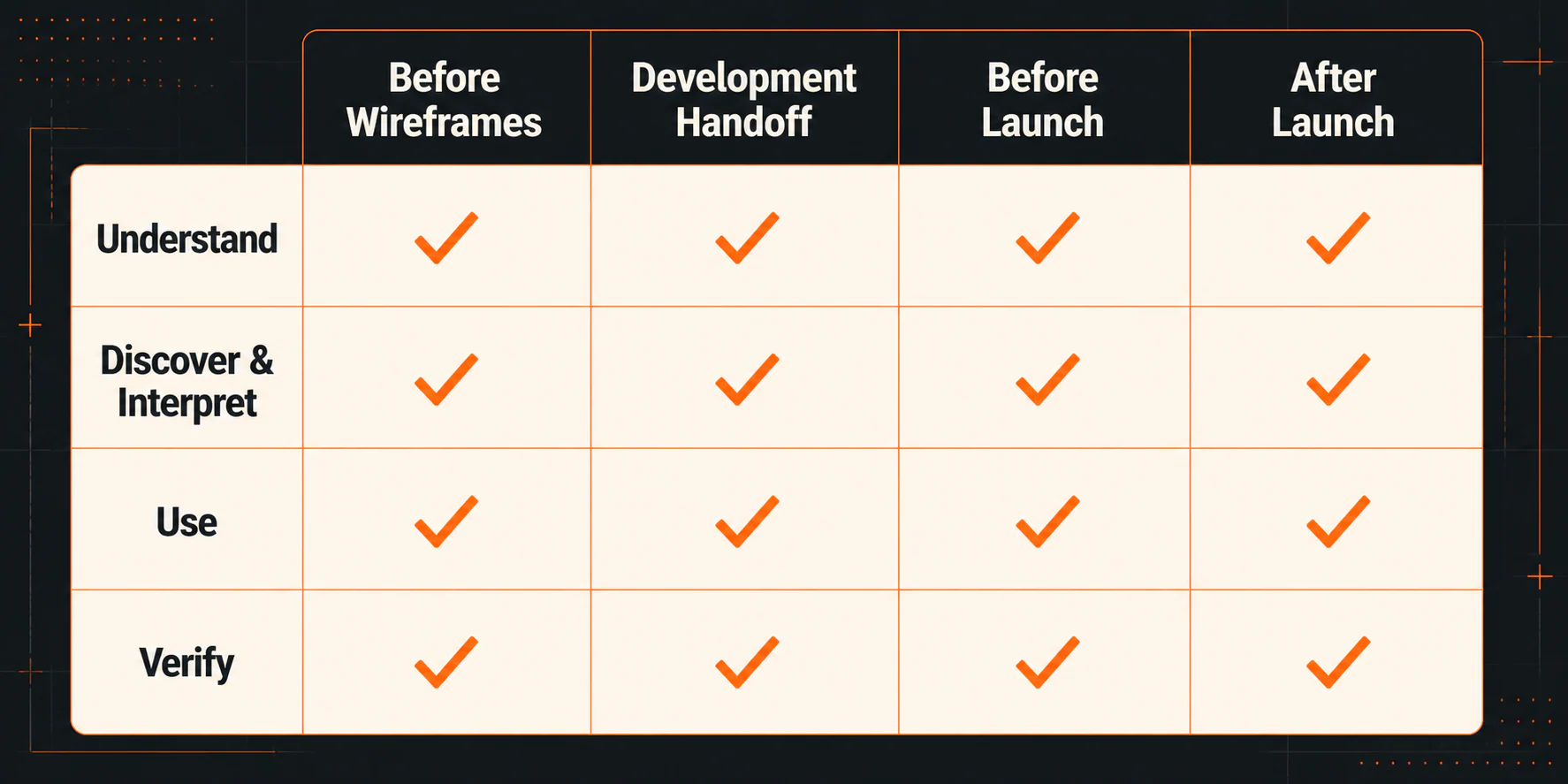
Before design: decide what each important page must do
Wireframes should arrange a page's real job, not create empty boxes that someone fills with copy at the end.
Start with a page inventory. List the existing and planned pages, their intended audiences, and the reason each page deserves to exist. For a local service business, that often includes core services, legitimate service areas or locations, proof, common questions, contact options, and resources that help a prospect decide.
Each important page needs a short brief with five answers:
- Who is this page for?
- What question or task brought that person here?
- What must the person understand before taking action?
- What proof reduces the risk of that action?
- What is the primary next step?
That is where web design and SEO first meet. Search research can clarify how people describe the service and what questions a useful page should answer. The owner supplies the actual offer, service area, proof, limitations, and lead-handling reality. The designer uses those requirements to create hierarchy and emphasis. The developer eventually turns them into a working page.
Plan navigation and internal links as part of the design
A page does not become easy to find merely because it appears in an XML sitemap. Google describes sitemaps as suggestions and warns that sitemap inclusion does not mean every URL will be crawled immediately. Important pages also need sensible paths from other pages.
Plan the main navigation, contextual links, breadcrumbs where useful, and relationships between service and location content before the page layouts harden. Google's crawlable-link guidance says links are generally crawlable when they use an HTML <a> element with an href, and it recommends descriptive anchor text that helps people and Google understand the destination.
From the owner’s side, the question is simple: can a person reach each important page through a logical path, and does every planned link have a real destination? "We will add the links later" is how useful pages become expensive orphans.
Decide what the mobile visitor must see and do
Do not design a complete desktop page and then negotiate which parts survive on a phone. Google uses the mobile version of a site's content for indexing and ranking, and its mobile-first indexing guidance recommends responsive design as the easiest pattern to implement and maintain.
That does not mean "make everything smaller." It means the primary content, internal links, structured data, images, and page meaning should remain available on mobile. A local-business prospect should also be able to tap the phone number, read the service-area details, inspect proof, open the menu, and complete the form or booking flow without fighting the layout.
Define verification before there is anything to verify
List what will count as a successful inquiry and how it will be checked. A form submission is not enough if it never reaches the correct inbox. A phone click is not enough if the number is wrong. A booking confirmation is not enough if the analytics event fires twice.
Decide who will test each action, where leads should arrive, which analytics or call-tracking events matter, and what qualified-lead feedback the business can review after launch. This is the beginning of measurement, not a promise that the redesign will improve conversion.
Before wireframes settle, every important page should have a real job, useful content, a path into and out of the page, a mobile priority, and a primary action the team knows how to test. Then the designer is arranging something real.
During the build: make the handoff specific
"Make it SEO-friendly" is not a development requirement. Neither is "make it accessible" or "make it fast." The handoff should translate those goals into things the team can inspect.
Give the developer the final content hierarchy
The handoff should identify the page's visible topic, descriptive headings, body content, proof elements, links, calls to action, and any content that expands or changes after an interaction.
Use headings to help people scan and assistive technology navigate. Do not turn heading tags into a superstitious ranking formula. Google's current SEO Starter Guide says semantic heading order is useful for screen readers but that out-of-order headings are not material to Google Search. The goal is a coherent page, not a ritual.
If primary content or navigation depends on JavaScript, ask the developer to verify what appears in the rendered HTML and whether links use crawlable markup. Google's JavaScript SEO guidance explains that Google processes JavaScript through crawling, rendering, and indexing. That does not make JavaScript bad, but it does create an implementation dependency worth testing.
Annotate responsive and accessible behavior
A desktop mockup does not show what happens when text wraps, the screen narrows, a visitor zooms, or someone uses a keyboard. Annotate those states.
At minimum, the handoff should address:
- how navigation and content reflow on small screens;
- the order in which content appears when columns stack;
- visible keyboard focus and logical focus order;
- labels and programmatic names for form controls;
- error messages that explain what needs correction;
- sufficiently large, separated controls for touch;
- readable text contrast;
- text alternatives for informative images and empty alternatives for purely decorative ones.
These are user requirements. They should not be sold as an SEO trick. The WCAG 2.2 standard provides formal, testable accessibility criteria, including text alternatives, reflow, contrast, focus visibility, labels, names and roles, and target size. A handful of spot checks cannot certify conformance or answer every legal question, but they can prevent obvious barriers from being designed into the template.
Make image decisions before uploading giant files
For each image, define its purpose, expected display size, crop behavior, and alternative-text treatment. Ask the developer how responsive image candidates and explicit dimensions will be handled. Explicit width and height help the browser reserve space, while responsive image sources can avoid sending an unnecessarily large file to a small screen.
The largest image in the initial view deserves special attention because it may affect Largest Contentful Paint (LCP). Below-the-fold images are often reasonable candidates for lazy loading; the likely LCP image should not be delayed automatically just because a plugin offers a "lazy-load everything" switch.
Alt text should communicate an informative image's purpose or content. It is not a place to hit a keyword quota. Decorative images generally should not be announced as if they contain useful information.
Define search controls without pretending you control the result page
Specify an accurate, page-specific title and a useful meta description for each important page. Google may generate title links and snippets from multiple sources, so these elements influence search presentation rather than control it.
Also document the intended canonical URL, whether the page should be indexable, and whether supported structured data fits the page type. Structured data can make a qualifying page eligible for supported rich results. It does not guarantee that a rich result will appear, and it is not a general ranking switch.
The developer needs final or decision-ready content, real URLs, responsive states, accessibility behavior, image requirements, search controls, and tracking requirements. Each one should be concrete enough to inspect. Nothing important should hide inside the word "optimized."
Before launch: test the site people will actually use
This is the gate most likely to get squeezed. The launch date is close, the homepage looks good, and every late defect feels like an inconvenience. That is exactly when a checklist earns its keep.
Test representative pages from every reusable template, not just the homepage. Include at least one core service page, one location or service-area page if applicable, one article, and the main contact or booking route.
Open each key page on a phone without referring to the project brief. Confirm that the offer, location or service area, proof, and next action are still apparent. Check that essential content was not shortened into ambiguity or hidden behind a carousel, tab, or interaction that a visitor might miss. Read the title and headings together, and review prominent buttons in context: "Learn More" may work in a card grid, while "Request an Estimate" or "Book an Appointment" sets a clearer expectation when that is the actual action.
From there, check the page as a search system would encounter it. Important pages should return the intended status code, stay clear of accidental robots blocks, carry the intended canonical, and be reachable through crawlable internal links. Inspect the rendered page when content or links depend on JavaScript. Review page-specific titles and descriptions, image alternatives, and any structured data the page uses. Validate the XML sitemap, but do not treat it as a substitute for internal links or proof of indexing.
Now use the site. Test common phone and desktop widths, open the menu, zoom the page, move through controls with a keyboard, and complete every important form. Trigger errors on purpose so you can see whether the message helps. Make a test call where appropriate and finish the entire booking flow.
Check the current Core Web Vitals, Largest Contentful Paint (LCP), Interaction to Next Paint (INP), and Cumulative Layout Shift (CLS), with appropriate lab tools before launch and field data when enough real-user data becomes available. Google's Core Web Vitals guidance defines "good" field targets as LCP within 2.5 seconds, INP under 200 milliseconds, and CLS under 0.1. Field assessment uses the 75th percentile of page loads. These targets help find delayed primary images, scripts that block interaction, and layout shifts, but neither a passing target nor a lab score guarantees rankings, inquiries, or sales.
Finish by submitting every important form and confirming that the lead reaches the right person with the needed fields. Test phone numbers, email links, maps, scheduling, thank-you states, analytics, consent behavior, and conversion events. Record what was tested, by whom, on which date, and what happened. Preserve a dated pre-launch baseline if the business has one, while remembering that demand, seasonality, competitors, search-result features, and operational changes can all affect the post-launch numbers.
Before launch, representative pages should answer all four questions and every critical inquiry path should work from start to finish. Broken core content, crawlability, accessibility, or lead delivery belongs on the launch list, not in a future backlog.

If the Redesign Changes URLs, Take the Migration Branch
First ask whether the URLs need to change at all. A new visual system or CMS does not automatically require new addresses. If an existing URL still represents the same useful page, preserving it removes avoidable migration work.
If URLs do change, the launch procedure changes with them. Google's site-move guidance recommends preparing an old-to-new URL map, implementing permanent server-side redirects, updating internal links and canonicals, submitting the new sitemap, retaining redirects for at least a year, and monitoring the move.
Use this branch:
- Export every indexable old URL before launch.
- Map each old URL to the closest relevant new URL.
- Preserve useful existing URLs when there is no good reason to change them.
- Implement a direct permanent redirect from each changed old URL to its mapped destination.
- Update internal links so visitors and crawlers use the new URLs rather than relying on redirects.
- Point canonicals to the correct live URLs and remove accidental staging blocks or
noindexdirectives. - Generate and submit a sitemap containing the preferred new URLs.
- Test old URLs, new URLs, redirect chains, error pages, and important external-entry paths.
- Monitor both old and new URLs after launch.
Do not send every removed page to the homepage just to make the 404 count disappear. A redirect should preserve a meaningful destination. If no close replacement exists, the team needs an explicit retirement decision rather than a misleading route.
Google notes that temporary search fluctuation can occur while changed URLs are crawled and indexed. That is a reason to plan and monitor the move, not a basis for predicting a specific recovery date.
After launch: check the live site again
A prelaunch pass proves the staged build worked under test conditions. The live site still needs its own check.
In the first post-launch review:
- open priority URLs on the production domain;
- use Google Search Console URL Inspection on representative pages;
- crawl the main navigation and key page relationships;
- retest calls, forms, bookings, lead delivery, and analytics;
- check robots rules, canonicals, sitemaps, and status codes on production;
- inspect mobile layouts and keyboard behavior again;
- watch server errors and unexpected 404s;
- if URLs changed, test the redirect map and monitor old and new URL patterns.
Then separate implementation verification from performance evaluation. A missing form email, broken canonical, or blocked page is an implementation defect. A shift in impressions, click-through rate, qualified inquiries, or bookings is a performance observation that needs enough time and context to interpret.
Do not look at bounce rate or dwell time and declare that Google rewarded or punished the design. When tracking is reliable, those numbers may point to page friction, but they are not established here as direct ranking levers. Review them alongside scroll behavior, form starts, completed inquiries, call quality, device type, landing page, and actual customer feedback.
If you want a disciplined way to choose and evaluate page changes, use this conversion rate optimization checklist for local businesses. And set expectations before interpreting early search movement: the answer to how long SEO takes to work is not "until the new design launches."
After launch, run the same four questions on the live site, give someone responsibility for follow-up, and keep broken implementation separate from longer-term changes in search visibility or business results.
Who Should Own Web Design and SEO Handoffs?
You do not need one person who claims to master design, development, SEO, accessibility, analytics, and conversion strategy. You do need one accountable owner for the shared requirements.
Separate specialists can work well together when they share:
- one page and URL inventory;
- approved page briefs and content requirements;
- the same acceptance matrix;
- named owners for design, content, development, tracking, and testing;
- a change process for decisions that affect another discipline;
- recorded signoff at each gate.
Ask prospective vendors concrete questions instead of "Do you do SEO?"
- Who defines the page inventory before wireframes?
- When is final content introduced into the design?
- How will you preserve or map existing URLs?
- What evidence will show that important content and links are available on mobile and in rendered HTML?
- Which accessibility behaviors are included, and who tests them?
- Who tests forms, calls, bookings, analytics, and lead delivery?
- What does the post-launch review include?
The answer does not have to use the exact language in this article. It does have to assign the work and produce something testable.
The owner should not have to referee design and SEO after the site is built. Put the shared requirements in the project brief, revisit them before wireframes, during the development handoff, before launch, and on the live site. If URLs change, require the migration work. If a critical item cannot be demonstrated, it is not done.
This cannot promise rankings, traffic, conversions, leads, or ROI. It can prevent a more basic problem: paying for a finished-looking website without verifying that prospects can understand it, search systems can reach it, people can use it, and the business can measure what happens next.
The useful question for every vendor is simple: who owns each requirement, and how will they show you it works? If you want help turning those requirements into a site and search plan, learn how YEAH! Local approaches SEO for local businesses.
Last updated