Conversion Rate Optimization Checklist for Local Businesses (With AI Prompts)

Key Takeaway
Use this CRO checklist to verify tracking, find page friction, prioritize one local-business test, and use AI prompts without mistaking guesses for evidence.
A contact-form submission, a tracked phone click, and a booked appointment are not the same outcome. Treating them as interchangeable is one of the quickest ways to make a conversion-rate optimization effort look more certain than it is.
For a local business, CRO is the disciplined work of making it easier for the right visitor to take the next useful step, then checking whether that website action led to a useful inquiry. This checklist is built for service pages, location pages, and paid landing pages that should generate calls, forms, consultations, or appointments. It will not tell you a universal "good" conversion rate or promise a lift. It will give you a way to choose one page, find a defensible problem, make one meaningful change, and record what happens next.
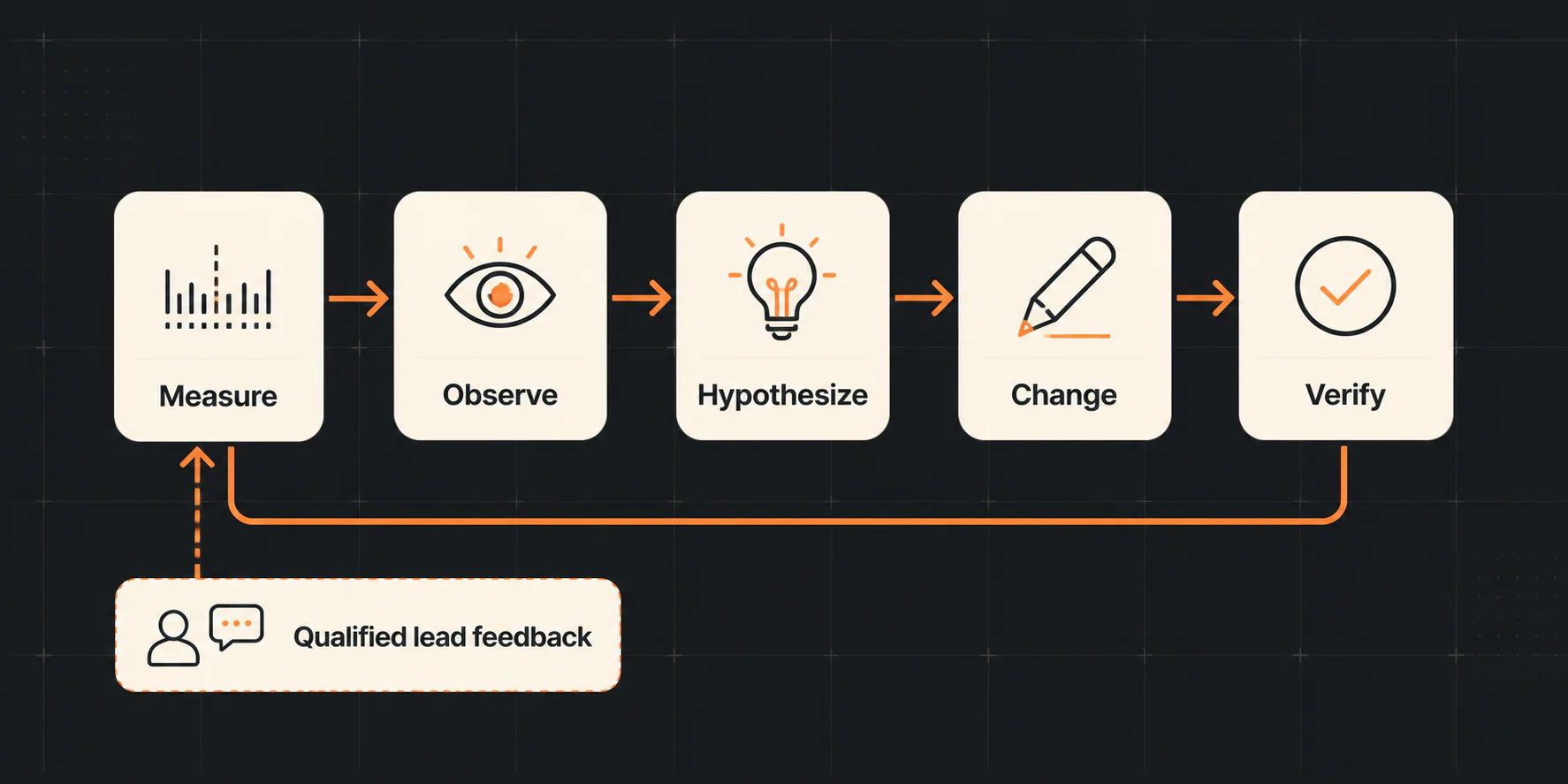
The job is simpler than most CRO diagrams make it look. Pick one page, make sure the call or form works, find one real obstacle, change it, and see whether the right people are more likely to get through. If you start swapping headlines and button colors before checking the contact path, you are decorating a leak.
Table of Contents
Before you edit the page
Gather these basics first:
- Access to the page and the person who can approve a change.
- One defined business outcome for the page.
- A way to test the call, form, booking, or confirmation path yourself.
- Access to analytics or a colleague who can validate the relevant events.
- A safe source of customer information you are allowed to use, such as anonymized form reasons, call dispositions, usability notes, or behavior-tool observations.
- A small change log: what changed, when, why, who approved it, and what you will review afterward.
Those basics let you follow one page from the customer's question to the business result without turning the review into a sitewide project.
1. Decide What This Page Should Produce
Start with the action the page is supposed to earn. On an emergency plumbing page, that might be a phone call. On a consultation page, it might be a completed request form. On a booking page, it might be the completed booking rather than a click on the booking widget.
Write down five separate definitions:
| Item | What to define |
|---|---|
| Primary conversion | The one website action this page is designed to earn. |
| Numerator | The count of that action for the agreed time period. |
| Denominator | The comparable page visits, sessions, or other exposure measure you will use. |
| Guardrails | Outcomes that keep an apparent improvement honest, such as spam, wrong-location inquiries, broken contact paths, or unsuitable service requests. |
| Business outcome | What happens after the website action: qualified inquiry, reachable prospect, booking, sale, or another outcome your team can consistently classify. |
This distinction is not paperwork for its own sake. A form-submission event can be marked as a GA4 key event, but that configuration does not make every submission qualified, booked, or valuable. Decide what each label means before comparing periods or declaring a page "better."
For an HVAC repair page, the website action might be a completed form. You would also watch for duplicate submissions and people outside the service area, then ask staff how many forms were real repair requests. The example shows the setup; it is not a benchmark or result.
Another team member should be able to look at one inquiry and use the same definitions without guessing.
Make sure the call or form really works
Do a practical path test before you analyze a conversion rate. From the page, test the phone number, form, booking path, confirmation state, and any follow-up handoff you can safely inspect. Then confirm that the relevant website action is recorded where your team expects it.
Google Analytics uses events for interactions, and its current documentation shows that a specific event can be created and marked as a key event. Use Google's key-event guidance to check the current approach for your implementation rather than relying on an old click path or screenshot.
Your short measurement audit should answer:
- Does the phone number work on desktop and mobile?
- Does the form submit with realistic, non-sensitive test data and show a clear confirmation?
- Is the primary action firing the expected analytics event or key event?
- Can the business tell that a useful inquiry arrived, without confusing a tracking event for a qualified lead?
- If paid traffic is involved, does the source or campaign context survive far enough to be useful?
If the contact path or measurement is broken, fix that first. A landing-page redesign cannot explain a number that was never recorded correctly.
AI prompt: audit an event map without granting the model authority
Use an AI tool to check the completeness of a map you already understand. Do not paste visitor names, phone numbers, messages, recordings, health information, financial details, or other sensitive data into a tool unless your approved privacy and vendor process specifically permits it.
Prompt: You are reviewing a local-business measurement map. Use only the information below. Do not assume tracking works, do not invent benchmarks, and do not call an analytics event a qualified lead. For each row, identify: (1) the defined website action, (2) the confirmation or validation step, (3) the downstream outcome if supplied, (4) missing definitions, and (5) a safe next validation step. Label every statement as Fact from input, Interpretation, or Unknown. Page: [page URL or description] Primary action: [definition] Event map: [anonymized event names and conditions] Confirmation behavior: [description] Downstream handoff: [approved, non-sensitive description]
2. Look at One Page and the People Reaching It
Do not optimize "the website" as a single unit. Pick one page with a clear business role, then define the audience you are examining. A service page receiving local organic traffic is not directly comparable with a short-term paid campaign landing page or a branded homepage visit.
Keep the scope to one sentence: "Review the [page] for [traffic source, device group, service, or location] during [time period], using [primary action] and checking for [poor-fit or broken outcomes]." Segment only when the data is interpretable enough to support it.
For a paid landing page, message match is often the first thing to inspect: does the search ad or campaign promise the same service, location, and next step the visitor sees on the page? The Google Ads guide for local businesses is a useful companion if you need to connect the campaign and page without turning this CRO checklist into a full ads tutorial.
You should be able to name the page, audience, period, main action, and the bad outcomes you are watching for in one short note.
Find the first real source of confusion
The page may be unclear. The form may be hard to use on a phone. Visitors may be arriving for the wrong service. Those are different explanations, and they call for different fixes.
Start with two kinds of information:
- The numbers: landing-page activity, key events, device or source differences, funnel steps, and form errors where they are actually measured.
- The context: customer questions, approved call or form reason codes, usability notes, staff observations, and behavior-tool observations.
Heatmaps and session recordings can help you see recorded interaction patterns, not read a visitor's mind. Microsoft describes heatmaps as aggregated interaction views and documents recording limitations. If you use either, confirm consent, masking, access, retention, and any applicable privacy requirements before collecting or reviewing data. The patterns you see are observations; they do not prove why a visitor acted.
When evidence is sparse or contradictory, do not force a diagnosis. Run a manual mobile and desktop contact-path review, ask staff what questions they repeatedly hear, and collect another comparable period of information. A clean "unknown" is better than a confident fiction.
AI prompt: synthesize observations while retaining the gaps
Prompt: Group the anonymized observations below by page friction theme. Preserve counts and denominators exactly as supplied. Separate observation from interpretation, note contradictions, and list the missing evidence that prevents a confident conclusion. Do not infer visitor motives, conversion rates, revenue, or causal effects. Return a table with Theme, Facts from input, Possible interpretation, Missing evidence, and Safe next check. Scope: [page, audience, period] Analytics observations: [non-sensitive summary] Usability notes: [non-sensitive summary] Customer/staff questions: [approved, anonymized summary]
3. Repair the Clearest Obstacle
Follow the HVAC owner through the page. Can someone tell whether after-hours help is available, tap the phone number, understand what happens next, and reach the right person? Use the table to locate the first weak part of that trip, then fix that part instead of redesigning everything.
| Area | What to inspect | Evidence that could justify a change | Verification |
|---|---|---|---|
| Message match | Does the page clearly describe the service, location, and next step promised to this visitor? | Relevant search or campaign language conflicts with the page, or usability notes show confusion. | Recheck the page against the source message and run a plain-language review. |
| Primary CTA | Is the next step understandable, available, and honest about what happens next? | Contact-path tests fail, visitors ask what happens after submitting, or the next step is unclear. | Test the CTA on desktop and mobile and confirm the confirmation state. |
| Service and location fit | Can the reader tell whether you serve their need and area? | Wrong-service or wrong-location inquiries occur under your definitions. | Have a teammate classify example inquiries using the agreed rules. |
| Trust and proof | Are reviews, credentials, claims, and proof current and supportable? | Staff or customers repeatedly ask for verification, or the page makes a claim you cannot substantiate. | Verify every visible proof point with its owner or source. |
| Forms and phone paths | Are fields, labels, validation, errors, and confirmation usable for this specific request? | Test submissions fail, errors are unclear, or observed users struggle with a particular step. | Complete a safe test submission and inspect the receiving workflow. |
| Mobile use | Can a visitor read, tap, call, and complete the next step on a small screen? | Mobile path tests or observed interactions show a specific barrier. | Test representative viewports and assistive interaction where available. |
| Page experience | Are loading, responsiveness, or layout shifts interfering with the task? | Field data or a repeatable page check identifies a relevant issue. | Use the technical finding to guide remediation, then recheck the page. |
| Content order | Are essential questions answered before a visitor must commit? | Customer questions, usability notes, or page review identify an unanswered decision question. | Confirm the answer is accurate, visible, and does not bury the CTA. |
| Distractions | Do broken links, competing paths, or mismatched destinations interrupt the intended task? | Contact-path testing or page review finds a concrete interruption. | Click every relevant control on desktop and mobile. |
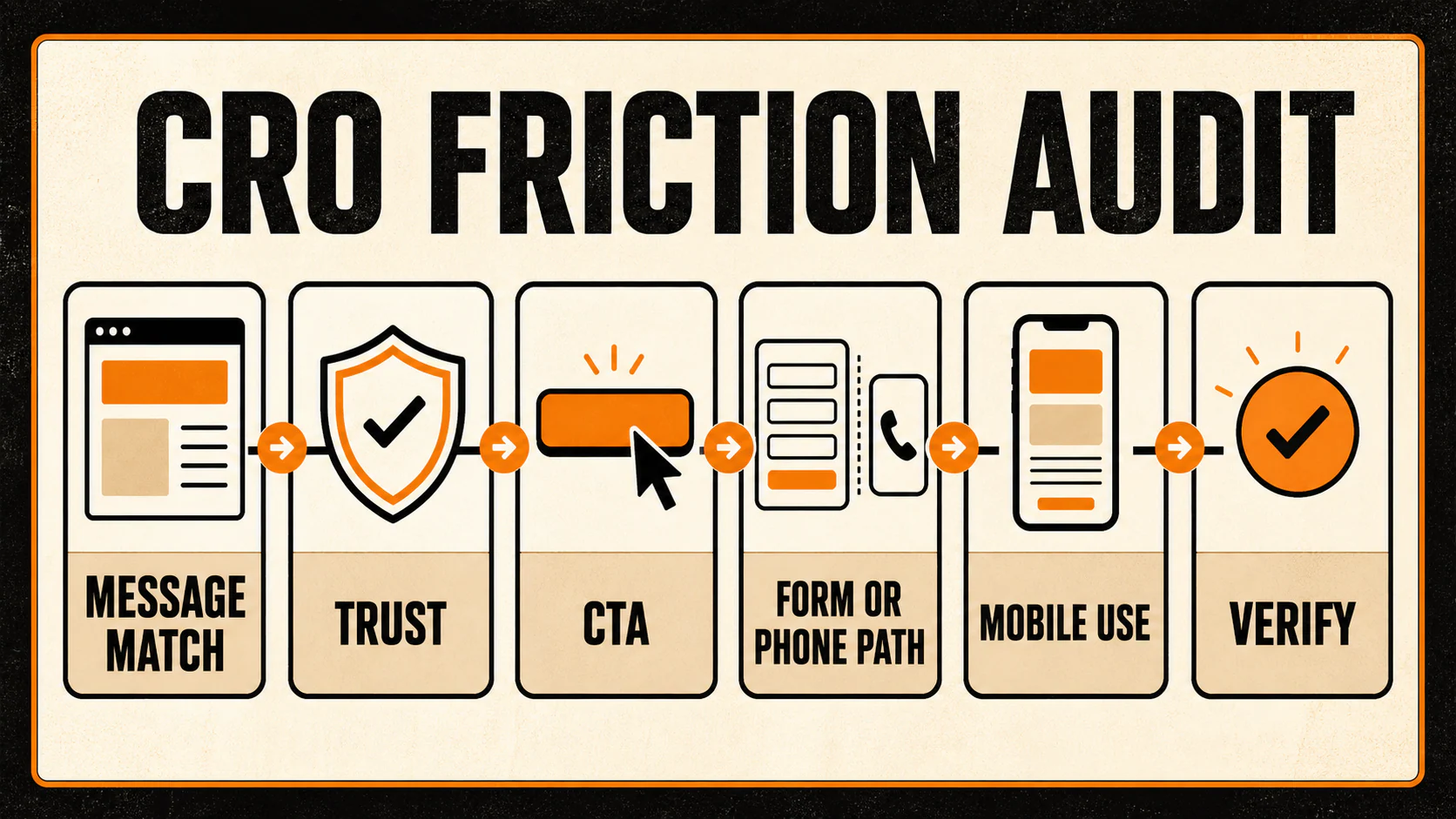
If page experience is part of the evidence, Core Web Vitals give you current names for real-world loading, responsiveness, and visual stability: LCP, INP, and CLS. They are not conversion benchmarks, and improving them does not prove that the conversion rate will rise. Nor does a good report guarantee search rankings; Google's page-experience documentation explicitly describes a broader set of considerations. Use a page-speed guide for the technical procedure when performance evidence identifies a problem.
Write down what you are changing and why
Pick the observation with the strongest evidence, meaningful business consequence, manageable effort, and a reversible path if the outcome is poor. You do not need a pretend precision score to make that choice.
Use this hypothesis shape:
For [defined audience] on [page], we saw [evidence]. We will change [one specific thing] because it may reduce [identified friction]. We will check [primary action] and [poor-fit or broken outcome] during [comparable review plan]. We will rethink the idea if [result that would show it did not help] occurs.
Consider this hypothetical example:
On an HVAC repair page, the after-hours instruction is unclear and staff keep hearing questions about availability. The team adds a plain next-step expectation beside the call button, confirms the phone path still works, and watches both completed calls and wrong-service inquiries over a comparable period. If the same questions keep coming, the change did not solve the confusion.
AI prompt: generate bounded hypotheses
Prompt: Based only on the observations below, propose up to three testable hypotheses. For each, quote or cite the supplied observation it relies on, identify the affected audience, name one reversible change, specify a primary measure and guardrail from the input, and state what result would weaken the hypothesis. Do not add benchmark rates, visitor motives, claims, or facts that are not supplied. If the evidence does not support a hypothesis, say so and list what to collect next. Scope: [page, audience, period] Defined primary action: [definition] Guardrails: [definitions] Observations: [anonymized evidence]
4. Use AI to Organize the Work, Not Make the Decision
AI can turn a messy set of notes into a clearer checklist, generate copy variants from approved facts, or expose a missing measurement definition. It cannot inspect your analytics account unless you provide appropriate access, validate a customer claim, determine consent, or prove why visitors behaved as they did.
Every useful prompt names the page, audience, period, and approved evidence; gives the model one narrow task; states non-negotiable claim boundaries; requests a usable format; and requires facts, interpretations, unknowns, and questions to be labeled.
For copy or CTA variants, give the model only substantiated service facts, real location coverage, actual scheduling expectations, and approved proof. Ask it to make no claims that the page owner cannot verify.
Prompt: Create three concise CTA-and-supporting-copy variations for this page. Use only the approved facts below. Preserve the stated service area and next-step expectation. Do not add urgency, scarcity, guarantees, prices, credentials, availability, or outcomes not explicitly supplied. For each variation, explain which supplied page question it addresses and flag any claim that still needs approval. Approved facts: [facts] Visitor question or observation: [approved evidence] Existing next step: [description]
Treat output as a draft for human review, not a production change. The person responsible for the business, compliance, and offer still needs to approve it. If your evidence comes from calls, consider whether an approved workflow for anonymized summaries can help maintain the boundary between marketing learning and sensitive customer data; this guide to AI call summaries and lead quality provides additional context.
5. Check Whether the Change Helped
When the traffic and tools support a formal A/B test, decide the expected change, main measure, possible bad outcomes, and implementation checks before launch. Do not start by changing several unrelated elements, then search the results for a story.
If your business does not have enough comparable activity for a useful A/B test, you can still make a careful change:
- Record the current page, scope, definitions, known context, and evidence.
- Make one meaningful, approved change when practical.
- Verify the contact path, analytics behavior, mobile use, copy accuracy, and rollback option.
- Observe a comparable period while documenting material context changes, such as a campaign, outage, seasonality, or staffing issue.
- Review the main website action, the poor-fit outcomes you were watching, and any booking or lead-quality information the business can safely use. Treat movement as a clue, not proof of the cause.
Choose a review that fits the traffic you actually have instead of copying a fixed test length or sample-size rule. The contact path and analytics were already tested earlier; after the change, repeat that same test and keep a way to reverse the edit.
AI prompt: plan verification, not a verdict
Prompt: Create a verification plan for the change below. Use only the provided scope and definitions. Include pre-launch checks, primary measure, guardrails, contextual factors to log, possible limitations, and decision options: keep, revise, stop, or gather more evidence. Do not recommend a universal sample size, test duration, expected lift, or causal conclusion. Page and audience: [scope] Change: [one change] Primary action: [definition] Guardrails: [definitions] Available evidence and tooling: [description]
Bring the real inquiries back into the review
First confirm the change is live and the contact path still works. Then review the website action and the poor-fit or broken outcomes you chose at the start. Where lawfully and operationally available, bring qualified-inquiry or booking feedback back into the record. Keep "qualified inquiry," "booking," and "revenue" separate; they answer different questions.
Your change log should include:
- Page and audience scope
- The main action, which visits and completed actions were counted, and the poor-fit outcomes you watched
- Evidence reviewed and its limitations
- Hypothesis and approved change
- Implementation date and owner
- Contact-path and measurement checks
- Observed outcome, contextual changes, and unresolved questions
- Next decision and review date
The decision can be to keep the change, revise it, stop it, or gather more evidence. Not every movement is a win. A flat or ambiguous result may leave the hypothesis unresolved; it is not a reason to launch another redesign without better evidence.
Copyable local-business CRO checklist
- I chose one page, one comparable audience, and one defined primary website action.
- I recorded which visits and completed actions were counted, the poor-fit outcomes, and what happened after the inquiry as separate facts.
- I tested the phone, form, booking, confirmation, and handoff path that applies to the page.
- I confirmed what the analytics event or key event represents and what it does not represent.
- I collected quantitative and approved qualitative evidence before selecting a change.
- I treated heatmaps, recordings, and staff observations as clues with limitations, not proof of intent.
- I checked message match, service/location fit, CTA clarity, trust, forms, mobile use, page experience, content order, and interruptions.
- I wrote one test idea tied to a real observation, a main measure, a possible bad outcome, and a result that would show the idea did not help.
- I removed sensitive information from any AI prompt and followed the organization's approved privacy and vendor process.
- I tested the change on desktop and mobile, verified the contact path and tracking, and kept a rollback path.
- I documented context, limitations, and the next review decision rather than claiming a guaranteed result.
If you need a shorter follow-on after completing the full method, these simple website changes to improve conversions can help you choose a limited next task. A broader technical, content, and SEO review belongs in the website audit checklist, not in a CRO experiment record.
FAQs
What is a good conversion rate for a local business?
There is no useful universal answer. The rate depends on what you count, the service, location, traffic source, page purpose, and whether the inquiries are qualified. Establish a consistent definition and comparable baseline for your own page before judging a rate.
What counts as a conversion in GA4?
GA4 records events, and an event that represents an important action can be marked as a key event. That is measurement terminology. A key event may represent a form submission, phone interaction, or booking action, but it is not automatically a qualified inquiry, appointment, sale, or revenue outcome.
Can a low-traffic local business do CRO?
Yes, with a different standard of certainty. Define the contact path and outcome, collect the strongest available evidence, make one meaningful and reversible change when appropriate, log context, and avoid treating a directional change as proof that the edit caused it.
Should I use heatmaps or session recordings?
They answer related but different questions: heatmaps aggregate interactions, while recordings visualize individual recorded sessions. Both have capture limitations and require an appropriate privacy, consent, masking, access, and retention process. Neither establishes visitor intent on its own.
Can AI analyze my website and tell me what to change?
AI can organize the information you provide, identify missing definitions, and draft test ideas or copy variants. It cannot replace verified analytics, user research, claim review, or a responsible decision about what changed and why.
What should I test first?
Start with the clearest problem you can support from what you observed, especially when it matters to the business and the fix is manageable and reversible. That might be an unclear service fit, a broken contact path, or a mismatch between the visitor's source and the page. There is no universal "best" button, form, or headline.
Start with the path, not the redesign
Before changing copy or design, define the primary conversion and test the contact path end to end. That one step makes the rest of the checklist usable: it keeps tracking events, qualified inquiries, bookings, and revenue from being collapsed into one flattering number.
For a broader system that connects visibility, conversion paths, and qualified-lead feedback, explore the YEAH! Local Growth Engine.
Last updated