
Key Takeaway
Audit your local business website in a practical order, find SEO and lead-path problems, prioritize fixes, and use AI prompts without trusting made-up answers.
Most website audit checklists hand you an intimidating pile of findings, then call the pile progress. A useful audit separates observations from guesses, connects each issue to a business task, and tells you what deserves attention first.
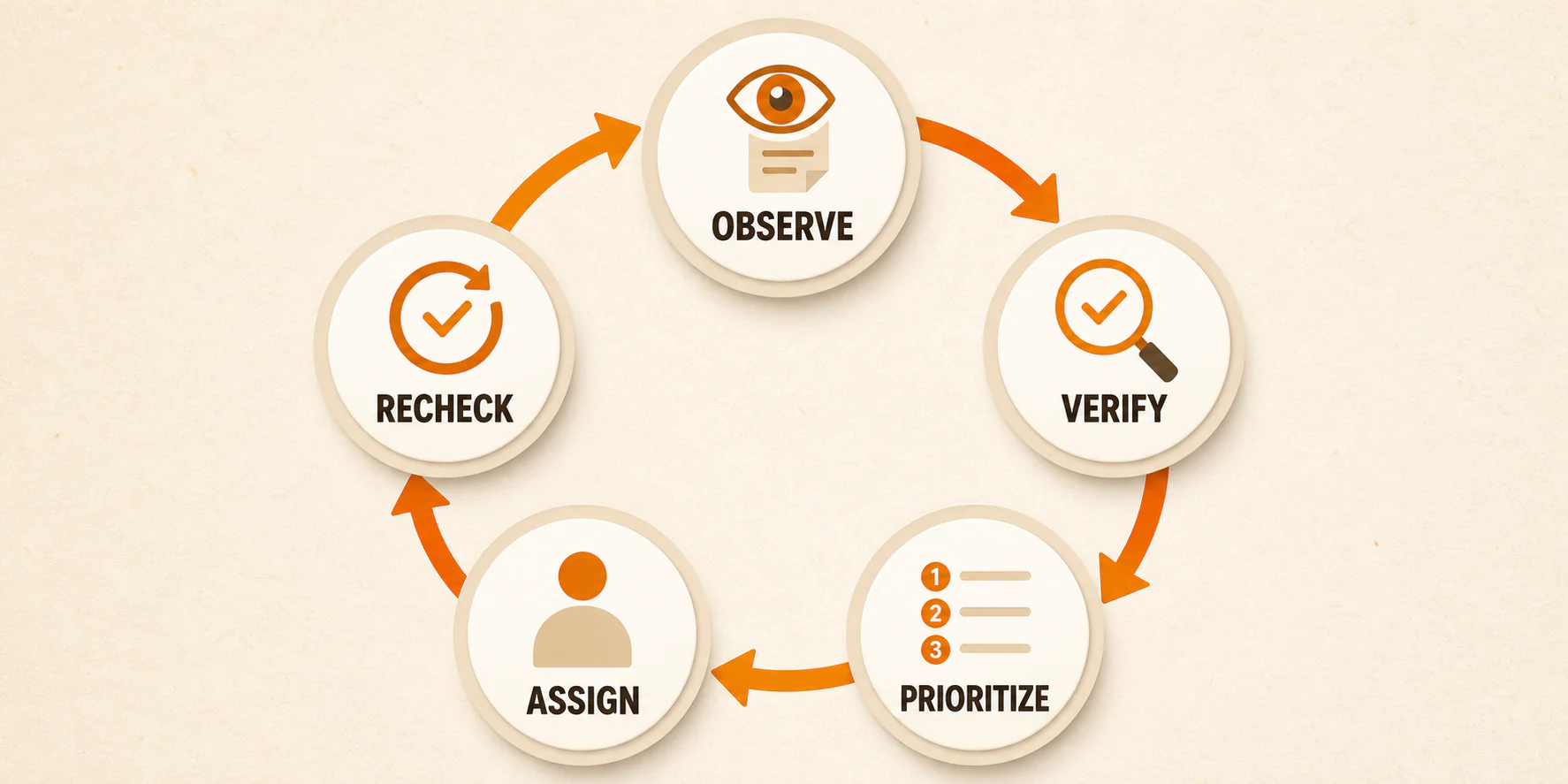
Start with the pages and customer actions that matter. Make sure you can see what happens, inspect the search and contact paths, then fix one clear problem and check it again. A perfect score is not the goal.
A red score is not a diagnosis. If the contact form is broken, your title-tag debate can wait.
This checklist is for a local-business owner or marketer auditing a small set of lead-generating pages. It will help you leave with a short list of problems you can explain and act on. It will not certify accessibility, security, privacy compliance, indexing, rankings, or conversion results. Those conclusions require deeper evidence and, in some cases, qualified professional review.
Table of Contents
Start with the pages that can create or lose an inquiry
Limit the scope first. Choose three to five priority pages and name one intended action for each page. Your list might include the homepage, a primary service page, a location page, a paid-traffic landing page, and the contact or scheduling page.
The action matters as much as the page. Is the visitor supposed to call, submit a form, book an appointment, request a quote, or understand a service well enough to continue? A page can look polished and still fail its actual job.
Gather what you can before testing:
- The current URLs for your priority pages
- Access to Google Search Console and Google Analytics, if available
- Access to the form, scheduler, phone-tracking, chat, or CRM systems involved in the lead path
- A phone and at least one desktop browser
- The name of the person responsible for the CMS, hosting, analytics, and lead routing
- A copy of the current page or screenshots so you can compare before and after
When access is missing, record the gap as an unknown and assign an owner. Guessing does not close it.
Set a privacy boundary before using AI. Do not paste names, phone numbers, email addresses, appointment details, credentials, private analytics exports, proprietary code, or other confidential data into an AI tool unless your organization has approved safeguards for that exact use. Sanitize examples and share only the minimum information needed.
Keep one simple list of problems throughout the audit:
| Page | Observation | Evidence | Likely impact | Confidence | Owner | Next action | Recheck |
|---|---|---|---|---|---|---|---|
/example-service/ | Contact button does not open the form on a phone | Device, browser, time, screenshot | Blocks the intended contact action on the tested setup | High | Developer | Reproduce, identify cause, fix | Pending |
That example stays within the evidence. The test proves a broken action on a stated setup. It does not prove that the site lost a specific number of leads. You have enough to justify an investigation without inventing an outcome.
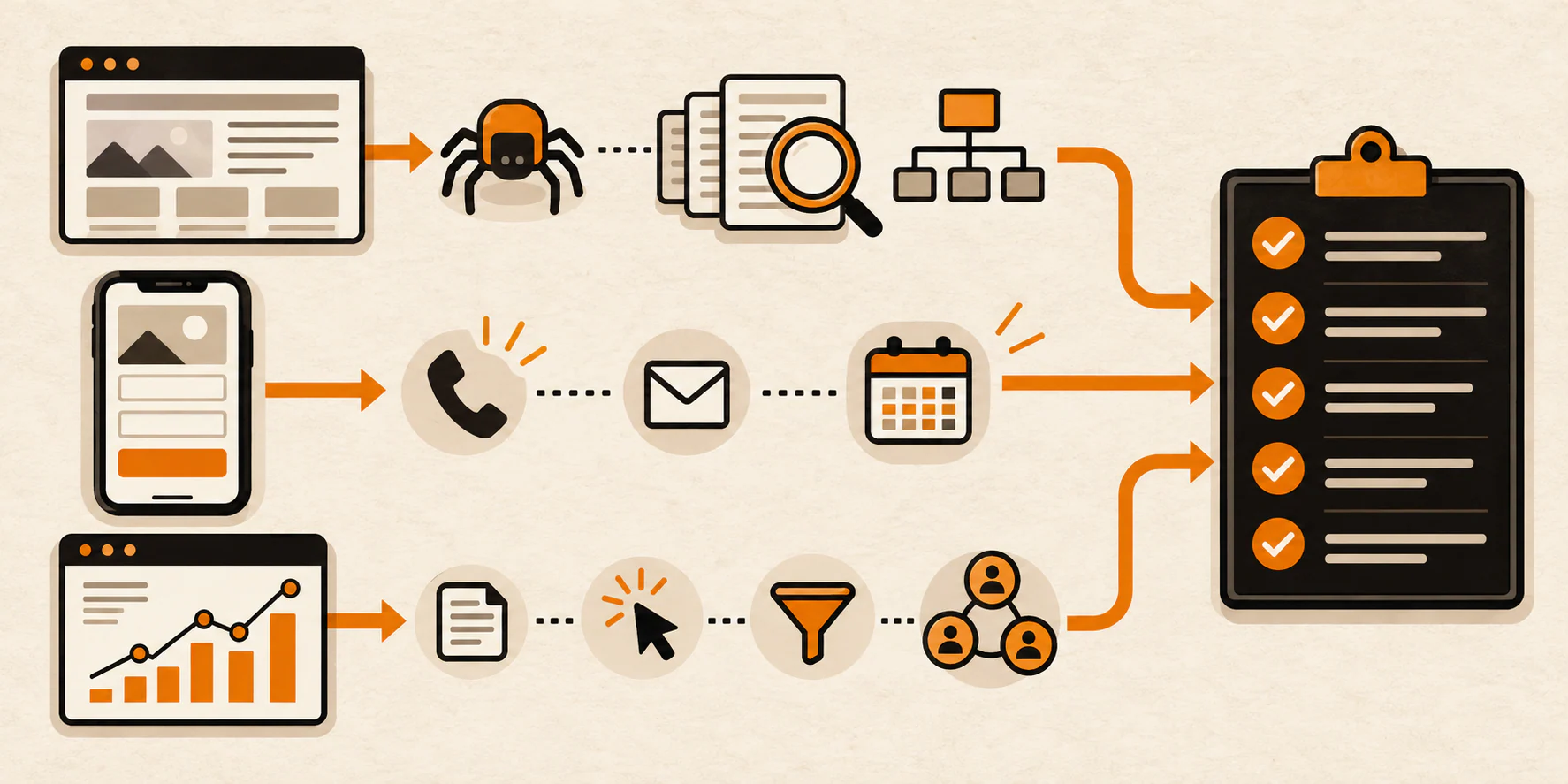
Step 1: Check whether search engines can reach and index the page
Crawlability and indexability are related, but they are not the same thing. Crawlability concerns whether Googlebot can request a page. Indexability concerns whether the page is eligible to be included in Google's index. A page can be crawlable and still excluded from the index. A crawl block can also prevent Google from seeing an indexing directive.
Google's technical requirements for Search eligibility include an accessible Googlebot, a working HTTP 200 response, and indexable content. Meeting those minimum requirements does not guarantee that a page will be indexed or rank.
For each priority page, check:
- Does the final URL return a working
200response rather than an error or unintended redirect? - Is Googlebot blocked by
robots.txt? - Is the page marked
noindex? - Does its canonical tag point to the intended URL?
- Is the page included in the correct XML sitemap?
- What does URL Inspection in Search Console report?
- Do Page Indexing and Crawl Stats reports reveal a broader pattern that needs investigation?
Google's site-maintenance guidance treats robots controls, canonicalization, crawlable resources, and sitemaps as distinct checks. Do the same. A sitemap entry is a discovery aid, not proof that a URL is indexed.
If Search Console says a priority page is excluded, preserve the exact reason and inspected URL in your issue log. "Google cannot find the page" is too vague to act on. A noindex directive, canonical choice, redirect, error response, or crawl block each sends you down a different path.
Step 2: Test the page like a customer on a phone
Now stop looking at reports and use the site.
Open each priority page on a phone. Start where a prospect might start and attempt the intended action without using insider knowledge. You are testing task completion, not whether the design matches your taste.
Check whether:
- The page quickly makes the service, provider, and relevant location clear
- The offer matches the search, ad, or link that brought the visitor there
- The primary button looks actionable and explains what happens next
- Phone links open the correct number
- Navigation, popups, chat widgets, and cookie controls do not cover the main action
- Form fields are labeled and usable on a small screen
- Required fields and error messages make sense
- A successful submission produces a clear confirmation
- The scheduler shows the expected service, location, and availability path
- The lead reaches the intended inbox, phone, calendar, or system
Repeat the main path with a keyboard on a desktop. You should be able to see where focus moves, reach controls in a sensible order, operate buttons and menus, complete the form, and recover from errors.
If the main contact path fails, move it ahead of cosmetic or metadata work. A beautifully optimized page that cannot accept the intended inquiry has failed the more immediate test.
When the problem is message clarity, use the offer-clarity guide for local businesses to work through the service, audience, and outcome. If the offer is clear but buttons, forms, or page structure create friction, review these practical website changes for local-business conversion paths.
Record the device, browser, starting page, action attempted, and result. "The mobile site is bad" is an opinion. "The form's submit button stayed disabled after every visible required field was completed on this device and browser" is a finding someone can reproduce.
Step 3: Separate speed evidence from speed guesses
Speed reports are useful. Score worship is not.
Core Web Vitals are one part of Google's broader page-experience considerations. Google's page-experience documentation also points site owners toward secure delivery, mobile display, intrusive interstitials, and clear separation between main content and distractions. Good Core Web Vitals alone do not guarantee top rankings.
For each priority-page template, separate two kinds of evidence:
- Field data reflects real-user experiences collected through the Chrome User Experience Report when enough data is available. It may cover a URL or a broader origin and represents a historical collection period rather than this exact test visit.
- Lab data runs a simulated test under defined conditions. It is useful for diagnosis and repeatable comparisons, but it is not a recording of every visitor's experience.
Check the reported scope before logging a finding. If PageSpeed Insights has no field data for a URL, say so. Missing data is neither a good result nor a bad one.
Then use the lab diagnostics to form questions:
- Which element is reported as the Largest Contentful Paint candidate?
- Which scripts or resources are associated with the reported delay?
- Is the problem concentrated on one template, device class, or page?
- Can the developer reproduce the diagnostic under recorded conditions?
Avoid prescribing a content delivery network, caching change, script removal, compression rule, or lazy loading before the evidence points there. Even a familiar tactic can be wrong for the element involved. Lazy loading an image that is likely to be the page's primary visible content, for example, may delay that content rather than help it.
For a deeper diagnostic process, use this guide to interpreting and improving PageSpeed Insights findings. Preserve the original report and retest the same URL under comparable conditions after a change. The useful result is a documented change, a comparable recheck, and no new breakage in the page's main task. A higher score on its own tells you less.
Step 4: Review content, local relevance, and trust
Skip the hunt for a universal word count or a place to repeat a keyword. Ask whether the page gives the right visitor enough accurate information to take the next step.
Read each priority page for these basics:
- Does the title and main heading describe the actual service and page purpose?
- Is the business, provider, or responsible organization identifiable?
- Is the relevant service area or location clear without awkward repetition?
- Does the page answer the questions a prospect needs before calling or submitting?
- Are process, pricing, availability, and eligibility uncertainties explained honestly where they matter?
- Are claims supported, specific, and still current?
- Are staff details, addresses, hours, services, images, and offers current?
- Do internal links help a reader continue to a relevant service or explanation?
- Do external links still work and lead where the anchor says they will?
- Are headings organized around real reader questions rather than keyword variations?
- Are there duplicate or thin sections that add no distinct answer?
Broken links and stale facts are straightforward findings. "This page needs more content" is not. Name the missing question, affected visitor, and evidence for why the gap matters.
Trust comes down to details a prospect can check. Name the business, keep contact information accurate, explain what happens next, and remove claims you cannot support. That beats another paragraph of generic superlatives.
Step 5: Run practical accessibility checks
Accessibility deserves more than a plugin badge and a passing automated score. Automated tools can identify some issues. Manual checks reveal different barriers. Neither one, alone or together in this limited audit, certifies accessibility or legal compliance.
The WCAG 2.2 Quick Reference includes requirements for keyboard operation and text alternatives for non-text content, along with many other success criteria. Use it as a technical reference, not as a shortcut to a legal conclusion.
On your priority pages, check:
- Can you reach and operate links, menus, buttons, forms, modals, and schedulers with a keyboard?
- Is the current focus visible?
- Do form fields have understandable labels and useful error messages?
- Do headings describe the page structure in a sensible order?
- Do informative images have meaningful text alternatives?
- Do decorative images use an appropriate empty text alternative instead of noisy descriptions?
- Do video and audio provide captions, transcripts, or another appropriate alternative where needed?
- Can content be zoomed and reflow without hiding essential text or controls?
- Does a suitable contrast-testing tool identify text or control contrast that needs review?
- Does the main task still work after these checks?
Record the exact element, path, test method, and observed failure. Do not ask AI to declare the page accessible, and do not assume an overlay or plugin resolves underlying barriers. If the issue affects a critical task or the business needs a compliance opinion, assign it for a fuller accessibility and legal review.
Step 6: Review security, maintenance, and privacy boundaries
A marketing checklist is not a penetration test.
At the owner level, confirm the operational basics:
- Priority pages and forms load over HTTPS
- A named person or vendor owns CMS, theme, plugin, and dependency updates
- Privileged access is limited to people who need it and can be reviewed
- Backups exist, and someone can say when restoration was last tested
- Monitoring and incident escalation have a named destination
- The responsible developer or host can review warnings and suspicious changes
HTTPS is a supported baseline in Google's site-maintenance guidance. The broader controls depend on the platform, hosting, data, and risk involved. Do not install a web application firewall, add security headers, run vulnerability probes, or change access rules simply because a generic checklist says so. Assign those decisions to the responsible technical owner.
For privacy, inventory what the site collects and where it goes:
- Forms and uploaded files
- Call tracking and recordings
- Chat and scheduling tools
- Analytics, advertising pixels, and cookies
- Embedded maps, video, payment, or review tools
- Email, CRM, and other downstream destinations
Note the data type, vendor, owner, stated purpose, and relevant policy link. Then route legal questions to qualified counsel for the applicable business, data, and jurisdiction. A privacy policy, cookie banner, consent checkbox, or AI-generated terms page is not universal proof of compliance.
Step 7: Verify measurement and lead quality
Analytics can tell you that an action was recorded. It cannot tell you, by itself, whether the action became a qualified inquiry, booked job, or revenue.
Google Analytics 4 documents how to mark meaningful actions as key events and derive a specific lead event from form activity. That distinction matters. A generic form submission and a lead form submission are not automatically the same business event.
Test each intended contact path with an approved, clearly labeled test submission:
- Does the phone, form, chat, or scheduler action work?
- Does the expected event fire once rather than zero times or multiple times?
- Does the confirmation page or message appear?
- Does the inquiry reach the correct person or system?
- Can the team connect the inquiry to its source without exposing unnecessary personal data?
- Is there a downstream way to distinguish spam, irrelevant contacts, qualified inquiries, booked work, and other outcomes?
Use the live data or debugging tools available in your approved setup, then verify the downstream handoff. A browser event with no delivered inquiry is an incomplete lead path. A delivered inquiry with no analytics event is a measurement gap. Those are different findings with different owners.
Google also explains why Search Console and Analytics answer different questions. Search Console is the source of truth for Google Search performance, while Analytics measures behavior on the site. Normal differences between the systems do not mean one is automatically broken.
If your team reviews call outcomes, this guide explains a privacy-aware role for AI call summaries in lead-quality feedback. Do not upload raw calls, transcripts, or contact details to an AI system without the required consent, policies, and approved safeguards.
Decide what matters first and give the fix to the right person
Start with the customer or business task that is blocked. A broken contact form deserves attention before a cosmetic score. A security, privacy, accessibility, medical, or legal concern belongs with someone qualified to handle it. Separate a problem you reproduced from a tool warning or a suspicion you still need to check.
Fix one problem, or one closely related group, then repeat the same check and make sure the change did not break a nearby page, form, tracking event, or search setting. If the result is still unknown, leave it open. A deployment message only tells you that something changed; it does not tell you the customer path works.
AI prompts that help without pretending to audit the site
AI can organize evidence. It cannot manufacture evidence you never gave it.
The safest prompts define the business task, supply sanitized source material, force unknowns to stay unknown, and ask for a structure you can verify. They do not ask the model to inspect a private account, infer results from a URL, test a vulnerability, or certify compliance.
Prompt 1: Turn crawl and index evidence into issue-log entries
You are organizing supplied website-audit evidence for a local business. Do not claim that you visited the page, accessed Search Console, or ran a crawl.

Business task for this page: [state the intended customer action]
Page URL: [public URL only]
Sanitized evidence: [paste the exact HTTP status, robots result, noindex result, canonical target, sitemap status, and URL Inspection or Page Indexing text you are allowed to share]

Create issue-log rows with: observation, supplied evidence, bounded likely impact, confidence, unknowns, responsible role, next verification step, and recheck criterion.

Separate direct observations from inferences. Mark any missing input as Unknown. Do not predict rankings or indexing. Do not invent crawl results. Do not include personal data, credentials, private analytics, proprietary code, legal conclusions, accessibility certification, or security certification.
Verify every row against the pasted source. If the model changes a canonical URL, status code, or reported reason, reject the row.
Prompt 2: Review a priority-page section against one user task
Review only the sanitized page copy pasted below. Do not claim to have seen the design, links, forms, analytics, or full website.

Business: [business type and location, if public]
Intended reader: [reader]
Page task: [one action, such as understand the service and request a quote]
Known constraints: [facts the business has approved]
Sanitized page copy: [paste the relevant section]

Return:
1. Statements that directly support the task
2. Questions the supplied copy leaves unanswered
3. Wording that is vague, unsupported, stale, or internally inconsistent
4. Suggested clarification questions for the page owner
5. Unknowns that require page, form, policy, analytics, or specialist evidence

Label direct observations from the supplied copy separately from any inference. Mark missing inputs as Unknown. Do not invent business facts, customer objections, results, testimonials, pricing, or legal requirements. Do not rewrite unsupported claims as facts. Do not include personal or confidential data. Do not certify conversion performance, accessibility, privacy, security, or legal compliance.
Use the response as an editorial worksheet, not as proof that the page works.
Prompt 3: Turn PageSpeed evidence into developer questions
Organize the supplied PageSpeed evidence into questions for a developer. Do not prescribe a fix unless the evidence directly identifies the mechanism, and do not claim to have tested the page.

Page and template: [public URL and template type]
Test date and device mode: [date, mobile or desktop]
Field-data scope and status: [URL, origin, unavailable, or Unknown]
Lab diagnostics: [paste the sanitized diagnostic names and relevant values]
Known recent changes: [approved facts or Unknown]

Return a table with: supplied observation, field or lab evidence, possible interpretation labeled as inference, question for the developer, additional evidence needed, risk of changing it, and comparable recheck.

Keep unavailable data as Unknown. Do not promise a ranking, traffic, or conversion result. Do not recommend deleting scripts, changing hosting, enabling a CDN, caching, compression, or lazy loading without evidence. Do not include source code, credentials, visitor data, legal conclusions, accessibility certification, or security certification.
The goal is a better technical conversation, not a confident list of generic fixes.
Prompt 4: Cluster a sanitized issue log and draft a verification plan
Organize the sanitized issue log below. Treat each row as an unverified report unless its evidence field states a reproducible observation.

Priority business actions: [list the approved actions]
Available owners: [roles, not personal names]
Known release constraints: [facts or Unknown]
Sanitized issue log: [paste rows with no lead, visitor, credential, private analytics, or proprietary data]

Cluster issues by dependency. For each cluster, return: affected task, evidence strength, unknowns, likely owner, prerequisite, bounded first change, before-state record, recheck method, and regression checks.

Keep missing inputs as Unknown and label every inference separately from the supplied observations. Do not assign numeric revenue, lead, ranking, or conversion impact unless that figure appears in the supplied evidence with its method. Do not treat a tool score as a diagnosis. Do not invent access, findings, fixes, or outcomes. Do not certify accessibility, privacy, security, or legal compliance. Flag work requiring a developer, analytics owner, accessibility specialist, security professional, or legal counsel.
The final plan should make dependencies visible. It should not turn low-confidence guesses into urgent work merely because the model can phrase them convincingly.
What the owner should have at the end
A useful audit leaves you with a prioritized list, a person responsible for each fix, the evidence behind it, and a note about what happened when you checked again. Honest unknowns and clear escalation points belong in the file too.
A 100-item unchecked list is busywork. A smaller list with defensible evidence and ownership is useful.
You should be able to hand the result to a developer, marketer, analytics owner, accessibility specialist, security professional, or legal reviewer without asking them to reverse-engineer what you saw. Each person should know the affected page, observed problem, confidence level, next action, and what will count as verified.
If the audit points to a rebuild, our website design service brings the design, search foundations, and path to contact together.
If you want the website, search visibility, paid media, and lead-quality feedback managed as one connected system, explore the YEAH! Local Growth Engine. The starting point stays the same: see what is happening, confirm the problem, and fix the part that matters before chasing another score.
Last updated