
Key Takeaway
Updated your website but Google still shows the old version? Learn how to request a recrawl, submit a sitemap, check indexing, and troubleshoot delays.
You updated a service page, changed your holiday hours, or fixed an outdated offer. Your website shows the new information. Google still shows the old version. Annoying, yes. Mysterious, not necessarily.
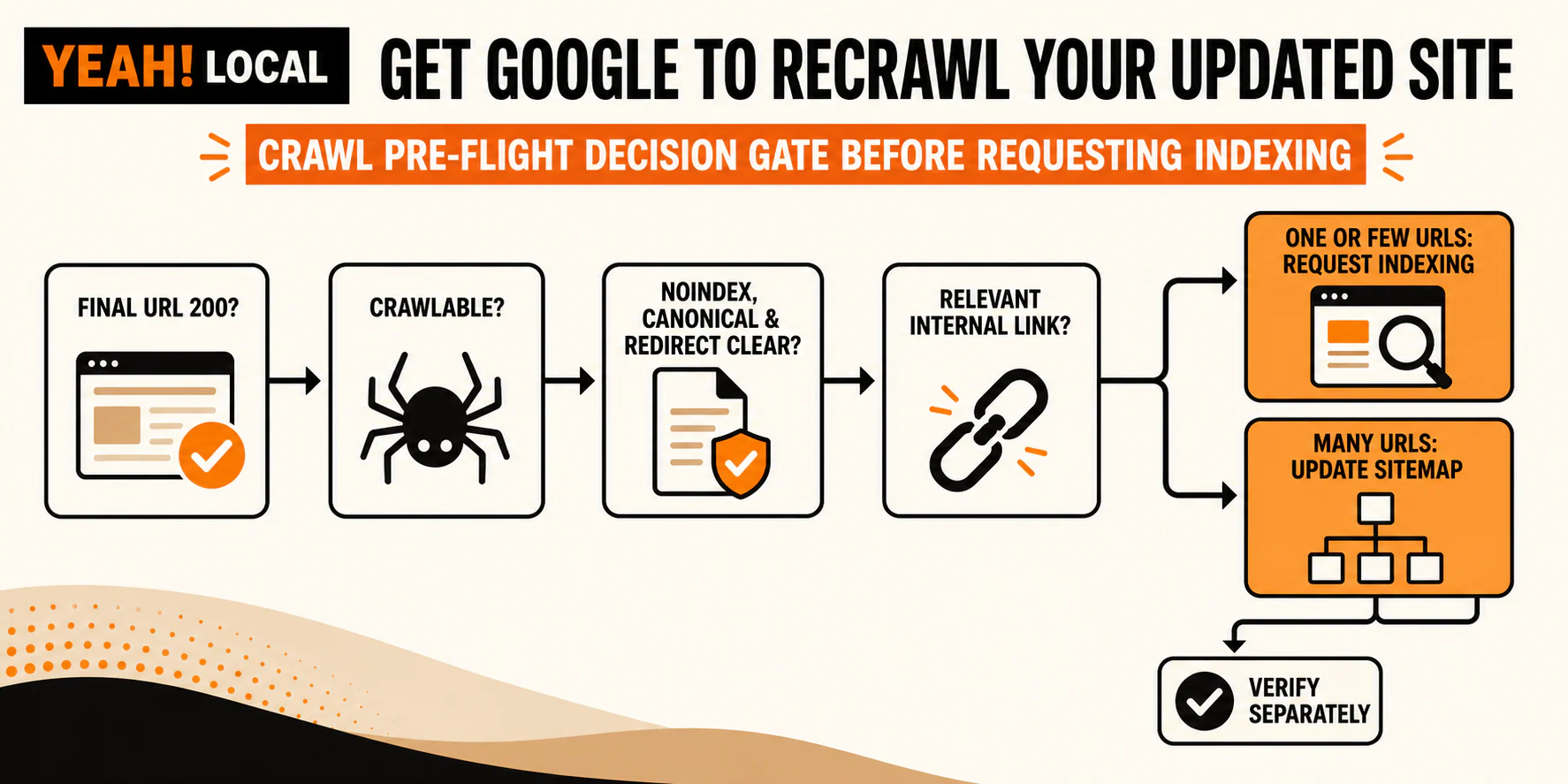
For one or a few updated URLs, inspect each one in Google Search Console and use Request Indexing if the live page is accessible and indexable. For many new or substantially changed URLs, update your XML sitemap with accurate lastmod dates and submit it through Search Console. Before either move, check the response status, crawl access, noindex, canonical, redirects, mobile rendering, and internal links.
Submitting the same request again will not make Google crawl faster. A request also does not guarantee a crawl, indexing, better rankings, or a deadline. The useful sequence is simple: diagnose first, request second, verify third.
The short answer: request the crawl, but check the page first
Google normally discovers pages and updates as it crawls links around the web. Search Console lets a site owner ask Google to revisit a URL, but "ask" matters here. "Force Google to index" is marketing language. There is no force button hiding in a submenu.
Google's current recrawl documentation separates the job by scope:
- For one or a few URLs, use URL Inspection and Request Indexing.
- For many URLs, use a sitemap.
Do not start with the request, though. First make sure the page you want Google to process is the page you intend to expose. Requesting indexing for a blocked URL, a redirect, or a page whose canonical points somewhere else mostly creates a very official-looking delay.
First, separate crawling, indexing, search display, and rankings
These terms often get mashed together as "Google has not updated my page." That is understandable, but it is too vague to tell you what to do next.
Crawling is Google's process of fetching a page and following links to discover content. If Google has not recrawled your updated service page, it may still be working from an older version.
Indexing happens after crawling. Google processes the page and decides whether and how to store it in its search index. A fetched page is not automatically an indexed page.
Search display is what people see in a result, including its title link and snippet. Google generates those elements automatically and may show wording that differs from your HTML. A title or snippet you did not write is not proof that the page was never crawled.
Ranking is where the page appears for a particular search. A page can be crawled and indexed without moving up for the phrase you care about.
That leaves four common outcomes after an update:
- Google has not crawled the changed page yet.
- Google crawled it but did not index it.
- Google indexed it, but the result still shows an old or rewritten title or snippet.
- Google processed the update, but rankings did not improve.
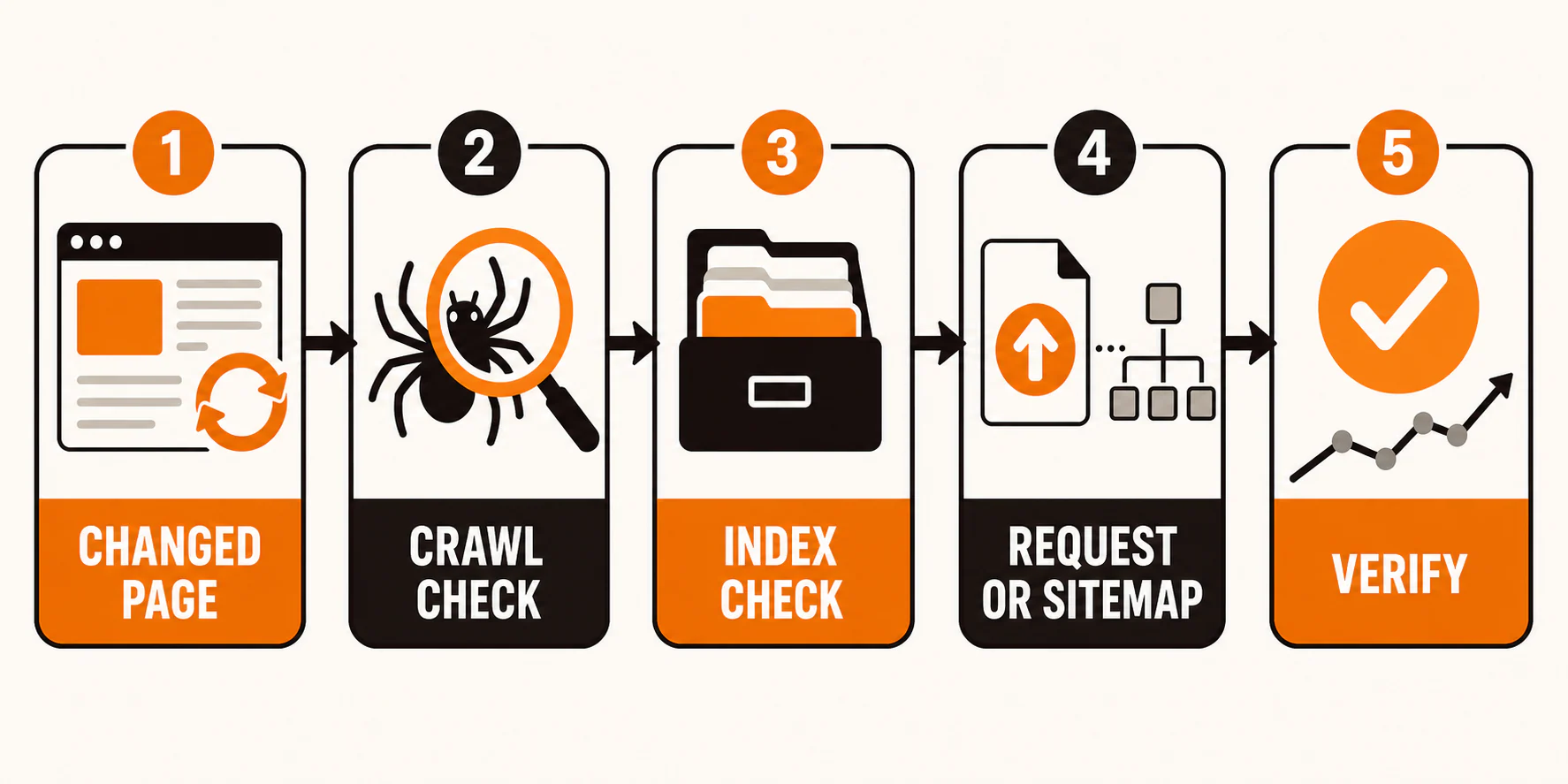
Suppose a plumber updates a water-heater service page with current service areas, pricing language, and scheduling details. The first question is not, "Why did my ranking stay put?" First confirm whether Google saw the changed page. Then confirm whether Google indexed the intended URL. Only after that does a ranking diagnosis make sense.
When a recrawl request makes sense
A recrawl request is useful after a substantial change. It is not a cure for every stale result or traffic dip.
| Situation | Best next action | Why |
|---|---|---|
| One substantially updated page | Inspect the preferred canonical URL and request indexing | URL Inspection lets you check and submit one URL |
| A few updated service or location pages | Inspect each important URL | You can catch access or indexing problems before requesting |
| Many changed URLs or a site migration | Update and submit the XML sitemap, then run migration checks | A sitemap helps discovery at scale but cannot repair redirects or canonicals |
| An old result for a page you do not own | Use Google's Refresh Outdated Content tool when eligible | The tool is for removed or significantly changed content on a page you do not own |
| Rankings changed after Google processed the current page | Diagnose relevance, quality, competition, demand, and technical evidence | Another recrawl request does not solve a ranking-only problem |
The Refresh Outdated Content tool is not the normal route when you control the page. Update your page, use Search Console, and verify the result there.
A sitemap cannot repair broken redirects, conflicting canonicals, or internal links that still point to old URLs.
Run this preflight check before requesting indexing
This is the step people skip because the button is more satisfying. The button is also much less useful when the page is not ready.
- Confirm the final URL returns HTTP 200. Open it in a private browser window and check the address after any redirects. A developer or SEO tool can confirm the status code.
- Rule out access problems. Authentication, firewall rules, server errors, and security tools can keep Googlebot out even when the page works for a logged-in administrator.
- Check
robots.txtcarefully. Google's robots.txt guidance says the file controls crawling. It is not a reliable way to keep a web page out of Search because Google may learn about a blocked URL from other links. Do not delete aDisallowrule until you know why it exists.
- Look for an unintended
noindex. The rule tells Google not to show the page in search results, but Google must be allowed to crawl the page to read it. Blocking the page inrobots.txtwhile expecting Google to seenoindexis a small technical standoff that your website will not win. Google's robots meta documentation explains the rule.
- Verify the canonical. Your declared canonical should point to the URL you want indexed. If the water-heater page names another service page as canonical, requesting the first URL sends mixed signals. Later, use URL Inspection to see which canonical Google selected.
- Follow the redirects. Fix loops and needless chains. Submit the final URL instead of an address that sends Google somewhere else.
- Check the mobile-rendered page. Google uses the mobile version of content, crawled with its smartphone crawler, for indexing and ranking. Make sure the important service copy and links appear on mobile as well as desktop. Google's mobile-first indexing guidance recommends equivalent primary content across versions.
- Add a relevant internal link. Link from a crawlable page such as the main Services page. A footer link buried among 200 locations is technically a link, but a descriptive link in relevant copy gives people and crawlers a clearer path.
- Make sure the update is real. Correcting service information or adding a location is meaningful. Changing the displayed date while leaving the article untouched is housekeeping theater. Use
lastmodfor significant changes that match reality, not decorative freshness.
How to request a recrawl for one page in Search Console
To use Request Indexing, Google says you must be an owner or full user of the Search Console property. Once the preflight checks pass:
- Open Google Search Console and select the property that contains the URL.
- Use URL Inspection and enter the full URL, including the correct protocol and path.
- Review what Google knows about the indexed URL.
- Select Test Live URL to check the current public version.
- Fix any access or indexability issue the inspection reveals.
- Select Request Indexing.
- Record the request date and what changed.
Google's current URL Inspection guidance makes an important distinction: the default report describes the indexed version, while the live test checks whether the current page can likely be indexed. A successful live test does not mean the page is already in Google's index.
Keep a simple log with the URL, change, request date, and result to verify. It sounds fussy until three people request the same page and nobody remembers why.
Requests are subject to a quota, and repeated submissions do not help. Google's crawling and indexing FAQ says there is no way to force an update, and crawling can take time.
How to signal changes across many URLs
When a redesign, location expansion, or content cleanup changes many URLs, clicking Request Indexing page by page is the wrong scale. Use an XML sitemap.
Include the canonical, indexable URLs you want Google to discover. For a changed URL, update lastmod only after a significant change. Revised primary copy, changed structured data, or important updated links may qualify. A new copyright year does not.
Submit the sitemap through Search Console and monitor whether Google can read it. You can also filter the Page Indexing report by sitemap to monitor indexed URLs in that group. A sitemap helps Google discover URLs, but it does not guarantee crawling or indexing, and it does not improve rankings by itself.
For a site migration, the sitemap is only one item on the checklist. Map old URLs to genuine replacements, configure redirects, update canonicals and internal links, keep the destination pages accessible, and inspect representative URL types. The four-gate process for web design and SEO explains why a redesign has to work for crawling, relevance, users, and maintenance rather than merely look finished on launch day.
How to verify what Google did
Wait, then inspect the URL again. Google documents a range of a few days to a few weeks for crawling after a request, but that is a range, not an appointment.
Use this verification sequence:
- Reinspect the exact URL in Search Console.
- Compare the indexed information with the live test.
- Check the Page Indexing details, last crawl date, and Google-selected canonical.
- Review the live search result for relevant queries, remembering that Google can generate different title links and snippets.
- Review impressions and clicks in the Performance report over a useful period.
- If technical help is available, check server logs for Googlebot requests to the URL.
Google's Performance report guidance recommends focusing more on trends in clicks and impressions than on average position alone. A single quiet Tuesday is not a trend. Neither is a single exciting Tuesday.
Server logs can confirm that Googlebot requested a URL, but they may require help from a developer or host. A log visit confirms access. It does not confirm indexing, the search display, or a ranking change.
Google may have fetched the plumber's updated page and selected the intended canonical while still showing an unexpected title link or snippet. That is a search-display question, not proof of a failed crawl.
What if Google crawled the page but did not index it?
Start with the reason Search Console reports. Do not turn a specific status into a scavenger hunt through 47 generic SEO tips.
Possible branches include:
- An unintended
noindex, crawl block, authentication requirement, or server response problem - A Google-selected canonical that points to another URL
- Duplicate or very similar content, with another URL selected as canonical
- A page with no useful internal path from the rest of the site
- Content that offers little unique value for the reader's need
- A new page or site that still needs time to be discovered and processed
- Security, spam, or manual-action issues supported by the relevant Search Console reports
These are diagnostic possibilities, not a claim that one must be the cause. Fix the issue supported by the evidence, test the live page again, and request indexing after the page is ready.
If several pages show different problems, use a broader website audit checklist to organize the review. An audit can help group technical and content issues, but each URL still needs its own evidence.
What if Google indexed the update but rankings did not improve?
Then the recrawl process may have worked exactly as intended. Crawling and ranking are different jobs.
A ranking problem can involve search intent, usefulness, competition, authority, internal linking, local relevance, page experience, or changing demand. Google's guide to debugging Search traffic drops also covers technical issues, security or spam issues, site moves, seasonality, and algorithmic changes. That is a list to investigate, not permission to blame the latest update on sight.
Google describes core updates as broad changes rather than penalties aimed at individual sites. Its core update guidance says improvements may take time to show and do not guarantee a visibility gain.
Check whether the page matches what searchers need and earns its place among competing results. For a local service page, explain the service and applicable area instead of stuffing city names into interchangeable paragraphs. The near-me SEO guide goes deeper on local relevance without the usual location-keyword gimmicks.
Give ranking work an honest measurement window, too. Our realistic SEO timeline guide explains why a crawl request and an SEO result should not share the same stopwatch.
Common recrawl mistakes
- Requesting the same URL repeatedly. Duplicate requests do not make Google crawl it faster.
- Changing only the visible date. A fresh timestamp cannot turn unchanged information into a meaningful update.
- Updating a page without linking to it. Give the page a relevant, crawlable internal path.
- Submitting the wrong URL. Redirected, duplicate, blocked, or
noindexURLs need diagnosis, not enthusiastic submission. - Treating a sitemap as a guarantee. It supports discovery and monitoring. Google still decides what to crawl and index.
- Treating an unexpected snippet as proof of failed indexing. Google generates snippets for the query and may not use your meta description.
- Redirecting every 404 to the homepage. Genuine 404 responses are normal. Fix broken internal links, and redirect a removed URL only when there is a genuine replacement.
- Expecting a recrawl to repair weak content. Request Indexing cannot make the page more useful or reverse a ranking decline on command.
A simple recrawl checklist for local businesses
Use this whenever you make a meaningful change to an important page:
- Confirm the final URL and write down what changed.
- Check the HTTP status, public access, crawlability,
noindex, canonical, redirects, and mobile content. - Add or confirm a relevant internal link.
- Use Request Indexing for one or a few URLs, or update the sitemap for many.
- Record the request or sitemap submission date.
- Later, verify crawling, indexing, search display, and rankings separately.
- If processing succeeded but visibility did not improve, diagnose rankings as a new problem.
That is the whole operating loop: diagnose, request, verify. No courting the algorithm. No submitting the same URL nine times before lunch.
If you have several affected pages, a site migration, or a visibility decline with no obvious cause, YEAH! Local's SEO service can help separate the technical problem from the ranking problem and build the right fix.
Frequently asked questions
How long does it take Google to recrawl a page?
Google says crawling after a request can take from a few days to a few weeks. Timing varies, and a request does not reserve a deadline. Check URL Inspection later instead of assuming that a delay means failure.
Can I force Google to index a page?
No. You can make the page accessible, indexable, well linked, and useful, then request indexing or include it in a sitemap. Google decides whether and when to crawl and index it.
Does requesting indexing improve rankings?
Not by itself. Request Indexing asks Google to process a URL. Ranking is a separate outcome tied to the query and Google's ranking systems. A fully processed page can stay in the same position or rank differently for different searches.
Should I request indexing every time I edit a page?
No. Use it for meaningful updates to important URLs, especially when timing matters or you need to verify a fix. Google can discover routine changes through normal crawling, internal links, and sitemaps.
What is the difference between Request Indexing and a sitemap?
Request Indexing is the practical route for one or a few specific URLs and lets you inspect each page first. A sitemap helps Google discover and monitor many canonical URLs. Neither option guarantees indexing or higher rankings.
Can robots.txt keep a page out of Google?
Not reliably. robots.txt controls crawling, but Google may still know about and list a blocked URL from other links. To use noindex, allow Google to crawl the page so it can read the instruction. Confirm why a crawl rule exists before changing it.
Last updated