
Key Takeaway
Use this practical AI receptionist pilot plan to map booking calls, protect the human handoff, test failures, and measure what actually works.
An AI receptionist is useful when the phone problem is boring and repeatable. It gets risky when you ask it to improvise.
That is the line too many businesses miss. They hear a smooth demo, picture every call getting answered, and jump straight to "replace the front desk." Bad plan.
The better first deployment is much narrower: one common call type, one defined next step, and one clean escape hatch to a person. After-hours scheduling for a standard service can work. Clinical questions, angry customers, complicated pricing, and anything urgent should not be the opening act.
This guide is a practical way to decide whether your business is ready, build the call path, test the ugly edge cases, and run a controlled pilot. It is not a product ranking, and it will not pretend that answering more calls automatically produces more revenue.
What an AI receptionist actually does on a call
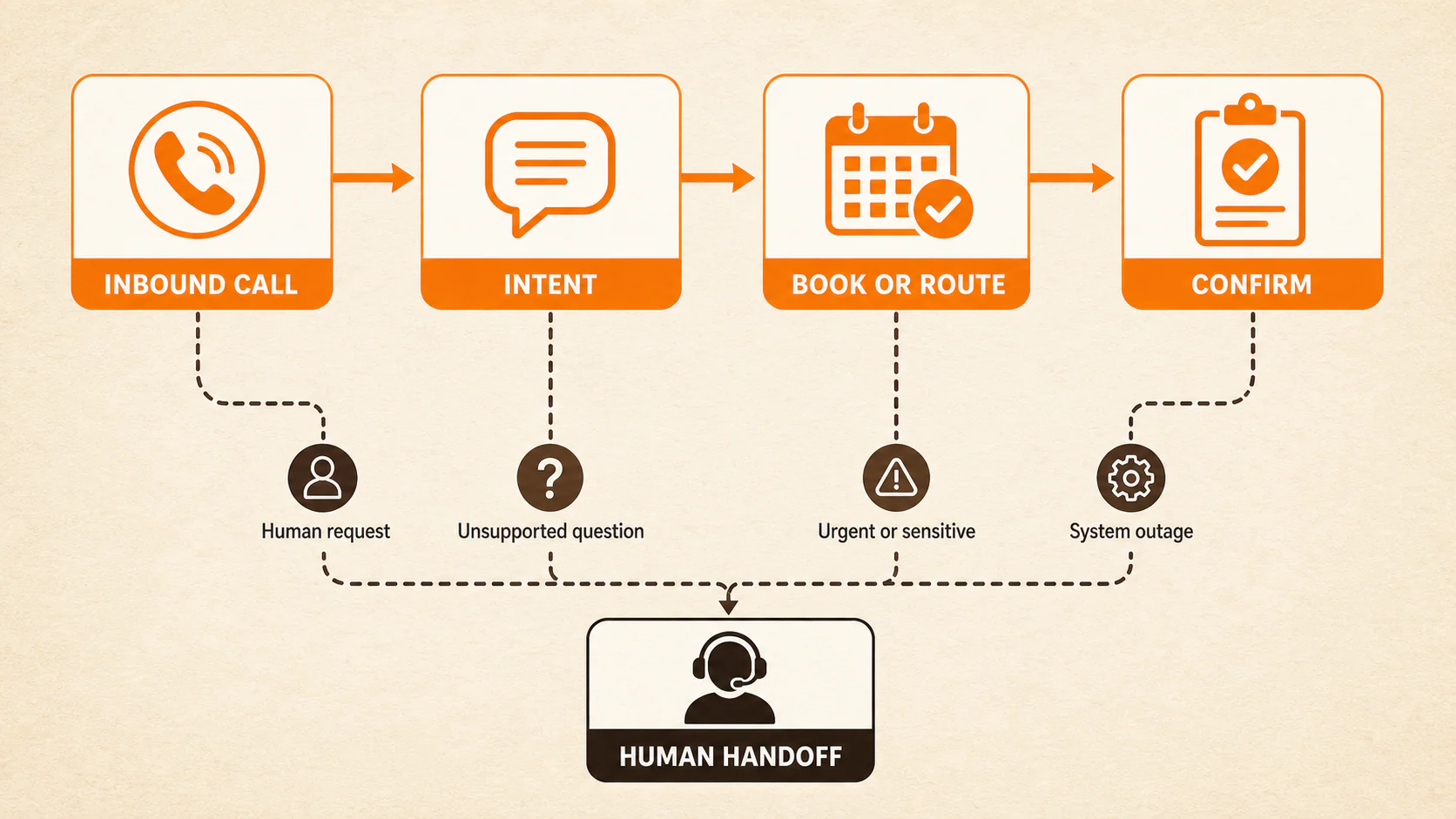
A typical AI receptionist follows a loop that is fairly easy to understand, even though the technology behind it is not simple:
- The phone system sends the call to the AI.
- Speech recognition turns the caller's words into text the system can process.
- Configured instructions, approved business information, and workflow logic determine the next response or action.
- The system answers in a generated voice, asks a follow-up question, books or routes the call, or triggers another approved action.
- It logs the result, sends a confirmation, transfers the caller, or flags the call for staff review.
That is a typical pattern, not a promise about every platform. The exact path depends on the provider, phone setup, integrations, model, and rules. Twilio's voice-agent documentation, for example, shows a live path that routes the call, transcribes speech, passes the text to application logic, and converts the response back to speech.
Take a hypothetical happy path. A caller asks for a standard inspection appointment. The AI confirms the service area, checks approved availability, offers two times, books the selected slot, repeats the date and address, sends a confirmation, and logs the appointment.
Sounds tidy. But the voice itself is almost the least interesting part.
The result depends on whether the calendar is current, the service-area rules are correct, the appointment type has the right duration, and the system knows what to do when the caller changes the address halfway through. A natural voice sitting on top of sloppy business rules is still a sloppy system. It just sounds nicer while making the mistake.
Decide whether your business is ready
Do not start by shopping for voices. Start by checking whether the business can explain its own intake process.
You are ready for a limited pilot when you have:
- One narrow, repeatable task. "Book a standard estimate for one service" is workable. "Handle anything a caller might need" is not.
- A current source of truth. Hours, locations, services, prices, policies, service areas, and common answers need an owner and an update process.
- Working access to the required systems. If the AI needs a calendar, CRM, phone queue, or messaging tool, confirm the actual integration and permissions instead of assuming a logo on a vendor page means the workflow will work.
- A named human owner. Someone must review calls, fix rules, and decide whether the pilot expands or stops.
- A real fallback destination. This may be a staffed queue, on-call person, callback workflow, or carefully written message. "Transfer to the team" is not a plan if nobody knows where the transfer lands.
- A privacy and legal review for the actual workflow. Recording, transcription, retention, outbound calls, and regulated information introduce different questions.
- A baseline. You need to know how comparable calls perform now, even if the baseline is modest: calls received, calls answered, booking-intent calls, valid bookings, transfers attempted, and appointments that needed correction.
If you cannot check those boxes, pause. You do not have an AI problem yet. You have an intake-process problem.
Use the local business call-audit scorecard to find where callers currently get stuck. Automating a confused process does not remove the confusion. It makes the confusion faster and harder to see.
Choose one call type for the first pilot
The safest first use case is common, easy to recognize, governed by clear rules, and easy to reverse when something goes wrong.
Good candidates include:
- after-hours booking for one standard appointment type;
- overflow calls for one service and one location;
- basic lead capture followed by a human callback;
- simple qualification and routing based on service and location; or
- common administrative questions drawn from an approved answer set.
These uses still need testing. They are simply easier to define than a broad "AI front desk."
Keep these out of an early pilot:
- urgent or emergency language;
- clinical advice, symptoms, medication, or triage;
- complaints or emotionally charged conversations;
- complex estimates, negotiations, or exceptions;
- sensitive financial, legal, or eligibility decisions;
- unusual cancellations, refunds, or policy disputes; and
- any call where the correct answer depends on judgment the system does not have.
Then add one rule above all the others: never guess.
If the answer is not in the approved knowledge source, the availability cannot be confirmed, the caller falls outside the defined path, or the integration returns something ambiguous, the AI should say it cannot confirm and move to the approved fallback. A graceful "I need to connect you with the team" is far better than a confident wrong answer.
Map the happy path, human handoff, and failure paths
Write the workflow before you configure it. If the team cannot map the call on a page, the AI will not magically discover the right policy in real time.
The routine path
For a standard booking call, define five things:
- Greeting. What does the caller hear, and what disclosure is appropriate for this workflow?
- Intent. How does the system recognize the one call type it is allowed to handle?
- Minimum qualification. What is the least information needed to determine service, location, and booking fit?
- Action. Does it book, route, collect a callback request, or send an approved link?
- Confirmation and log. What details are repeated to the caller, what written confirmation is sent, and what record appears for staff?
Fewer questions are usually better, but only when the system still collects what the next step requires. Skipping the service address feels efficient right up until the appointment lands outside your coverage area.
The human handoff
Define what happens when:
- the caller asks for a person;
- the caller sounds upset or confused;
- the question is unsupported;
- urgent or sensitive language appears;
- the request needs professional judgment; or
- the AI fails twice to understand the caller.
For each branch, specify what the caller hears, where the call goes, what context travels with it, and what happens if nobody answers. A transfer that drops into an unmonitored mailbox is not a successful handoff.
The failure paths
Boring failures need as much attention as the polished demo:
| Failure | Safe response | Staff check |
|---|---|---|
| Requested slot is unavailable | Offer only verified alternatives or move to callback | Confirm no phantom appointment was created |
| Calendar or CRM is down | Stop booking and use the outage fallback | Check that the caller and request were captured once |
| Caller corrects a name, date, or address | Repeat the corrected detail before acting | Verify the final record, not the first value heard |
| Duplicate caller or existing appointment | Avoid creating another record until identity and intent are clear | Review duplicate handling in the calendar and CRM |
| Wrong service or service area | Give the approved answer and route only if a valid destination exists | Confirm the system did not improvise eligibility |
| Silence, noise, or repeated misunderstanding | Ask once or twice, then offer a person or callback | Review whether the audio problem was handled without trapping the caller |
| Urgent or sensitive request | Follow the human-approved escalation message and route | Confirm the transfer reached the intended person or queue |
If you cannot describe the safe behavior for a failed integration, an unavailable person, and an explicit request for a human, the workflow is not ready.
Test it like a skeptical caller
Do not test by reading the ideal script in a silent room and calling it done. Real callers interrupt, mumble, change their minds, ask two questions at once, and insist that Tuesday the 14th is a Friday.
Build a test matrix before the public pilot:
| Test | What to try | What must be verified |
|---|---|---|
| Happy path | Standard eligible booking | Correct service, person, date, time, duration, location, confirmation, and log |
| Interruption | Speak over the AI or change the answer mid-sentence | The system uses the corrected information and does not duplicate an action |
| Noise and silence | Background noise, a pause, or a weak connection | The caller gets a sensible retry and a fallback instead of a dead end |
| Accent or language need | Use realistic callers and phrasing for your audience | The system understands or hands off; it does not pretend to support a language it cannot handle reliably |
| Unavailable slot | Ask for a full or blocked time | Only real alternatives are offered; no invalid booking appears |
| Existing caller | Use a record with a current appointment | No duplicate contact or appointment is created without confirmation |
| Human request | Ask for a person at the start and midway through | Transfer begins promptly and reaches the intended destination |
| Urgent phrase | Use an approved urgent-language test | The AI stops the routine flow and follows the exact escalation rule |
| Unsupported question | Ask about an unapproved price, policy, or service | The AI says it cannot confirm and uses the fallback |
| Integration outage | Disable or simulate the unavailable calendar/CRM | Booking stops safely, the caller gets the approved alternative, and staff receive a usable record |
Official voice-agent testing guidance identifies noisy audio, interruptions, latency, model choice, and configuration as factors that can change behavior. You do not need to copy one provider's setup. You do need to test those conditions on the product and workflow you actually plan to use.
After every test call, check all four layers:
- what the caller heard;
- what happened in the calendar;
- what appeared in the CRM or call log; and
- what confirmation or transfer reached the caller or team.
A pleasant conversation with a wrong calendar record is a failed test.
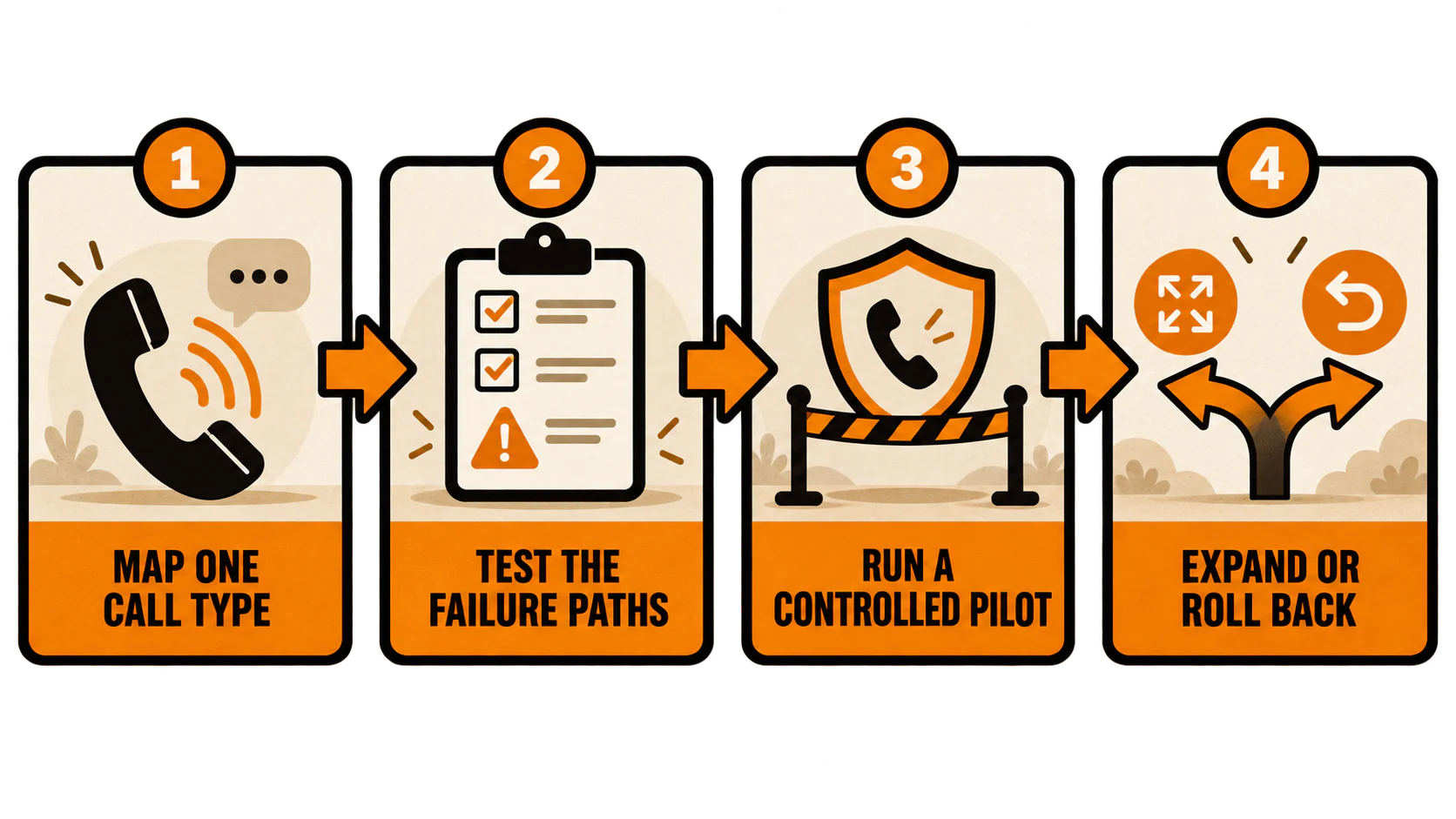
Launch a controlled pilot
Passing scripted tests earns the system a pilot. It does not earn unrestricted access to every caller.
Set boundaries before launch:
- Limit the pilot to defined hours, call types, services, and locations.
- Keep a staffed fallback available during the first phase.
- Name the person who reviews calls and owns rule changes.
- Decide how often calls, logs, bookings, and handoffs will be reviewed. Daily is reasonable during a small new pilot; the exact cadence should match volume and risk.
- Document who can change prompts, integrations, permissions, and retention settings.
- Keep a simple rollback path so calls can return to the previous workflow without rebuilding the phone system under pressure.
Most importantly, write the rollback triggers before you need them. Pause or roll back when the AI:
- creates a wrong or duplicate booking;
- gives a misleading answer about price, policy, availability, or service;
- fails a required transfer;
- mishandles protected or sensitive information;
- traps a caller who asks for a person; or
- loses an integration without switching to the approved fallback.
One bad call does not always mean the entire idea is dead. It does mean the affected workflow needs to stop until the cause is understood and retested.
Expansion should follow the same discipline. Add a service, location, or call type only after the current pilot meets its quality gates across real calls and the team has reviewed the exceptions. More scope is not a reward for enthusiasm. The system has to earn it.
Measure whether it is helping
"The AI answered 200 calls" is activity, not proof of value.
Compare the pilot with equivalent calls from the baseline. If the pilot covers after-hours calls for one service, do not compare it with every daytime call across the business. Keep the hours, call intent, service, and routing conditions as similar as practical.
Define the scorecard before launch:
- Answer rate: answered calls divided by calls offered to the workflow. Decide whether short disconnects, spam, and abandoned rings belong in the denominator.
- AI booking completion rate: valid AI-created appointments divided by eligible booking-intent calls handled by the AI.
- Successful handoff rate: calls connected to the intended person or queue divided by handoffs attempted. Define "connected" so a transfer to an unanswered line does not pass.
- Booking correction rate: AI-created appointments requiring staff correction or cancellation divided by AI-created appointments reviewed.
- Caller abandonment rate: calls that end before the intended next step divided by eligible calls handled. Separate technical drops when possible.
- Explicit human-request rate: calls where a person is requested divided by eligible AI-handled calls.
The denominators matter. If the AI receives 30 booking-intent calls, books 12 valid appointments, sends 10 inappropriate calls to a person, and loses eight callers, "12 appointments booked" hides the part you need to fix.
Track show rate and qualified-lead outcomes too, but keep the conclusion honest. A later appointment may show or become a good lead for many reasons: caller intent, service fit, staff follow-up, offer, price, or timing. The AI can be part of the path without being the sole cause.
That is also why the post-call process matters. Build a practical lead follow-up system for calls that need staff action, and use AI call summaries as review inputs rather than treating a summary as proof that a lead was qualified.
Privacy, recording, outbound calls, and healthcare need a separate check
This is the section to slow down on. The rules depend on what the system does, where the parties are, what data is handled, and whether the call is inbound or outbound.
If calls are recorded or transcribed, review the jurisdictions and exact workflow with qualified counsel. FTC guidance on telemarketing compliance notes that state recording laws vary, so a generic disclosure copied from another company's script is not a legal review.
Do not casually extend an inbound receptionist setup into automated outbound calling. The FCC has ruled that AI-generated voices fall within the TCPA's artificial or prerecorded voice language for covered outbound calls. FTC rules also impose requirements on many prerecorded telemarketing messages, with exceptions and different treatment depending on the call. Those points do not mean ordinary inbound receptionist calls are categorically prohibited. They mean outbound reminders, follow-ups, reactivation campaigns, and sales calls deserve their own review before launch.
Healthcare needs the same discipline. Administrative scheduling may be an appropriate narrow workflow, but urgent symptoms, clinical advice, medication questions, distressed callers, and ambiguous emergencies should stay on a human-approved path unless the business has a separately governed and validated system for them.
When HIPAA applies, do not stop at "the vendor says it is compliant." HHS says a covered entity or business associate using a cloud provider to create, receive, maintain, or transmit electronic protected health information on its behalf needs a HIPAA-compliant business associate agreement and must meet the relevant safeguards and risk-analysis requirements. Not every clinic call automatically contains ePHI, but the workflow needs to account for when it does.
For any sensitive use case, review:
- what is recorded or transcribed;
- what the caller is told;
- where data is stored and for how long;
- who can access recordings, transcripts, and summaries;
- whether data is used to train models;
- which vendors and subcontractors touch the information;
- how deletion and access requests work; and
- what happens when the AI detects urgent or sensitive language.
That may feel less exciting than choosing a voice. Good. Excitement is not the standard here.
The practical decision: start, wait, expand, or roll back
You can make the decision without falling for either extreme. AI receptionists are neither magical employees nor useless toys. They are controlled intake systems, and the quality of the control matters.
Start a pilot when you have one narrow use case, current business rules, working system access, a named owner, a tested human handoff, a privacy review, and a baseline.
Wait when nobody can state the booking rules, the source information is stale, the fallback is imaginary, or the team cannot review the calls. Fix the intake process first.
Expand only after the pilot meets its defined quality gates across real calls, including correct bookings, successful handoffs, acceptable correction rates, and safe failure behavior.
Roll back when the system guesses, misbooks, traps callers, mishandles sensitive information, or cannot fail safely during an outage.
The best mental model is a tightly trained intake lane, not "a tireless new receptionist." Give it routine traffic, clear signs, and a safe exit. Keep people in charge of exceptions, judgment, and care.
If you want help connecting call handling to the rest of your local marketing system, talk with YEAH! Local. Build a call path you can test, measure, and trust before you bolt AI onto a messy process.
Last updated