
Key Takeaway
Build a focused local Google Ads campaign with better targeting, conversion tracking, negative keywords, and four practical AI prompts.
Google Ads can spend your money exactly the way you told it to, and still produce almost nothing useful for the business.
That is the annoying part. The platform may be following the instructions perfectly. The instructions are just wrong.
Maybe the campaign treats every form submission as a win. Maybe the service area includes three counties the business barely serves. Maybe the ad promises one thing and the landing page delivers another. Google cannot decide which of those choices makes sense for your business.
So do not begin your first local campaign in the ad-writing screen. Begin with one service, one service area, one useful conversion, and one page that can turn the right visitor into a real lead. Then build a focused Search campaign around those facts.
AI can organize inputs and generate candidates. It cannot decide what a profitable job is, where you travel, which claims you can prove, or whether a call was worth paying for. You still own those decisions.
Before you open Google Ads, get six things straight
A local Search campaign needs a narrow starting point. Complete this checklist before launch:
- One service: Pick a specific service you want to sell, not everything the company can technically do.
- One useful conversion: Decide whether the campaign should produce calls, quote requests, appointment requests, purchases, or another meaningful action.
- One matching landing page: The page should clearly explain the advertised service, location, offer, and next step.
- Your real service area: List the cities, ZIP codes, or radius you can serve profitably, plus places you need to exclude.
- An affordable test budget: Choose an amount the business can tolerate spending while it gathers evidence. There is no universal magic number.
- Working call and form tracking: Install it and test it before traffic arrives.
This prompt turns those facts into a campaign worksheet. Fill in every bracket. If you do not know an answer, write unknown. An honest blank beats an AI-generated guess.
AI prompt 1: Build the campaign-input worksheet
You are organizing inputs for a local Google Search campaign. Do not invent, infer, or improve any business fact.

Business name: [NAME]
Service to advertise: [ONE SERVICE]
Ideal customer for this service: [CUSTOMER]
Locations we serve: [CITIES, ZIP CODES, OR RADIUS]
Locations we do not serve: [EXCLUSIONS]
Primary conversion: [CALL, FORM, APPOINTMENT REQUEST, PURCHASE, ETC.]
Typical value of a qualified lead or completed job: [VALUE OR UNKNOWN]
Maximum acceptable cost for the chosen outcome: [AMOUNT OR UNKNOWN]
Verified differentiators: [FACTS ONLY]
Claims we must not make: [GUARANTEES, PRICES, CREDENTIALS, AVAILABILITY, ETC.]
Landing-page facts: [PASTE THE RELEVANT PAGE COPY]

Return:
1. A campaign-input table using only the supplied facts.
2. A list of missing decisions labeled "Owner must answer."
3. Potential conflicts between the ad offer, service area, conversion goal, and landing page.
4. No keyword, budget, bidding, or ad-copy recommendations yet.
If the output exposes a fuzzy offer, fix that first. Better ads cannot rescue an offer the customer cannot understand. The same goes for the page. Our landing-page conversion checklist can help you tighten that piece before you buy traffic.
Define the outcome before the platform defines it for you
Google recommends choosing a campaign objective that matches the business outcome because the objective influences suggested features and settings. But that label is not the business definition of success.
Keep these four levels separate:
- Ad-platform conversion: Google Ads recorded an action, such as a call or submitted form.
- Qualified lead: The person needs the service, is in the service area, and is a reasonable fit.
- Booked appointment or estimate: The qualified lead agreed to a real next step.
- Sale or completed job: Revenue actually reached the business.
A campaign can look healthy at level one while failing at levels two through four. A form submission is not automatically a good lead, and a misdirected call should not train bidding toward more of the same.
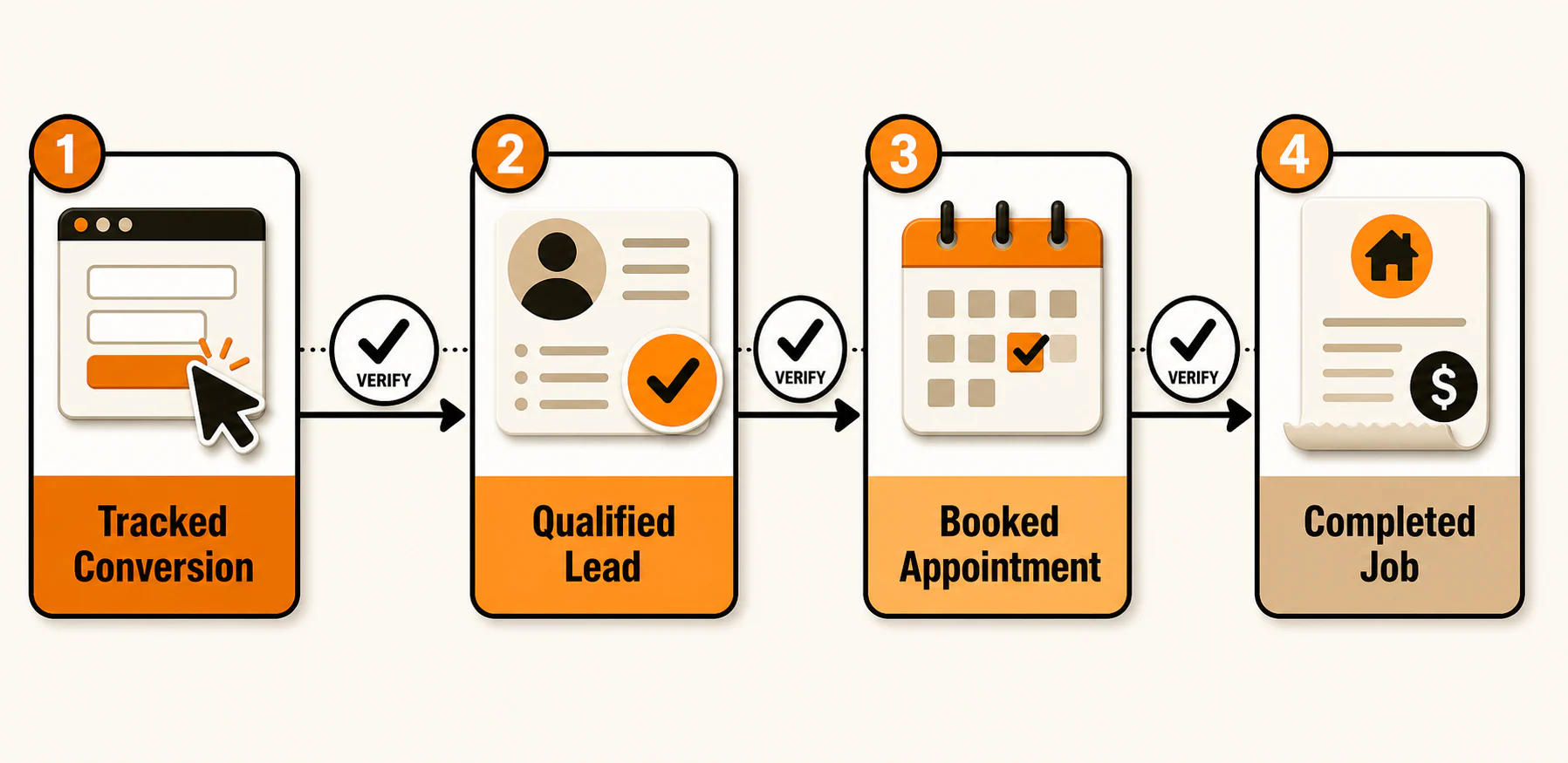
Before launch, write down what qualifies a lead and where that outcome will be recorded. Compare Google Ads data with call recordings, CRM notes, appointment records, or sales records. Our guide to why bad calls can look good in ad reports goes deeper into that gap.
Use Search as the first working example, not a universal rule
This guide uses a Google Search campaign to reach people searching for a specific local service. Google's current Search campaign setup documentation covers objectives, conversion goals, settings, ad groups, responsive Search ads, and budget. Google notes that new users may see a different onboarding flow, so labels and screen order can change.
Search is still a business-fit decision. Local Services Ads, for example, are a separate channel with their own eligibility, verification, and lead-management rules, not a Search campaign setting. If that channel fits your category, read our Google Local Services Ads explainer.
Keep the structure simple: one service, tightly related ad groups, matching ads, and a landing page that keeps the same promise. Boring structure is fine. Expensive confusion is not.
Set geography like someone has to drive there
"Local" is not a targeting strategy. It is a boundary.
Google Ads supports area and radius targets, although availability can vary by country. Build the campaign around cities, ZIP codes, a radius, or a careful combination. Exclude places you cannot or do not want to serve.
Start with the business reality:
- How far will a technician, estimator, provider, or customer reasonably travel?
- Are there cities inside the radius that create bad jobs or expensive drive time?
- Does the business cross state, county, or licensing boundaries?
- Are some locations technically serviceable but rarely profitable?
Then inspect the advanced location option. Google's default Presence or Interest option for applicable campaigns can include people who are in, regularly in, or interested in the target. Presence limits targeting to people likely in or regularly in those locations. For a service business that only serves people physically within a defined area, Presence may fit better. A business that can serve people interested in the area may choose differently. Google's advanced location options guide explains the distinction.
Google also says geographic targeting uses several signals and is not guaranteed to be 100% accurate. Add exclusions, then review actual location performance after launch. A tidy settings map is not proof that every click came from the right place.
Build keyword themes around commercial intent
Keyword Planner, specific search phrases, and negative keywords belong here. But they need to work as a decision system, not a bag of ideas.
Begin with ways a customer might search for the chosen service. Group terms by the job behind the search:
- service plus city or neighborhood;
- service plus "near me" language;
- urgent or same-day need, if the business genuinely offers it;
- estimate, quote, appointment, repair, replacement, or another commercial qualifier that fits;
- a specific problem the service solves.
Keep different intents apart. "Roof repair" and "roof replacement" may deserve different ad groups and pages. Tight themes reveal whether the keyword, ad, and page tell the same story.
Use Google Keyword Planner to discover and refine ideas, but treat its volume and forecast outputs as estimates, not promises. Review match types deliberately. Then build negative-keyword candidates for obvious mismatches such as jobs, training, DIY, free information, services you do not provide, and locations outside your market.
AI prompt 2: Generate keyword and negative-keyword candidates
Using only the campaign facts below, create keyword hypotheses for a local Google Search campaign. Do not claim that any keyword has traffic, buying intent, or a specific cost unless I provide supporting data.

Service: [SERVICE]
Service area: [AREA]
Customer problems: [PROBLEMS]
Services included: [INCLUDED]
Services excluded: [EXCLUDED]
Landing-page wording: [PASTE COPY]

Return:
1. Tightly related keyword themes, with the likely search job for each theme.
2. Candidate keywords under each theme.
3. Candidate negative keywords grouped by irrelevant intent, employment, DIY/research, wrong service, and wrong location.
4. Questions that must be checked in Google Keyword Planner or with the business owner.

Label every keyword and negative keyword "Hypothesis, manual review required." Do not recommend automatic account changes.
Before adding a negative, ask whether it could block a valuable variation. After launch, use the search terms report to see which queries actually triggered ads. Google says that report includes a significant number of queries, not necessarily every query, so treat it as useful evidence rather than a perfect transcript.
Write ads that the landing page can defend
Responsive Search ads let you provide headlines and descriptions that Google can combine. Google documents up to 15 headlines and four descriptions, but repetitive filler is not the goal. Aim for variety without contradiction.
Build candidates around:
- the exact service;
- the real location or service area;
- verified differentiators;
- a clear next step;
- useful assets such as sitelinks, calls, locations, callouts, or structured snippets when they apply.
Use the current term assets, not "ad extensions." Google's responsive Search ad guidance recommends unique headlines and descriptions, relevant wording, specific calls to action, useful assets, and limited pinning.
The non-negotiable rule: the ad cannot outrun the landing page. Do not invent a discount, years in business, credentials, awards, emergency availability, service location, guarantee, or price. If the page says "request an estimate," the ad should not quietly upgrade that to "book today" unless the business can actually honor it.
AI prompt 3: Draft responsive Search ad candidates
Draft responsive Google Search ad candidates using only the facts below.

Keyword theme: [THEME]
Service: [SERVICE]
Location: [LOCATION]
Verified differentiators: [FACTS]
Allowed offer: [OFFER]
Call to action: [CTA]
Landing-page facts: [PASTE COPY]
Prohibited or unverified claims: [LIST]

Return varied headline and description candidates organized by service, location, differentiator, objection, and call to action. Do not invent prices, discounts, guarantees, credentials, awards, availability, urgency, locations, or performance claims. Flag any line that is not directly supported by the inputs. Check character limits, but label the result "Candidate copy, manual review required."
Read every line beside the landing page. If the ad sounds stronger than the page, the answer is not to hope nobody notices. Fix the mismatch.
Set budget and bidding without pretending there is a magic number
"How much should I spend?" has no responsible stock answer. You need the market, estimated click costs, conversion rate, lead quality, close rate, job value, margin, and tolerance for uncertainty. None of those numbers becomes universal because somebody put it in a blog post.
Use Keyword Planner estimates and business economics to build a range. Ask:
- What might a click cost in this market?
- How many clicks could the daily budget reasonably support?
- How much can the business afford to spend before it learns enough to make a decision?
- What is a qualified lead worth, not merely a form submission?
- How long does it take for a lead to become a booked job or sale?
Choose a bidding strategy that fits the conversion data you trust and the outcome you want. Automated bidding works from account goals and conversion signals; weak signals can steer it toward activity the business does not value. For deeper tradeoffs, see our guide to Google Ads automated bidding for local businesses.
Keep the initial campaign narrow enough to produce interpretable evidence. Spreading a modest budget across five services, a huge area, and several campaign types does not create diversification. It creates fog.
Install and test conversion tracking before launch
Conversion tracking is a prerequisite, not a cleanup task for week three.
Google documents website conversions through the Google tag or an Analytics source and warns about duplicate reporting. It supports call conversions from ads, a website, and imported offline outcomes. Implementation depends on the site, phone setup, region, consent requirements, and account.
Before launch:
- Create separate conversion actions for meaningful forms and calls.
- Decide which actions are primary and should influence bidding, and which are secondary observations.
- Check for duplicate reporting between Google Ads and Analytics imports.
- Submit a test form and confirm the lead reaches the correct inbox or CRM.
- Place a test call and confirm the call path and reporting work.
- Record a way to label qualified leads, booked appointments, and sales outside the ad platform.
Do not count a button click as a completed lead when the form never arrived. Do not call tracking "done" because a tag exists. The test has to reach the actual business system.
Launch narrow, then follow the evidence
Once the campaign is live, resist changing five things after every uncomfortable morning. Review evidence consistently. Keep platform activity separate from business quality.
Watch these layers together:
- Search terms: What did people actually type, and which terms belong on the negative list?
- Locations: Where were the relevant clicks and leads attributed, and are wrong areas slipping through?
- Ad and landing-page alignment: Are people clicking one promise and finding another?
- Conversions: Are forms and calls being recorded once and reaching the business?
- Lead quality: Which conversions became qualified leads, appointments, estimates, or sales?
- Economics: What are cost per click, conversion rate, cost per conversion, and cost per qualified lead telling you together?
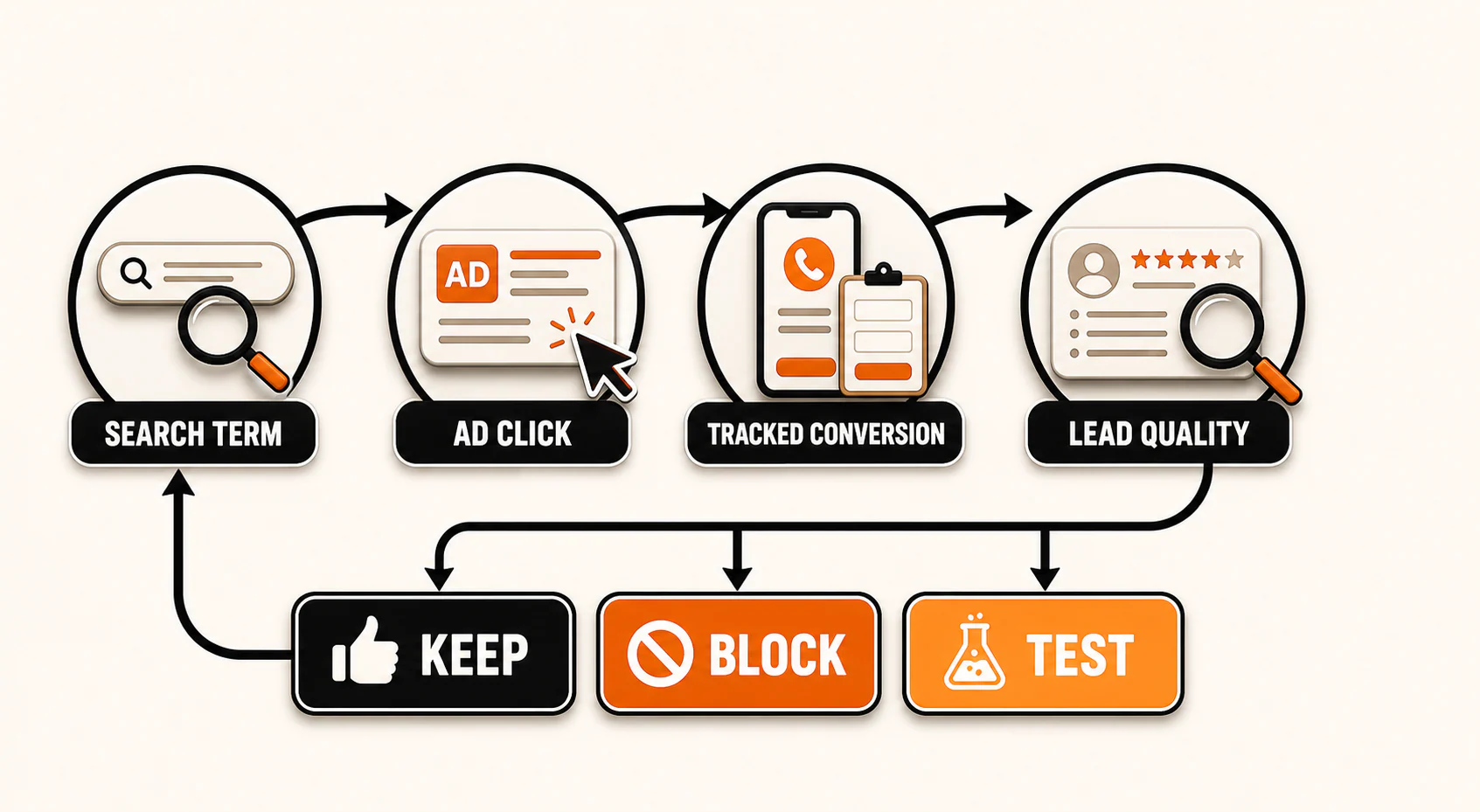
Here is the troubleshooting map that matters:
- Clicks but no leads: Check the search terms, offer, page-message match, page usability, form, phone number, and conversion tags before increasing spend.
- Leads but poor quality: Tighten keyword themes, negatives, locations, qualifying copy, and the definition of a primary conversion. Listen to calls and review form details.
- Little or no volume: Check campaign eligibility, targeting, keyword status, bids, budget, approval issues, and whether local demand exists. Do not solve low volume by blindly widening everything.
- Leads from the wrong locations: Review the advanced location option, included and excluded locations, user-location reporting, and the business's own lead records.
Google's search terms report documentation explains how to review queries and add irrelevant terms as negatives. The judgment is yours: keep, block, or design a controlled test.
AI prompt 4: Run a weekly evidence review
Analyze the pasted Google Ads and business lead-quality data. Treat the data as incomplete unless every requested field is present. Do not recommend or make automatic account changes.

Date range: [RANGE]
Search-terms export: [PASTE]
Location-performance export: [PASTE]
Conversion-action export: [PASTE]
Qualified-lead, appointment, or sales outcomes: [PASTE]
Campaign changes made during the period: [PASTE]

Return:
1. Observations directly supported by the data.
2. Possible explanations labeled as hypotheses.
3. Questions the owner must answer.
4. Search terms to review for keep, block, or test decisions.
5. Up to three proposed tests, each with one change, a reason, and a verification metric.

Do not invent missing values, assume a tracked conversion is qualified, or declare statistical certainty. End with a manual-review checklist.
The local Google Ads pre-launch checklist
Before you enable the campaign, verify every item:
- One service and one primary customer need are clearly defined.
- The landing page matches the service, location, offer, and call to action.
- The service area reflects where the business can actually serve customers.
- Included locations, exclusions, and the advanced location option were reviewed.
- Keyword themes are tightly related and checked in Keyword Planner.
- Negative-keyword candidates were reviewed for accidental blocking.
- Responsive Search ad copy uses only verified business facts.
- Relevant assets are configured and accurate.
- The budget is affordable as a test and grounded in market estimates and business economics.
- The bidding choice matches the conversion data available.
- Forms and calls were tested from click to inbox, CRM, or phone.
- Primary and secondary conversion actions are intentional and not duplicated.
- Someone owns the weekly search-term, location, conversion, and lead-quality review.
The best first campaign is rarely the biggest. It is the smallest one that can answer a useful business question without muddying the evidence.
Start with one service. Confirm that the right people can find it, understand it, and complete a trackable next step. Then verify whether those conversions become qualified opportunities. Expand only when the evidence earns it.
If you want help building or repairing that system, YEAH! Local's pay-per-click advertising service focuses on the full path from campaign structure and landing-page alignment to lead-quality tracking, not clicks for the sake of a busy dashboard.
Last updated