
Key Takeaway
Build a simple, policy-safe process for getting honest online reviews. Learn who to ask, when to ask, what to say, and how to respond.
Most local businesses do not have a review problem. They have an asking-system problem.
The team does good work. Customers leave happy. Then everybody gets busy, nobody asks for a review, and the Google Business Profile sits there looking quieter than the actual business.
The fix is straightforward: invite real customers after they have enough experience to comment, use neutral language, give them one easy link, and respond professionally when they post. The goal is honest feedback, not a manufactured wall of five-star praise. That distinction matters, both for trust and for staying on the right side of platform rules.
Here is how to build a review-request process that works when Tuesday goes sideways.
Table of Contents
Get the rules straight before you send anything
Google wants reviews to reflect genuine experiences. Its review-request guidance allows businesses to remind customers to leave a review and to share a direct link or QR code. It also says businesses should not offer incentives in exchange for a review.
Before you write a request, set these ground rules:
- Ask customers who had a real experience with the business.
- Do not offer a discount, gift, giveaway entry, free service, or other reward for a Google review.
- Do not ask only the customers you expect to be happy.
- Do not send unhappy customers to a private form while giving happy customers the public review link.
- Do not ask someone to post while an employee watches or waits for the screen.
- Do not request five stars, a positive review, certain keywords, or the name of an employee.
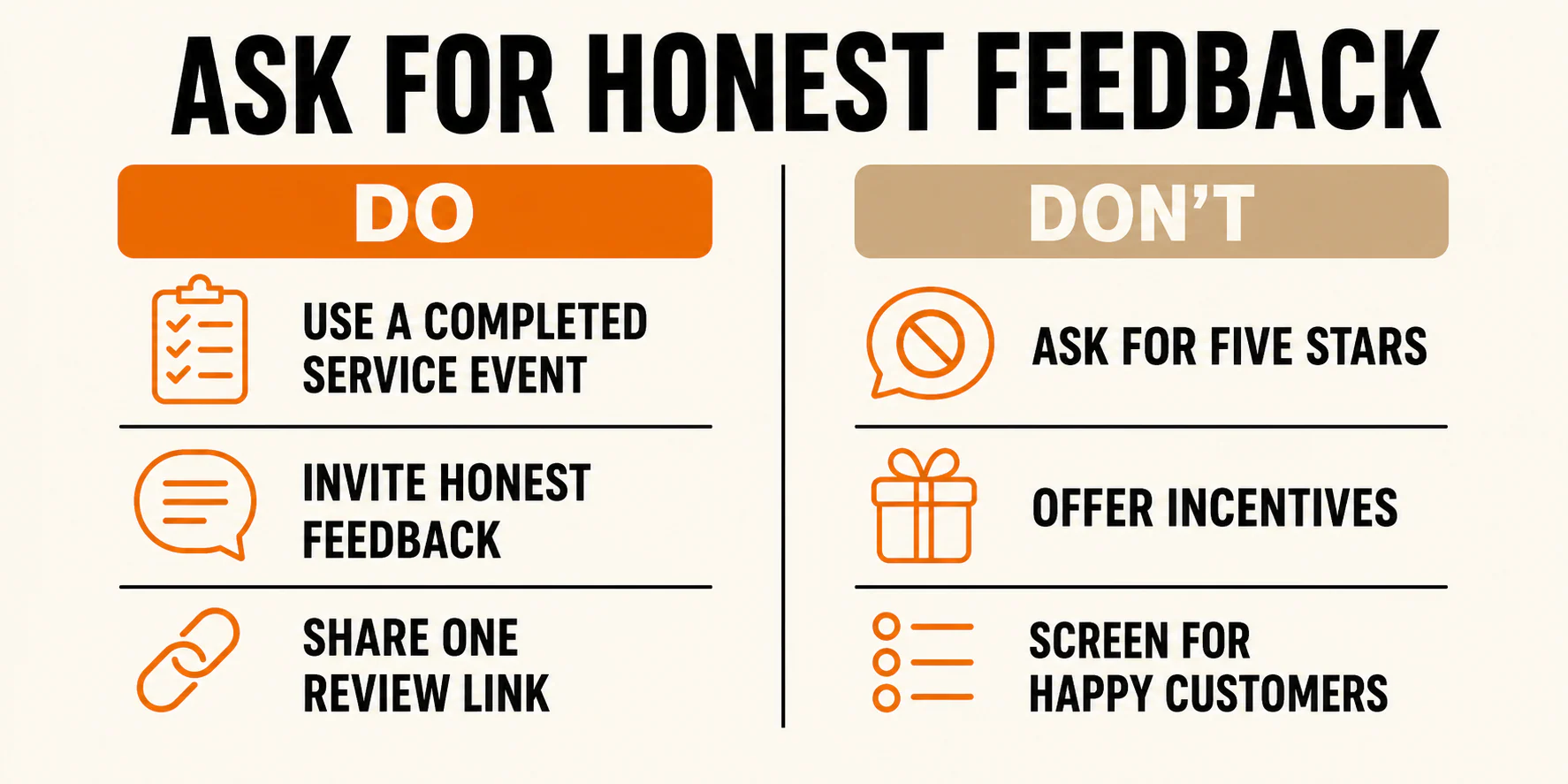
Google's prohibited-content policy addresses fake engagement, selective positive solicitation, on-premises pressure, and requests for specific review content. In plain English, the review needs to belong to the customer. You can open the door. You should not stand in the doorway coaching them through it.
The Federal Trade Commission has a related but separate set of rules and guidance for U.S. businesses. The FTC's review-solicitation guide warns marketers to ask people with real experience, follow the platform's rules, avoid positive-only solicitation, and handle incentives and material connections properly. Its Consumer Reviews and Testimonials Rule Q&A explains that an incentive cannot be expressly or implicitly conditioned on positive or negative sentiment.
Do not mash those standards together. A practice can raise an FTC issue, violate a platform rule, or both. For Google reviews, skip incentives altogether. This is general U.S. guidance, not legal advice. Regulated or privacy-sensitive businesses may need an additional compliance review.
Choose where reviews actually matter
For many local businesses, Google is the sensible primary focus because the Business Profile appears where customers compare nearby options. It is not the only platform worth considering.
The right secondary platform depends on how people discover and evaluate your business. Look at where prospects already check your credibility and whether that platform permits solicitation. Confirm its current rules before adding it to your process.
Avoid giving customers a menu with seven review sites and asking them to choose. That feels flexible to the business and like homework to the customer. Pick the destination that matters for the request, then provide one direct path.
Decide who is eligible before anyone asks
This is where many review programs quietly go wrong.
A defensible eligibility rule is based on a completed, genuine experience, not on whether the customer seemed delighted. For example: every customer whose appointment was completed, every homeowner whose scheduled work was finished, or every buyer whose order was delivered and not canceled.
Apply the rule consistently. Remove duplicates and people who never completed a real experience. Put privacy-sensitive, safety-related, or legally disputed situations on manual hold when needed, but do not turn those exceptions into a happiness filter.
You can invite private feedback from everyone. It should sit beside the public review option, not replace it when a customer reports a concern.
The experience still comes first. A clever request cannot rescue sloppy scheduling, surprise charges, or a crew that leaves a mess in the driveway. These customer service examples that can earn better reviews focus on trainable behaviors before the request goes out.
Pick the right trigger, not a magic hour
There is no universal best hour or day to request a review. The useful question is: when does this customer have enough experience to give an informed opinion?
Use these triggers as starting points, then adjust them to fit your workflow:
| Business model | Starting trigger | Why |
|---|---|---|
| Appointment or visit | After the visit is complete | The customer can comment on the actual experience |
| Home service | After the work and immediate cleanup are complete | The customer can see the result |
| Longer project | At a meaningful completed milestone or final handoff | The customer has enough context to evaluate the work |
| Retail or ecommerce | After delivery and reasonable use | The product experience exists |
| Support issue | After resolution, not during the frustrating part | The customer knows how the full service recovery went |
That last row deserves attention. Asking for a review in the middle of a complaint is like requesting applause while the microphone is still squealing. Finish the work first.
Your trigger should be specific enough that the person or system responsible can recognize it. "After the job" is fuzzy. "When the work order changes to Complete" is usable.
Make the request easy to complete
Once the trigger is clear, remove unnecessary steps. Google provides current instructions for creating a direct review link or QR code from a Business Profile. Interface labels can change, so use Google's help page when setting this up rather than relying on an old screenshot.
Test the link while signed out or in a private browser window. Confirm that it opens the correct profile. Similar names and multiple locations make wrong-profile links surprisingly easy.
Then choose the channel that fits the customer interaction:
- Mention the request in person, then send the link by email or text.
- Add a direct link to a post-visit or post-job message.
- Place a QR code on a receipt, thank-you card, or passive in-store display.
- Send a follow-up after a support issue has been resolved.
A displayed QR code is different from an employee watching someone write. Let the customer use their own device, words, and time.
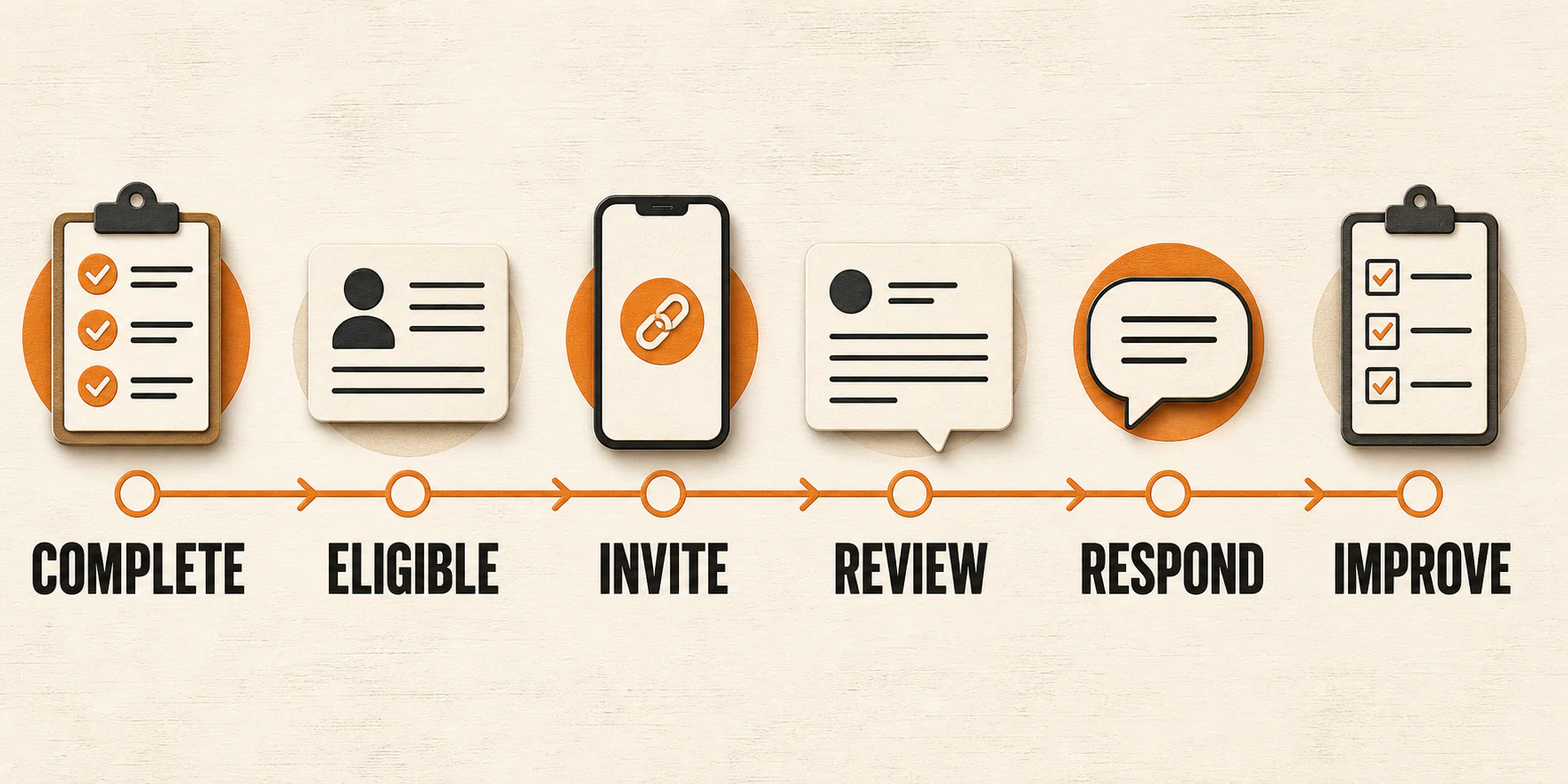
The workflow is simple: completed experience, neutral eligibility rule, request, honest review, thoughtful response, and service improvement.
Use neutral scripts that sound like a person
You do not need a speech. You need a short request that explains what to do without steering the answer.
In-person handoff
"Thanks for choosing us. If you would like to share your experience, we can send you a link to leave an honest review. No pressure either way."
Email or text follow-up
"Thanks for working with us. If you have a moment, would you share an honest review of your experience? Here is the link: [review link]. We appreciate your feedback."
After a resolved support issue
"Thank you for giving us the chance to address this. If you would like to share your experience, you can leave an honest review here: [review link]."
Notice what is missing: "five stars," "positive," "mention your technician," and "tell people how fast we were." The customer owns the rating and the wording.
These scripts are deliberately plain. Plain is useful here. If you want more options for different situations, use our full library of email templates for requesting online reviews, then adjust the language to match how your business normally speaks.
Build a workflow that survives a busy week
A review process fails when it depends on someone remembering at exactly the right moment. Memory makes a lousy workflow. At best, it is a hopeful suggestion wearing office clothes.
Build the first version around one owner and a small number of clear states:
- Pull eligible customers from the normal system your team already uses, such as completed appointments, closed work orders, or delivered orders.
- Send the neutral request after the defined trigger.
- If you use a reminder, cap this first version at one polite follow-up where the channel, consent, and situation make it appropriate.
- Stop after a review, opt-out, bounce, complaint, or manual hold.
- Check the review link and destination profile regularly.
- Bring recurring feedback themes back to the team.
Name the owner. "The front desk" is a department, not an owner. One person should check the automation, exclusions, links, and stop rules.
Automation can help execute a sound rule. It should not decide who seems happy enough to receive the public link. If your automated path separates customers by sentiment, the software is simply doing review gating faster.
Run a small internal check before using the workflow broadly. Confirm that a completed record enters the eligible list, the correct message goes out, the link opens the right profile, and every stop condition halts the next message. This verifies the process, not how many people will review you or what rating they will choose.
Respond without starting a public wrestling match
Reviews are public. Replies are public too. Write for the customer who posted, but remember that future customers may also read the exchange.
Positive or neutral review
Thank the reviewer without exposing private details. You do not need to turn every reply into an advertisement.
Legitimate negative review
Acknowledge the concern, stay factual, and avoid debating every sentence in public. Offer an appropriate offline next step. If you need account information or health, financial, legal, or other sensitive details, move that conversation to a private channel.
Possible policy violation
Flag a review only when there is a plausible violation of the platform's rules. A negative opinion is not automatically fake, abusive, or removable. Google's review-management guidance explains how verified businesses can reply and flag content they believe violates policy.
Privacy, safety, or legal escalation
Pause the normal response process when a review involves threats, safety concerns, legal claims, or information your team should not address publicly. Route it to the appropriate owner or adviser. Fast is useful. Careful is better.
A professional reply shows that the business is paying attention, but it cannot guarantee a changed review or win every reader to your side. Respond well because it is the right operational move, not because you expect a rescue.
Measure the system honestly
Track the parts of the process you can actually observe:
- Requests sent
- Delivery and click data, when the channel provides it
- Reviews received
- Replies completed and response time
- Recurring praise, complaints, and service themes
Keep review metrics separate from booked jobs, revenue, and rankings. A rising review count alone does not prove what caused a sales or ranking change.
Google says local results are mainly based on relevance, distance, and prominence, and its local-ranking guidance says review count and positive ratings can help local ranking. That does not create a magic review number, rating threshold, or guaranteed position. Reviews are one part of local SEO, not the whole machine.
Fix the common breakdowns
The link opens the wrong profile
Generate a fresh link from the correct Business Profile, then test it while signed out. Check every saved template and QR code that uses the old destination.
Requests go out too late or too often
Tie the request to a specific completion status and enforce the stop rules. One stale message is forgettable. A string of them starts to feel like a collections department for compliments.
People click but do not finish
Check for friction. The link may be broken, the profile may be wrong, or the message may ask the customer to do too much. Keep the request short and send customers directly to the intended destination.
Negative feedback repeats around one issue
Stop treating the pattern as a reputation problem. It is an operations signal. Assign the issue to someone who can change the underlying process, then watch whether the theme continues.
A review is delayed, missing, or removed
Check Google's current help and content policies. You can flag content that appears to violate policy, but you cannot promise that a missing review will appear or that a removed review will return. Do not ask the customer to keep reposting the same review while the status is unclear.
Frequently asked questions
Can I offer an incentive for a Google review?
No. Google prohibits incentives in exchange for posting, changing, or removing a review. That includes discounts, gifts, giveaways, and free goods or services. Other platforms may have different rules, and FTC requirements still apply, so check the platform before running any review program.
Should I ask only happy customers?
No. For Google, use a consistent rule based on a genuine completed experience rather than the customer's expected sentiment. You can offer a private feedback channel to everyone, but do not use it to keep unhappy customers away from the public review option.
Is a QR code allowed?
Yes. Google provides a way to create a review QR code. Display it passively or include it on a receipt or thank-you material. Do not pressure a customer to complete the review while an employee watches.
When is the best time to ask?
Ask after the customer has enough experience to give an informed opinion. That may be after a visit, after a completed home-service job, at a meaningful project milestone, after product use, or after a support issue is resolved. Treat those as starting triggers to test, not universal timing facts.
Can I ask customers to mention an employee or service?
Do not prescribe the content of a Google review. Google's policy specifically warns merchants against requesting specific content, including asking customers to identify a staff member. Invite an honest account and let the customer decide what matters.
What should I do with a negative review?
First decide whether it is legitimate feedback, a possible policy violation, or a situation that needs privacy, safety, or legal escalation. For legitimate criticism, acknowledge the concern, avoid sharing customer details, stay factual, and offer an offline next step when appropriate.
Put the first version in place today
You do not need a complicated reputation platform to begin. Define one eligible-customer rule, one completion trigger, one owner, and one neutral request message. Test the link and stop conditions. Then run the process consistently and listen to what comes back.
If the feedback reveals a service problem, fix it. If the workflow breaks, repair it. And if you want help connecting reviews to the rest of your local visibility work, talk with YEAH! Local when it makes sense. No hard sell required.
Last updated